
Livraison le jour même ou le lendemain

Qualité garantie

Débloquez vos offres de bienvenue: Livraison GRATUITE | Jusqu'à -80 % | 30 jours d'essai gratuits à JoyPlus
Téléchargez l'application
A fan can quickly make hot weather more comfortable, but not every model is suited to the same uses. Whether you are looking for a pedestal fan, ceiling model, portable appliance or computer cooling solution, differences in power, noise, battery life and installation requirements can be significant.
Before you buy, three common mistakes are worth avoiding:
Here are the criteria to consider when choosing a solution that is genuinely suited to your needs.
For a desk or bedside table, a compact desk fan will generally be enough to create a targeted airflow. In a larger room, a pedestal model with oscillation or a ceiling fan will distribute the air more widely.
In particular, check:
A 132 cm ceiling fan cannot be chosen in the same way as a portable appliance. You need to check the ceiling height, the type of mounting and the length of the suspension rod. Before carrying out any work on the electrical installation, switch off the power and follow the manufacturer’s instructions carefully.
The term silent fan should be treated with caution. When the manufacturer provides it, the decibel rating offers a more objective point of comparison, but it varies depending on the mode used and the measuring conditions.
A non-slip base, anti-vibration feet and a rigid mounting system help to reduce unwanted noise. For a bedroom, look for:
The Taurus Boreal 16 CR is advertised as featuring a direct-current motor, five speeds, three modes and operation that the manufacturer describes as quiet. These details are still marketing claims: the noise level you actually perceive will depend on the selected speed and the surrounding environment.
A rechargeable fan or portable model gives you greater freedom, but battery life varies depending on the speed, temperature and battery condition. Check its capacity in mAh, charging time and the type of connector used.
For a USB car fan, also check:
A washable filter can make maintaining a bladeless fan easier, provided you remove it, clean it and allow it to dry completely before putting it back in place. Always unplug the appliance before cleaning it.
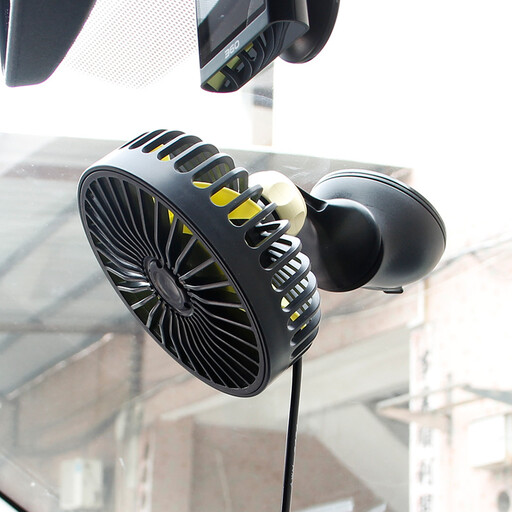
Why this choice suits this profile : This USB car fan is ideal for everyday journeys as well as holiday trips. It is designed for anyone looking for quick installation on the dashboard or windscreen.
The suction-cup mount and 360° rotation let you position it precisely. USB power, meanwhile, avoids the need for permanent installation.
Five blades, three speeds, adjustable rotation and compatibility with a car charger, power bank or USB port.
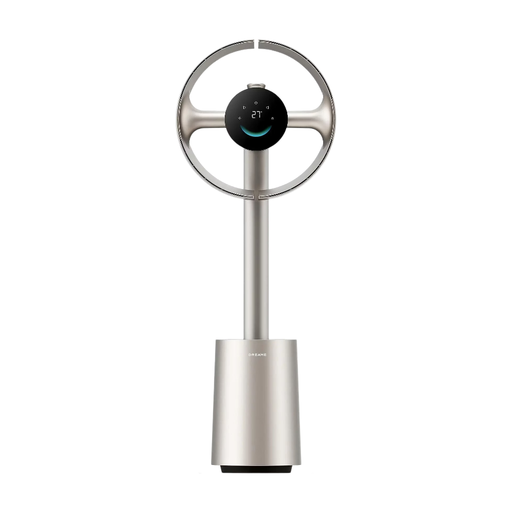
Why this choice suits this profile : Its pedestal design, touchscreen, magnetic remote control and app operation will appeal to households that want to manage all their settings in one place.
The removable, washable pre-filter helps ensure maintenance is not overlooked. The advertised coverage of up to 270° also helps distribute air across a wider area of the room.
Multiple fan modes, an advertised temperature sensor, horizontal and vertical oscillation, and a stated electrical power rating of 55 W.
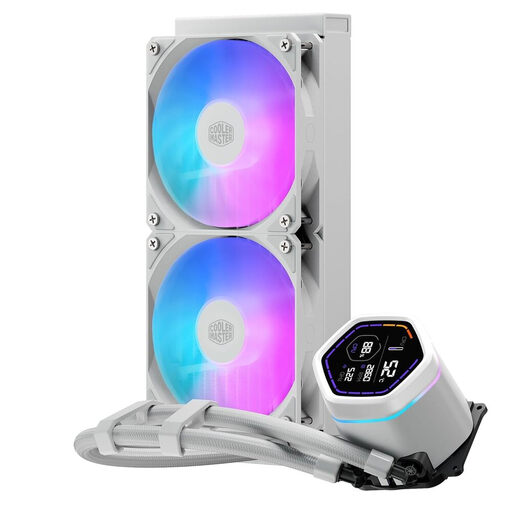
Why this choice suits this profile : This 240 mm liquid cooler is aimed at PC users who are prepared to check the socket, the space available inside the case and the connectors before beginning a performance-focused installation.
The specified Intel and AMD mounting hardware, pre-installed fans and pre-applied thermal paste help to minimise installation errors, provided you check compatibility with your setup.
240 mm radiator, two white ARGB fans, digital display and an advertised five-year warranty.
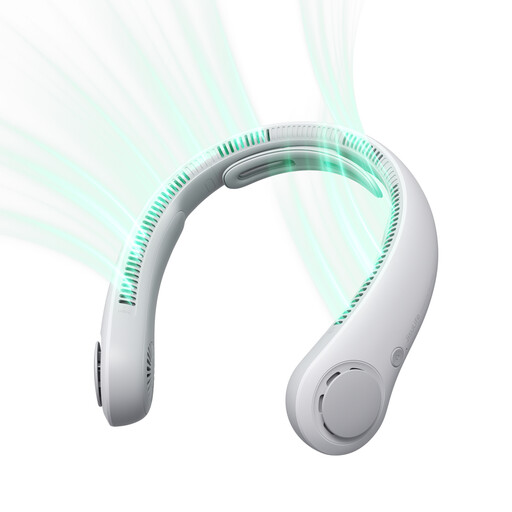
Why this choice suits this profile : This bladeless portable fan is worn around the neck. It is suitable for journeys, outdoor activities or working in a space without a nearby power socket.
Its 5,000 mAh battery and USB-C charging reduce reliance on a mains socket. However, the air inlets must remain clear to prevent overheating.
Five speeds, bladeless design, stated weight of approximately 282 g and claimed battery life of 2.5 to 16.5 hours, depending on the setting.
We have put together a comprehensive, real-time updated selection of products that meet these demanding criteria as well as European safety standards.
A CPU cooler can never replace a room fan. For a compatible processor, check the socket, the maximum height supported by the case and the PWM connector. The Cooler Master Hyper 212 Black is advertised as having a height of 152 mm, four direct-contact heat pipes and compatibility with Intel LGA 1851/1700 and AMD AM5/AM4 sockets.
To improve the appearance and airflow inside a PC, a pack of ARGB PC fans such as the CORSAIR RS120-R ARGB White includes three 120 mm fans, a PWM connection and 5 V three-pin ARGB lighting. Make sure your motherboard has the correct connector: 5 V ARGB and 12 V RGB are not interchangeable.
Consumption depends on the electrical power rating and the length of time it is used. To estimate it, multiply the power in watts by the number of hours of operation, then divide the result by 1,000 to obtain kilowatt-hours. You then simply apply your electricity tariff. A 35 W appliance used for five hours theoretically consumes 0.175 kWh, excluding any potential losses.
It depends on the motor, how often it is used, dust levels and maintenance. Unplug the appliance before cleaning the blades or grilles, avoid moisture and regularly inspect the cable, base and fixings. For a model equipped with a lithium-ion battery, use the supplied charger and stop using it immediately if the battery swells or becomes deformed.
Place it on a stable surface, away from curtains and any object that could block the air intake or outlet. To refresh the air, you can point it towards an open window when the outdoor temperature is lower. A fan does not cool the air like an air conditioner: it mainly makes you feel cooler by circulating air over your skin.