
Livraison le jour même ou le lendemain

Qualité garantie

Débloquez vos offres de bienvenue: Livraison GRATUITE | Jusqu'à -80 % | 30 jours d'essai gratuits à JoyPlus
Téléchargez l'application
With the iPhone 15 Pro and its ability to shoot in 4K ProRes, content creators have a powerful new tool at their disposal. The downside? These ultra-high-quality video files put internal storage under serious strain, filling it up in record time. Fortunately, the arrival of the USB-C port is a game-changer, paving the way for a solution that is as simple as it is effective: the external SSD for iPhone 15.
As the Head of Product Recommendations at Joybuy, my mission is to do the legwork for you. In this guide, we'll break down the criteria that really matter when choosing your external drive, before presenting our selection of the best storage solutions for every need and budget.
The external storage market can be a real jungle. To make the right choice, you need to focus on a few essential features, especially if you plan to use it with an iPhone 15 or the future iPhone 16 Pro.
To record your 4K ProRes videos directly to external storage, the drive's write speed is crucial. An SSD that's too slow guarantees interrupted recordings and lost frames (the dreaded frame drops).
Storage capacity and connection type are two other critical points.
An external SSD is, by definition, a portable device. Its design must therefore be built for use in the field.
Here is our selection, designed for every type of user, from the demanding content creator to the casual user.
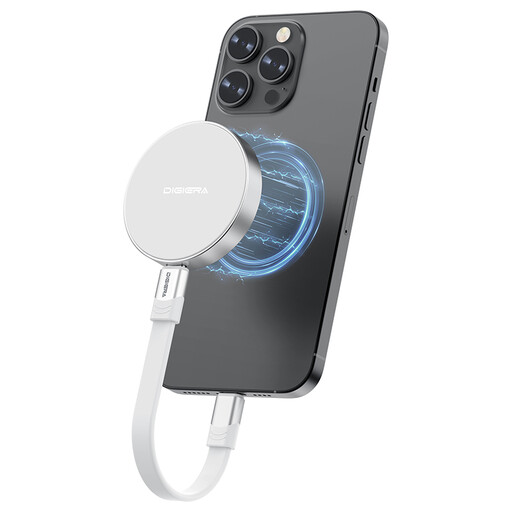
Why It Stands Out
This model is tailor-made for the iPhone 15 Pro ecosystem. Its magnetic design and cutting-edge performance make it the tool of choice for direct video recording. With speeds reaching up to 2000 MB/s read and 1800 MB/s write, it handles 4K ProRes files without flinching and turns your iPhone into a true production camera.
Advantages
Who Is It For?
The ideal companion for content creators, videographers, and photographers who use their iPhone 15 Pro / Pro Max (or the future iPhone 16 Pro) as their primary work tool. It's also an excellent option for mobile professionals and PS5 gamers looking to expand their storage with an ultra-fast solution.

Why It Stands Out
This USB drive is the reliable and budget-friendly storage solution for more traditional needs. Note that it is not designed for direct video recording on an iPhone, but it is perfect for transferring documents, photos, and other files between computers or devices equipped with USB-A ports.
Advantages
Who Is It For?
For those looking for an affordable storage solution to exchange files between devices with USB-A ports (computers, TVs, older consoles). Be aware that it is not meant to be plugged directly into an iPhone 15.
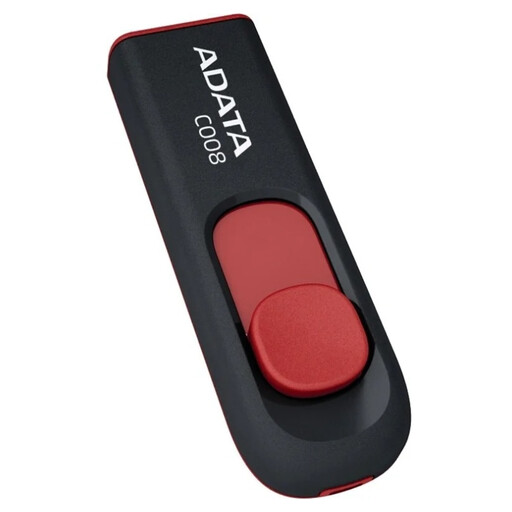
Why It Stands Out
The ADATA C008 is simplicity itself. Its capless, sliding design makes it very convenient for small, everyday transfers. It's the ultimate budget-friendly option for less demanding tasks.
Advantages
Who Is It For?
For those who just need a basic, reliable storage medium to share documents, carry music for the car, or transfer small files. Like its SanDisk cousin, forget about connecting it directly to an iPhone 15.
Our selection focuses on products that meet specific use cases. If your needs for capacity, speed, or form factor are different, feel free to explore our full catalog.
? Explore our full range of USB storage solutions
Yes, but be aware that this feature is exclusive to the iPhone 15 Pro and iPhone 15 Pro Max models. For it to work, you absolutely need a USB-C SSD drive with a write speed of at least 220 MB/s and a certified USB 3 compatible cable.
Absolutely. Most external USB-C SSDs have become the universal standard. You can use them without issue with laptops (MacBooks, Windows PCs), tablets (iPad Pro/Air), and even game consoles like the PS5 to store and run PS4 games or archive PS5 games.
The main difference is the engine under the hood and the resulting performance. An SSD (Solid State Drive) uses much more advanced and faster flash memory, similar to what's in your smartphone. A standard USB flash drive is simpler, slower, and therefore cheaper, making it perfect for occasional file transfers. However, for demanding tasks like 4K video recording, an SSD isn't an option—it's a necessity.