
Livraison le jour même ou le lendemain

Qualité garantie

Débloquez vos offres de bienvenue: Livraison GRATUITE | Jusqu'à -80 % | 30 jours d'essai gratuits à JoyPlus
Téléchargez l'application
An ergonomic wireless mouse can significantly improve comfort in the office, while working from home or during your studies, provided you choose the right shape and connection. Product listings often highlight a high DPI count, outstanding battery life or an “ergonomic” design. However, these features alone do not always guarantee the right choice.
Before comparing models, focus above all on the grip, connection type, power supply and compatibility with your computer. Here are the criteria to review to avoid unpleasant surprises and find the mouse that genuinely suits the way you work.
A compact, slightly raised mouse can be perfectly suitable for occasional use. However, it does not meet the same needs as a vertical mouse designed for right-handed users. The length of your hand, the width of your palm and the way you hold the mouse all have a direct impact on comfort.
An ergonomic vertical mouse for right-handed users creates a different hand position, similar to a handshake. It may take some time to get used to, and this type of model is not suitable for left-handed users unless it has been specifically designed for them. An ambidextrous mouse is more versatile, but its shape is generally less focused on encouraging a particular posture.
A sensor advertised at 4 800 DPI is not automatically better suited to office work than a model limited to 1 000 DPI. DPI refers to cursor sensitivity: it determines how far the pointer travels on screen for the same mouse movement.
For working on documents, browsing the Web or using everyday software, moderate sensitivity is usually sufficient. An adjustable-DPI mouse is useful if you switch between precision work, a large screen and occasional gaming. Also check the settings that are actually available, rather than focusing only on the maximum figure shown.
A battery-powered mouse can work for a very long time, but you will need to replace an AA battery when required. A rechargeable mouse avoids this inconvenience, although regular charging becomes part of your routine. Check the type of cable supplied, especially if you want USB-C charging, along with the information provided about the built-in battery.
For a desktop mouse, choose a shape that allows your palm to rest naturally without compressing your fingers. Vertical models suit right-handed users looking for a “handshake” style grip. If you often carry your mouse with a laptop, a compact model will probably be more convenient.
An ambidextrous mouse offers greater flexibility in a household where several people use it, or if you want to alternate between hands. It can also be easier to use in a confined space. However, check its width and height to avoid a grip that feels too cramped.
A Bluetooth mouse connects directly to compatible devices and does not take up a USB port. This is particularly convenient with modern laptops and when switching between devices. However, the pairing process may vary depending on the operating system.
A 2.4 GHz wireless mouse generally works with a nano receiver. Set-up is immediate: simply plug the receiver into an available USB port. The trade-off is that this type of mouse requires a USB-A port, which may not be available on some newer computers.
Models combining Bluetooth and 2.4 GHz are well suited to people who work with several devices. Also check the stated compatibility with Windows, macOS, Chrome OS, Linux or Android, depending on your equipment. A wired USB mouse can still be useful as a back-up, but it obviously does not offer the same freedom of movement.
A silent mouse helps reduce clicking noise in a shared office, library or during a video call. However, take care: the term “silent” generally applies to the buttons, and not necessarily to the scroll wheel or friction against the desk.
When considering battery life, distinguish between a “up to” twelve-month operating time with a battery and the battery life of a rechargeable model. Daily use, automatic sleep mode and how often you move the mouse can significantly affect the actual duration. Side buttons and DPI adjustment can also improve productivity, but they are not essential for everyone.
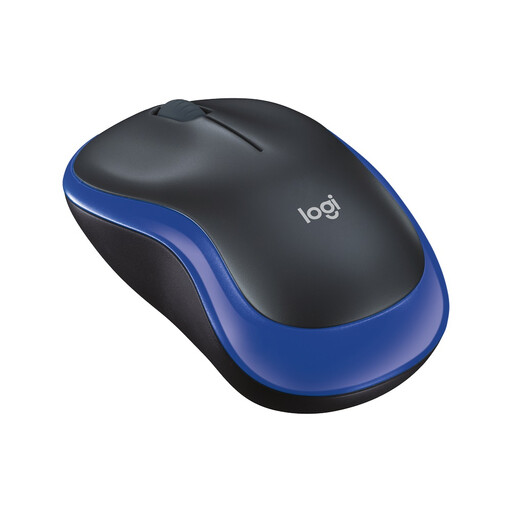
Why this choice suits this profile : This compact mouse is suitable for everyday tasks on both PC and Mac. It connects via a USB receiver and runs on an AA battery.
The listing mentions a shape suitable for both right- and left-handed users, along with a 1 000 DPI optical sensor. There is no excessive maximum sensitivity aimed at office use.
2.4 GHz connection, line-by-line scrolling, on/off switch and battery life of up to twelve months with one AA battery.
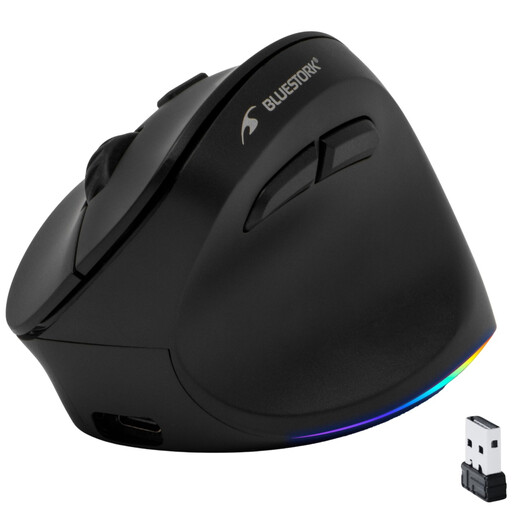
Why this choice suits this profile : This model is designed for right-handed users looking for a vertical shape, dual connectivity and a built-in battery that recharges via USB-C.
According to the technical information, sensitivity can be adjusted from 800 to 2 400 DPI. You can therefore tailor it to the way you use it instead of simply relying on the maximum value shown in the name.
Bluetooth and 2.4 GHz connections, six buttons, silent clicks, RGB lighting and USB-C charging.
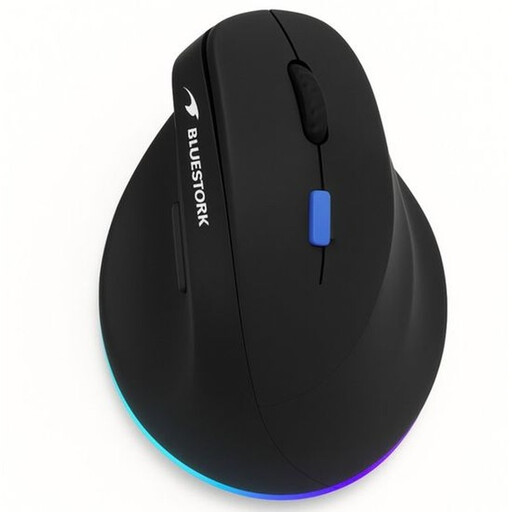
Why this choice suits this profile : Its vertical right-handed grip, six buttons and dual connectivity meet the needs of regular use with several devices.
The listing specifies the DPI adjustment range, the inclusion of a nano receiver and USB-C charging. This gives you practical information beyond the simple “ergonomic” label.
Rechargeable lithium battery, Bluetooth and 2.4 GHz connections, touch surface and adjustable sensitivity of up to 4 800 DPI.
We have put together a complete, real-time-updated selection of products that meet these demanding criteria as well as European safety standards.
It depends on your equipment. Bluetooth frees up a USB port and is suitable for compatible computers. A 2.4 GHz mouse with a USB receiver can generally be set up in a few seconds, particularly on a desktop PC. If you regularly switch between a laptop and a desktop computer, a dual-connection model can make things easier.
Its lifespan depends on the quality of the components, how often it is used, battery life and maintenance. A battery-powered mouse may offer up to twelve months of use, while a rechargeable model will need regular charging. Avoid liquids, high temperatures and abrasive cleaning products. Devices containing a battery or electronic components must be taken to an appropriate collection point, in accordance with WEEE regulations.
The price varies depending on the vertical shape, number of buttons, Bluetooth support, DPI adjustment, click noise level and power supply. To compare models on a sound basis, take any potential battery costs into account, check which accessories are included and prioritise the features that are genuinely useful in your working environment.