
Livraison le jour même ou le lendemain

Qualité garantie

Débloquez vos offres de bienvenue: Livraison GRATUITE | Jusqu'à -80 % | 30 jours d'essai gratuits à JoyPlus
Téléchargez l'application
An ergonomic office chair is about more than a high backrest and a long list of adjustments. Whether you work from home, study, sit through back-to-back video calls or game for several hours, an unsuitable chair can quickly become uncomfortable. The right model, on the other hand, should first and foremost suit your body shape, desk and daily habits.
Before buying an ergonomic office chair, take the time to identify common pitfalls and check a few practical features.
The term ‘ergonomic’ does not guarantee that a chair will suit everyone. A model may include a headrest and armrests, yet still be uncomfortable if the seat height, seat depth or lumbar support do not match your height.
So don’t simply check whether adjustments are listed on the product page: look at their range too. An adjustable computer chair should at least allow you to adjust the height and tilt. Adjustable lumbar support is also a welcome feature.
A sophisticated mechanism is not necessarily useful for everyone. A reclining office chair with several positions may suit someone who alternates between work and relaxation. However, it may be unnecessary for a student who mainly wants a stable seat.
Ease of use matters just as much. Controls that are difficult to reach or adjustments that regularly shift out of position may end up going unused.
A seat that is too short can put pressure on the backs of your thighs, while a backrest that is too low will provide poor support for your upper back. The manufacturer’s stated maximum load is also an essential safety criterion and must never be exceeded.
You should also consider the space available beneath your desk. In a small room, folding or lift-up armrests can make all the difference.
Your feet should rest flat on the floor, with your knees forming an angle of roughly 90 degrees. The seat height must therefore be compatible with both your height and your desk. If the seat is too high, a footrest may be needed to restore a correct sitting position.
Depth is just as important: the front edge of the seat should not put excessive pressure behind your knees. Some models, such as the SIHOO Doro S100, allow you to adjust the seat depth.
A backrest that moves with you can be more versatile than a fixed support. However, the terms ‘dynamic’ and ‘adaptive’ describe a design approach; they do not guarantee medical effectiveness.
When choosing an ergonomic office chair with lumbar support, check the adjustments available:
The SIHOO M18 includes a height-adjustable backrest, lumbar support, an adjustable headrest and a tilt function that can be locked up to 126°, according to the product information provided.
A breathable mesh office chair improves air circulation around the backrest and, in some cases, the seat. It can be particularly useful in a warm room or for prolonged use. A high-density foam seat, meanwhile, generally provides a more cushioned feel.
Mesh should be inspected regularly: keep sharp objects away from it and clean it with a soft brush or suitable cloth. You should also check the castors and mechanisms periodically.
The models below are presented based on their stated features, configuration and the uses they may suit. They are not a substitute for medical advice and do not guarantee an improvement in pain or physical conditions.
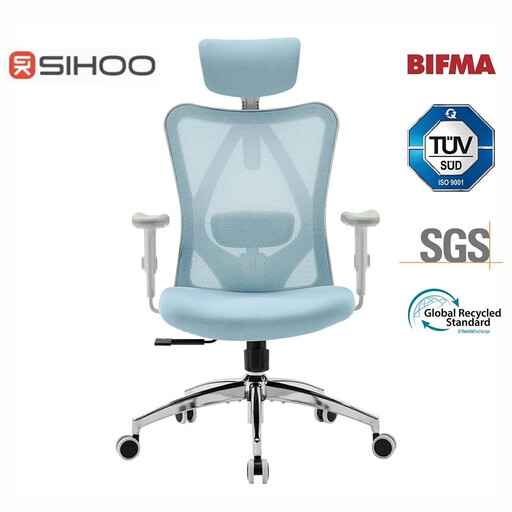
Why this model could suit you : It combines essential adjustments with a foam seat covered in mesh. A practical choice for setting up your first home office, studying or working on a computer every day.
The product page states a maximum load of 150 kg, a tilt that locks at 126° and several clearly identified adjustments, rather than making a vague promise of ergonomic comfort.
Adjustable headrest, adjustable armrests, 8 cm height adjustment, 360° rotation and stated BIFMA and SGS certifications.
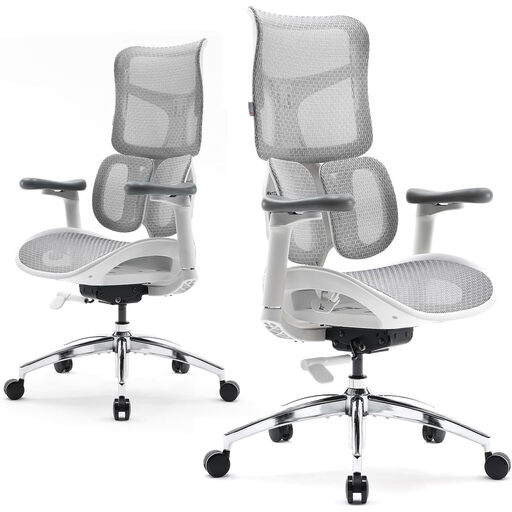
Why this model could suit you : Those who like to fine-tune their posture can take advantage of a five-position independent backrest, 4D armrests and an adjustable seat depth.
The specifications detail the adjustment ranges and state that the chair is suitable for users measuring 150 to 190 cm. It is still essential to compare these figures with your own body shape.
Aluminium frame, breathable mesh, dual dynamic lumbar support, tilt of up to 135° and armrests adjustable in four directions.
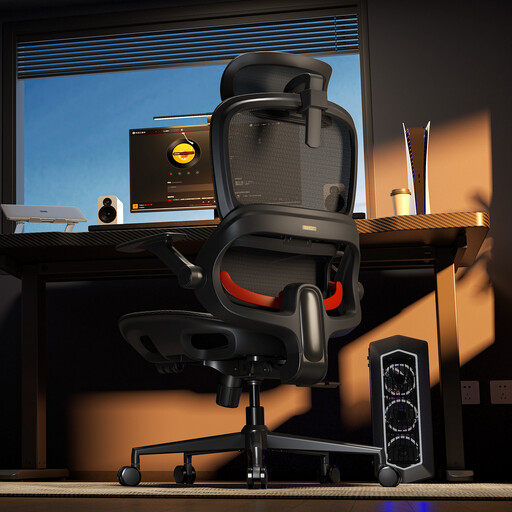
Why this model could suit you : When working from home and using your chair for several hours a day, the footrest lets you change position during breaks. The lift-up armrests also free up space beneath the desk.
The stated tilt angles are precise: 110°, 123° and 135°. The product page also mentions a breathable mesh seat and backrest, which should be confirmed for the version selected.
Adaptive lumbar support, wide headrest, lift-up armrests, reinforced castors and base, with a stated maximum load of 150 kg.
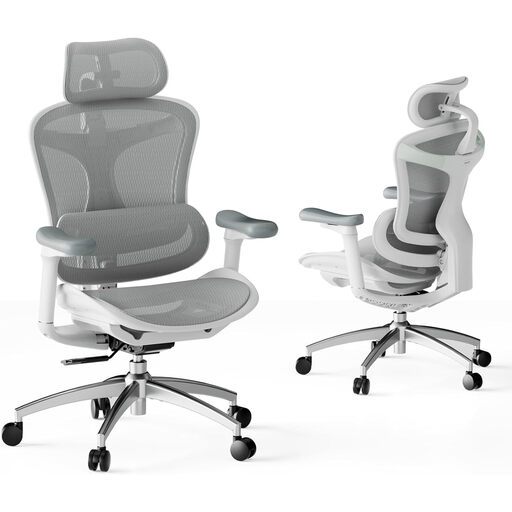
Why this model could suit you : Its mesh backrest, 3D armrests and three tilt positions can support work and study just as well as relaxing in front of a screen.
The product page details the tilt positions at 110°, 120° and 130°, along with a stated maximum load of 150 kg. This information allows you to compare the model with your actual needs.
Adjustable headrest, self-adaptive lumbar support, 3D armrests, weight-sensitive mechanism and stated TÜV, EN1335, REACH and SGS BIFMA certifications.
We’ve brought together a complete, real-time selection of products that meet these demanding criteria as well as European safety standards.
Even the best ergonomic office chair needs to be adjusted correctly. Start by moving the seat closer to the desk so that your elbows remain close to your body. Then adjust the height so that your feet rest flat on the floor, and position the lumbar support in the natural curve of your back.
On an office chair with a headrest, it should support your head without pushing your chin forwards. The armrests should keep your shoulders relaxed. Finally, change position regularly and stand up to walk around: no chair can replace regular breaks and movement.
Choose a model with adjustable height, a ventilated backrest, adjustable lumbar support and a seat suited to your height. For an ergonomic chair designed for long hours, the ability to adjust the tilt and armrest position can also improve everyday comfort.
It can be practical during breaks or while reading, but it should not be used to maintain a fixed position all day. Check that it can be folded away and that extending it does not restrict your legs beneath the desk.
Its lifespan depends on how often it is used, the weight it supports, the quality of its materials and how well it is maintained. Follow the stated maximum load, avoid sitting on the armrests and regularly check the screws, castors and mechanisms. When offered, a manufacturer’s warranty can also make it easier to replace certain parts.