
Livraison le jour même ou le lendemain

Qualité garantie

Débloquez vos offres de bienvenue: Livraison GRATUITE | Jusqu'à -80 % | 30 jours d'essai gratuits à JoyPlus
Téléchargez l'application
An ergonomic product can help you organise your space better, simplify certain movements or make a position more comfortable. But simply seeing the word "ergonomic" doesn't guarantee a purchase that's right for you. Whether you're a remote worker, a gamer, a parent, a senior or someone prone to neck and lower back tension, the right choice depends above all on how you'll use it, your body shape, the product's dimensions and the adjustments available.
A curved backrest, thick foam or a padded handle can give an impression of comfort without necessarily suiting your body shape. A fixed lumbar support, for example, doesn't always sit at the right level for your lower back. For an ergonomic office chair, check at least the seat height, backrest tilt and whether the armrests are adjustable or foldaway.
Claims like "great comfort", "anti-fatigue" or "suitable for everyone" are far too vague to help you choose between different models. Focus on concrete information: dimensions, maximum weight capacity, adjustment range, materials, foam type and care instructions.
An ergonomic cervical pillow marketed as suitable for all sleeping positions might not work for someone used to a very soft pillow. The same logic applies to an ergonomic mattress with multiple support zones: compare its firmness, thickness and compatibility with your bed base.
A bulky product can be difficult to get into a home with narrow staircases. Conversely, a compact accessory may require particularly precise adjustment. Remember to check the weight, delivery method, stated assembly time and care instructions. For electrical or immersive devices, also take the time to read the usage warnings.
To improve comfort at your desk, measure the height of your desk and the space available underneath the worktop. A chair should allow you to place your feet flat on the floor while keeping your knees in a comfortable position. The models featured here have weight capacities of 120 to 150 kg, but this figure doesn't replace checking the stability and range of adjustments.
A laptop stand should raise the screen without forcing you to bend your wrists. It's generally best to pair it with a separate keyboard. With a compact gaming keyboard, look closely at the key layout: a 60 % or 65 % format frees up space, but some arrow keys or functions may only be accessible via a key combination.
Memory foam offers slow rebound, while a mesh seat improves air circulation. Fabric, faux leather and metal each come with different care requirements. A water-repellent surface makes cleaning easier, but that doesn't mean it can be washed with lots of water.
For a wireless gaming mouse, check the battery life, connection type and compatibility with your computer. The AJAZZ model featured below offers wired, Bluetooth and 2.4 GHz connectivity, with adjustable sensitivity up to 24,000 DPI according to its product listing.
Certifications and standards such as BIFMA or SGS, when listed on the manufacturer's spec sheet, should not be confused with a promise of personalised comfort. Always respect the stated maximum weight. With immersive AR glasses, take regular breaks, stay aware of your surroundings and never use the immersive functions while driving or operating machinery.
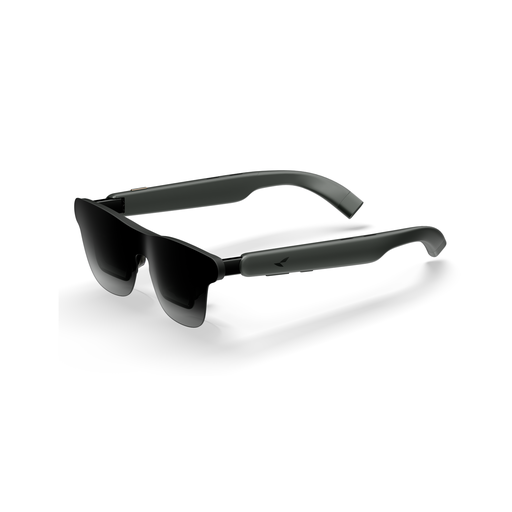
Why this choice suits this profile: This model targets users seeking a mobile audiovisual experience who are willing to carefully check the precautions associated with using an immersive device.
The listing states a weight of 78 g and reminds users of the risks of eye strain, headaches or dizziness with prolonged use.
A stated 59° field of view, a display that can reach 267 inches and 3DoF spatial tracking, according to the product specifications.
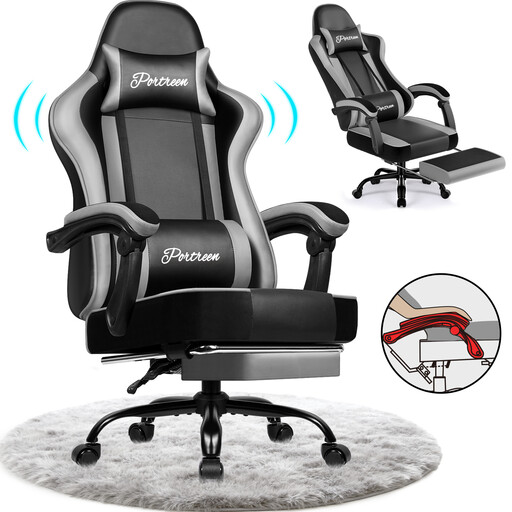
Why this choice suits this profile: It's suitable for long gaming, reading or working sessions when backrest tilt and leg support are among your priorities.
The listing details a 90 to 170° recline, 10 cm height adjustment and a maximum weight capacity of 150 kg. The footrest must be fully extended and locked.
A reclining backrest, headrest, lumbar support and a faux leather covering described as water-repellent and scratch-resistant to cats.
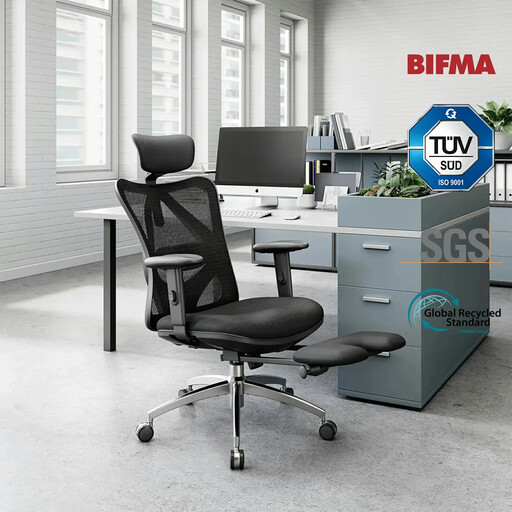
Why this choice suits this profile: Its five stated adjustments let you tailor the backrest, headrest, seat, tilt and armrests for comfortable working from home.
The listing mentions an adjustable seat, breathable mesh backrest and a maximum weight capacity of 150 kg – far more meaningful criteria than a simple promise of comfort.
A high mesh backrest, adjustable headrest and lumbar support, a footrest and castors described as quiet.
We've put together a comprehensive, real-time updated selection of products that meet these demanding criteria and comply with European safety regulations.
Place the screen at a height that limits neck tilt, keep your shoulders relaxed and adjust the chair so you can place your feet flat on the floor. A laptop stand should generally be paired with a separate keyboard and mouse.
It all depends on how often you use it, the weight it supports, the quality of the materials and how well it's maintained. Replace a pillow when its shape no longer springs back properly or the foam starts to degrade. For a chair, regularly check the screws, gas lift, castors and the various support areas.
No. They can encourage a more comfortable position or way of using something, but their effectiveness varies depending on your body shape, habits and setup. If pain persists, it's better to seek advice from a healthcare professional rather than relying solely on an accessory.