
Livraison le jour même ou le lendemain

Qualité garantie

Débloquez vos offres de bienvenue: Livraison GRATUITE | Jusqu'à -80 % | 30 jours d'essai gratuits à JoyPlus
Téléchargez l'application
Remote work, personal projects, marathon gaming sessions… The hours in front of the screen add up, and so do the discomforts?: back pain, fatigue, and decreased productivity. Faced with this sedentary lifestyle, setting up an ergonomic workstation is no longer a luxury but a true necessity for preserving your long-term health and well-being.
As a section editor at Joybuy, my mission is to navigate the market to help you make the right choices. This guide brings together our best advice and a selection of products to build a workspace that adapts to you, not the other way around.
Before jumping on the first model you see, it's essential to understand what makes for good equipment. Here are the key points to check when building your complete office setup.
A good ergonomic office chair is the starting point for any serious setup. It must provide dynamic support and adjust perfectly to your body type. Prioritise models that offer?:
Often underestimated, the desk plays a fundamental role. The sit-stand desk has now established itself as the ideal solution. It allows you to alternate postures throughout the day, which relieves pressure on the spine and stimulates blood circulation. Electric models with a memory function are the most practical?: a single button press is all it takes to switch from one height to another.
An effective workstation is an ecosystem where every element works in harmony. Ensure your chair's height is compatible with your desk's (in the seated position) and that you have enough legroom. Accessories like a monitor stand, an ergonomic keyboard, and a mouse complete the setup for optimal body alignment.
Here is a selection of products that tick all the boxes for comfort, adjustability, and durability, catering to different user profiles and budgets.
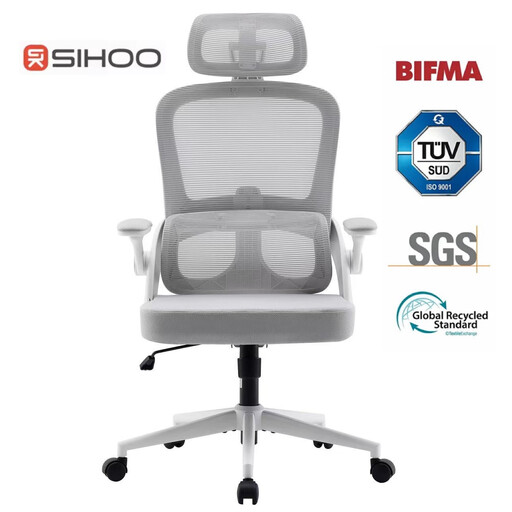
Why we chose it?? The SIHOO M102C chair is a powerhouse of ergonomics. Its real standout feature is its independently adjustable lumbar support (up to 6 cm), which allows for precise positioning for your lower back. Its 3D armrests (adjustable forward/backward, pivot, and height) offer a versatility rarely seen in this price range, perfect for switching from work to relaxation.
Pros:
Who is it for? Ideal for remote workers and professionals who spend most of their time seated and are looking for a versatile, durable, and highly adjustable solution without breaking the bank.

Why we chose it?? This Ochama desk takes your workspace to a new, more dynamic level. Its memory function, which saves multiple height settings, makes alternating between sitting and standing incredibly simple. And with its integrated USB-C port, storage bag, and hooks, it's a solution designed for organisation and efficiency.
Pros:
Who is it for? Perfect for anyone wanting to adopt a healthier work style with a simple and effective sit-stand desk. It's equally well-suited for freelancers and remote employees who appreciate a well-organised space.
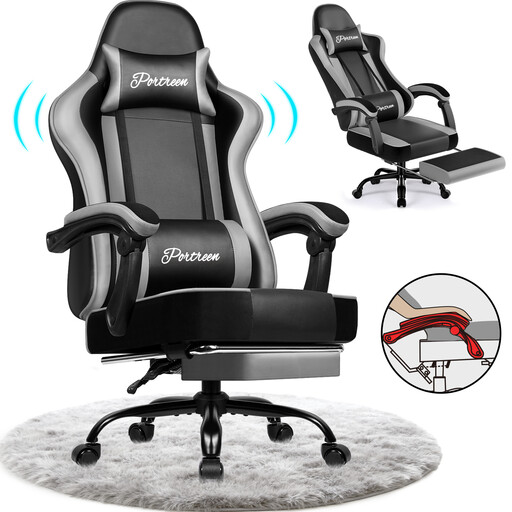
Why we chose it?? Don't be fooled by its gaming DNA?: the GTIMEX is an ultra-comfortable chair that's right at home in a wellness-focused office. What truly sets it apart is its retractable footrest combined with a backrest that reclines up to 170 degrees. This allows you to switch from a working posture to a near-total relaxation mode in an instant.
Pros:
Who is it for? For gamers, of course, but also for anyone seeking maximum comfort and the ability to fully recline during their breaks.
If the models featured don't tick all your boxes, or if you're looking for a more mobile solution for a small space, other options are available. A mobile desk, for example, can offer compelling flexibility.
Feel free to explore our selection of height-adjustable tables with wheels to discover a wider range and find the model that will fit perfectly into your home.
Alternating positions throughout the day helps reduce pressure on the intervertebral discs, improves blood circulation, reduces fatigue, and can even boost concentration. It's a direct investment in preventing back pain and your daily well-being.
An ergonomic office chair often prioritises a minimalist design and micro-adjustments (lumbar, 3D/4D armrests) to optimise work posture. A gaming chair, on the other hand, focuses on more enveloping comfort (bucket-seat style), a generous recline, and accessories like a footrest. This makes it perfect for mixed use, blending work and relaxation.
Here are a few simple guidelines to get you started?: