Joybuy Insights

Ergonomic Office Furniture: A Guide to Getting It Right

With remote work becoming the norm, having the right home office setup is no longer an option—it's a necessity. Yet, faced with a sea of options, it's easy to fall into common traps and end up with equipment that's unsuitable, or even downright uncomfortable. A poor choice doesn't just tank your productivity: it's often the direct cause of back and neck pain.

As a Lead Product Curator at Joybuy, my mission is to help you navigate this landscape. Let's cut through the marketing jargon and get straight to the point. Here are the classic mistakes to avoid and the key criteria to look for when investing in ergonomic office furniture that will stand the test of time.

The 3 Pitfalls to Avoid Before You Buy

  1. The "Ergonomic" Label Mirage?: Many products use this term without offering the essential adjustments. A truly ergonomic chair must adapt to your body, not the other way around. A simple curved backrest doesn't make a chair ergonomic.
  2. Overlooking Material Quality?: Mesh that sags after six months, upholstery that makes you sweat, or a frame that feels flimsy are all red flags. The durability of a chair or desk depends directly on the robustness of its materials. This is what protects your investment.
  3. Underestimating Space and Dimensions?: Buying a corner desk with storage that blocks a doorway, or a chair whose armrests hit the desktop? That's a classic misstep. Measuring your space beforehand and anticipating daily use is a non-negotiable step.

The Essential Criteria for an Informed Choice

To make a smart purchase, you need to know how to decode product specifications. Here are the essential checkpoints for your future remote work setup.

Beyond the Label: The Real Adjustments of an Ergonomic Chair

A comfortable office chair worthy of the name must offer multiple adjustment points to mould to your body. Check for the following settings?:

  • Seat Height?: Your feet should rest flat on the floor, with your knees at a 90-degree angle.
  • Lumbar Support?: This is the most critical feature. Good lumbar support should be adjustable in height and/or depth to perfectly match the curve of your lower back.
  • Adjustable Armrests?: Ideally, they should be adjustable in height, depth, and angle (known as "3D" or "4D" armrests) to relieve tension in your shoulders and neck.
  • Backrest Tilt?: The ability to recline and lock the backrest at different angles allows you to vary your posture throughout the day and avoid staying in a static position.

The Desk, the Cornerstone of Your Productivity: Dimensions and Storage

A computer desk is more than just a plank of wood?: it's the foundation of your efficiency. Its design directly impacts your organisation and comfort.

  • Desktop Surface?: Ensure you have enough space for your monitor(s), keyboard, mouse, and a place to take notes. A depth of 70 to 80 cm is often recommended to maintain a healthy distance from the screen.
  • Desk Height?: The standard height is around 75 cm. The key is that, when seated, your forearms can rest on the desk, forming a right angle with your upper arms.
  • Functionality and Storage?: A modern designer desk might be aesthetically pleasing, but is it practical for daily use? Assess your storage needs (drawers, shelves) to maintain a clean and uncluttered workspace.

Materials and Certifications: Guarantees of Durability

An investment in office furniture should be a long-term one.

  • For Chairs?:Breathable mesh is an excellent option for ventilation, but demand a high-density weave to prevent it from deforming. The frame, meanwhile, should be robust (steel or alloy).
  • For Desks?: Particleboard tops (E1 grade) offer an excellent balance of quality and price, while steel frames guarantee rock-solid stability.
  • Certifications?: Labels like BIFMA or SGS certify that the product has undergone strength and safety testing. They are a seal of reliability for load capacity and the durability of mechanisms.

Our Office Furniture Selection for Different Profiles

There's a right solution for every user. Here is our selection, designed for different use cases, to guide you toward the desk and chair set that's right for you.
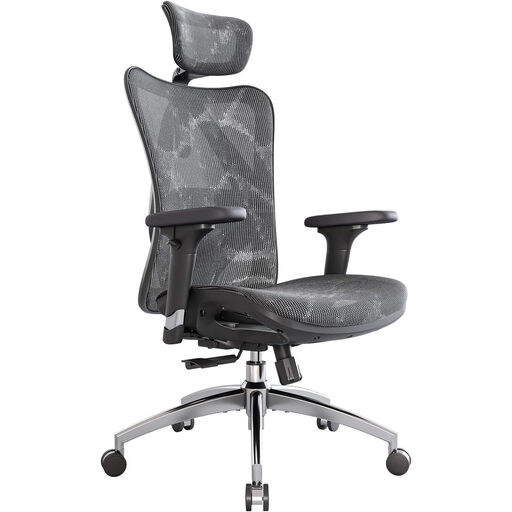
IDEAL PROFILE: THE DEDICATED REMOTE PROFESSIONAL
SIHOO M57S Ergonomic Office Chair

SIHOO M57S Ergonomic Office Chair with Lumbar Support

Why this choice? For those who spend 8+ hours a day at their screen, multiple adjustments aren't a luxury. This model was designed for precision tuning and unwavering support.

How This Product Avoids the Pitfalls

It goes beyond the "ergonomic" label: with its 3D armrests, adjustable lumbar support, and headrest, it offers deep customisation where entry-level models stop short.

Key Advantage

Its S-shaped backrest follows the curve of the spine, and its breathable polyester mesh ensures optimal comfort, even in the height of summer.
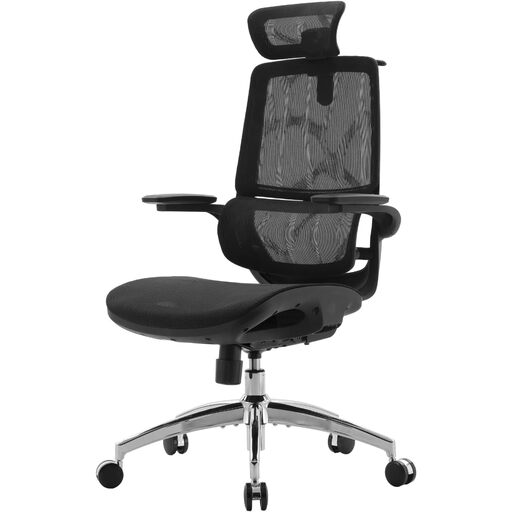
IDEAL PROFILE: THE VERSATILE USER IN A COMPACT SPACE
SIHOO M59AS Ergonomic Office Chair

SIHOO M59AS Ergonomic Office Chair with Flip-Up Armrests

Why this choice? Perfect for *home offices* where every square inch counts. Its flip-up armrests allow the chair to slide completely under the desk—a significant space-saver.

How This Product Avoids the Pitfalls

It sidesteps the classic dimension trap. Thanks to its 80° flip-up armrests, it offers greater flexibility, sliding under low desks or into tight corners where a fixed chair would fail.

Key Advantage

Its dual backrest, featuring adaptive lumbar support, dynamically follows your movements. The result: constant support without needing manual adjustments.

IDEAL PROFILE: THE COMPLETE WORKSPACE BUILDER
LANTINE L-Shaped Corner Desk with 4 Drawers

LANTINE L-Shaped Corner Desk with 4 Drawers and 2 Shelves

Why this choice? For those who think big and want everything within arm's reach. This is the centrepiece for a complete and perfectly organised home office setup.

How This Product Avoids the Pitfalls

Its reversible L-shaped design is the ultimate hassle-free solution: whether you need the drawers on the left or right, it adapts to your room. Its abundant integrated storage guarantees a consistently clear desktop.

Key Advantage

It combines a vast work surface with 4 drawers and 2 shelves. A true all-in-one workstation, designed for organisation and productivity.

Looking for More Options?

We have curated a comprehensive list of products that meet our strict selection criteria and current safety standards.

Frequently Asked Questions About Office Furniture

What is the lifespan of an ergonomic office chair?

A chair's lifespan depends on the quality of its materials and how well you care for it. A model with a steel frame, a certified gas lift (SGS, BIFMA), and high-density mesh can easily last 5 to 10 years. Regular cleaning and occasionally tightening the screws on its mechanisms will be enough to extend its life.

How do you properly adjust an office chair to prevent back pain?

Here is a simple 4-step method:

  1. Seat Height: Adjust it so your feet rest flat on the floor with your knees bent at a 90° angle.
  2. Seat Depth: You should be able to fit 2 to 3 fingers between the edge of the seat and the back of your knees.
  3. Lumbar Support: Adjust it to match the natural curve of your lower back.
  4. Armrests: Set their height so your forearms rest on them naturally, with your shoulders relaxed.

Is a sit-stand desk necessary for an ergonomic setup?

A sit-stand desk is an excellent option for encouraging movement and mitigating the negative effects of prolonged sitting. However, it's not a mandatory upgrade. The most important thing is to create a workstation adapted to your body and to remember to stand up for regular breaks. A good desk and chair set, well-chosen and, above all, well-adjusted, remains the cornerstone of a healthy work environment.