
Livraison le jour même ou le lendemain

Qualité garantie

Débloquez vos offres de bienvenue: Livraison GRATUITE | Jusqu'à -80 % | 30 jours d'essai gratuits à JoyPlus
Téléchargez l'application
A comfortable workspace is about more than just a stylish desk and a well-padded chair. For remote workers, students, gamers and professionals working from home, choosing ergonomic office furniture means considering dimensions, adjustability, stability and everyday organisation.
However, some marketing claims can be misleading. A height-adjustable desk isn’t necessarily right for your height, a chair with lumbar support won’t suit every body shape, and a storage unit can quickly become cumbersome if you haven’t carefully checked its dimensions.
An electric sit-stand desk may offer an impressive adjustment range, but you also need to check its minimum and maximum heights, the depth of the desktop and its weight capacity. A model that goes high enough but has a desktop too narrow for your screens and accessories may end up limiting its usefulness.
For a desk intended for remote work, a 120 × 60 cm desktop can accommodate a laptop, an external monitor and a few documents. With two monitors, speakers or gaming equipment, a width of 140 or 160 cm will be far more comfortable.
The term ‘ergonomic’ doesn’t mean you can skip checking the actual adjustments on offer. For an ergonomic office chair, make sure you look at:
An office chair with lumbar support can improve comfort, but it must be adjusted to suit your body shape. The backrest shouldn’t push you to lean forward, and your feet should stay firmly on the floor.
Electric desks and chairs are usually delivered flat-packed. So check that there’s a clear instruction manual, enough floor space to work on assembly, and that you can move the package to its final location.
For a height-adjustable desk, also allow enough clearance from walls, shelves and cables. Electric models must be used indoors, away from liquids and with secure connections. Assembling an electrical component requires extra care: follow the manufacturer’s instructions and check all connections before first use.
The seat height of a chair should let you keep your knees in a comfortable position and your forearms level with the work surface. For a desk, an adjustment range such as 72 to 118 cm or 72 to 120 cm allows you to alternate between sitting and standing, provided it suits your height.
The maximum load must cover everything placed on the desktop: monitor, computer, monitor arm, lamp, books and accessories. Several desks featured here have a static capacity of 70 kg. This limit must not be exceeded.
An electric sit-stand desk must remain stable during adjustment and once the height is set. Look at the leg structure, the number of motors, the control system and any memory functions.
Control panels with a digital display and presets let you quickly return to a comfortable position. Some models also include obstacle detection or overheating protection. These features make operation easier, but you still need to keep the area clear when raising or lowering the desk.
A desktop that’s easy to clean is particularly practical for everyday use. Product listings may mention particle board, a steel frame, a melamine finish or a low-formaldehyde-emission material. Always check the manufacturer’s detailed information rather than relying on a simple marketing phrase.
An office storage unit should aid movement, not hinder it. A mobile filing cabinet on castors is handy if you regularly rearrange your space. Think about drawer depth, whether the castors lock, and the total weight it can support.
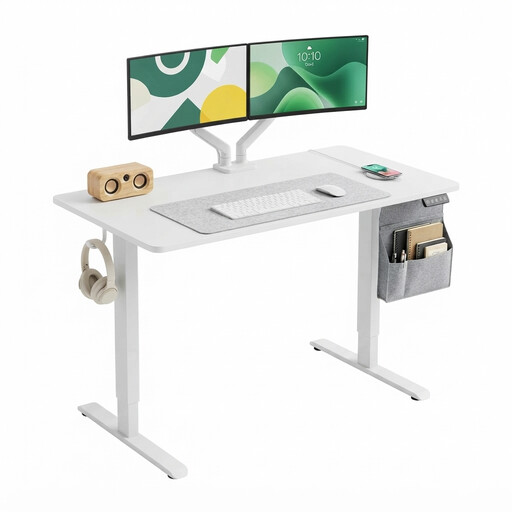
Why this choice suits this profile: Its compact dimensions work well in a bedroom, study corner or small home office. Height adjusts from 72 to 118 cm and two positions can be saved.
The adjustment range and stated 70 kg capacity are clearly listed, making it easy to compare against your equipment.
120 × 60 cm desktop, digital control panel, two presets and two hooks included. The listing mentions CE certification and compliance with European standards.

Why this choice suits this profile: Users who want a more generous surface will appreciate the 140 cm desktop, the USB-C port and the integrated organisation accessories.
The four memory heights make position changes simple, while cable management keeps the desktop clutter-free.
Adjustment from 72 to 120 cm, stated static load of 70 kg, USB-C port, storage pocket and three hooks.

Why this choice suits this profile: It supports long days of work or study thanks to its adjustable seat, reclining backrest and fold-away armrests.
The main adjustments are detailed: seat height from 46 to 54 cm, recline from 90 to 105° and adjustable lumbar support.
Mesh seat, 8 cm foam cushion, headrest, metal base, castors and a stated maximum load of 120 kg.
Pair your computer desk with suitable storage. The HaluPeit filing cabinet has five drawers, a top shelf and 360° swivel castors, two of which lock. Its stated dimensions of approximately 40 × 40 × 70 cm mean it can sit next to a desk, provided you check the available space.
For a gaming desk, allow enough depth for the monitor, keyboard and accessories. A headphone hook and cable management channels stop peripherals piling up on the desktop edge. For a study workspace, choose a surface that’s easy to clean and storage that’s accessible for books and stationery.
We’ve put together a comprehensive, real-time updated list of products that fully meet these strict selection criteria and European safety regulations.
A depth of 60 cm is generally enough for a laptop, monitor and keyboard. If you use two monitors, speakers or paper documents, a greater depth or a wider desktop will give you more room.
Power consumption depends on the motor’s wattage, how long adjustments take and how often you use it. The listings shown here don’t all state the electrical power, so it’s best to check this with the seller. The motor only runs during raising and lowering, not throughout your working time.
Respect the maximum load, avoid sharp objects, clean surfaces with suitable products and regularly check the castors, screws and mechanisms. For a chair with adjustable recline, use the lock and tension adjustment as per the manual to prevent premature wear.