
当日/次日达

品质保障

开启新人专享福利: 全场免邮 | 低至 2 折 | 免费试用 30 天 JoyPlus 会员
下载 Joybuy
Working from home, studying, gaming or spending long days in front of a screen: a poorly planned layout can quickly become uncomfortable. A chair that is too low, a desk that is too narrow or storage that is difficult to move can affect your everyday comfort and eventually make your workspace impractical.
The ergonomic office furniture market is nevertheless packed with marketing claims that can be difficult to distinguish. Here are the main pitfalls to avoid, the criteria to check and a selection of products suited to different needs.
A curved backrest or thick cushion is not enough to ensure good posture. For an ergonomic office chair, check at least the seat height, backrest and tilt adjustments. Adjustable lumbar support and armrests make it possible to tailor the chair more precisely to your body shape and desk height.
A 120 × 60 cm desk can accommodate a laptop and a monitor, but it may feel cramped with two monitors, speakers and a few accessories. Conversely, a 180 cm desktop can quickly take up all the space in a small room. Measure the width, depth and space needed to move the chair backwards before placing your order.
Also consider skirting boards, power sockets and the space needed to move around the furniture. A home-working desk should remain easy to access once installed, particularly in a bedroom or living room.
An electric sit-stand desk needs a nearby power socket, a stable floor and clear space beneath the desktop. Some models include overheating protection after several consecutive movements, in which case you must observe the interval specified in the instructions.
For a fabric or mesh chair, a soft, slightly damp cloth is generally sufficient for routine cleaning. Faux leather is easy to clean, but should be kept away from sharp objects and heat sources. These details have a direct impact on the lifespan of your home office furniture.
A height-adjustable desk should allow you to keep your forearms more or less horizontal when using the keyboard. The electric models featured in this selection offer adjustment ranges of 72 to 118 cm or 72 to 120 cm, depending on the reference.
Memory buttons make it easier to switch from sitting to standing. Two or four presets are particularly useful when several people use the same desk. You should also consider the adjustment speed, noise level and desktop stability at maximum height.
Add together the weight of your monitors, computer, monitor arms, books and various accessories. Several desks in this selection state a maximum static load of 70 kg. This does not mean that you should load the desktop without considering weight distribution: position the heaviest equipment in a balanced way.
Cable-management ports, hooks, side pockets and USB-C ports do not replace dedicated storage, but they help keep cables off the floor. A mobile desk organiser can complement your setup for documents, tools or small devices.
A chair intended for prolonged use should be chosen according to the user’s height, the desk height and the stated maximum load. The models featured here indicate maximum capacities ranging from 120 to 150 kg, depending on the reference.
A mesh backrest promotes airflow, while a padded seat provides a softer feel. A chair with a footrest can be useful for taking breaks, reading or gaming sessions. However, the footrest must be fully extended and locked before use.
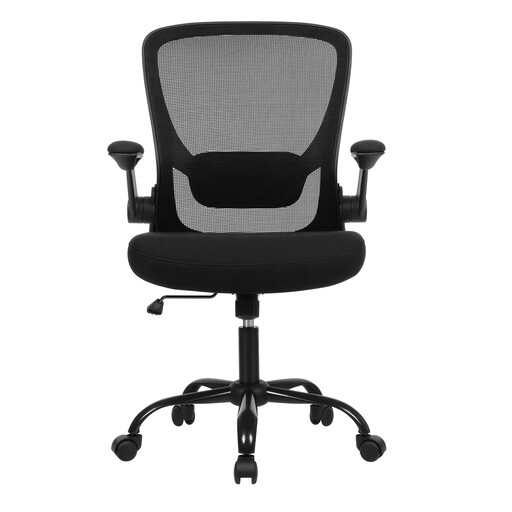
Why this choice suits this profile : Measuring 66 × 60 × 99–107 cm, with folding armrests and adjustable height, this chair fits easily into a small space used for working from home or studying.
It does not rely solely on thick padding: the height, lumbar support, tilt and armrests are all adjustable.
Foam seat, breathable fabric, tilt function and quiet castors advertised as suitable for different types of flooring.
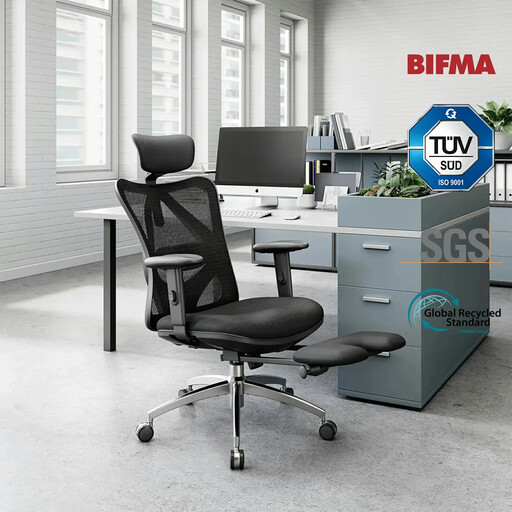
Why this choice suits this profile : With its high backrest, this chair is designed for people looking for a wide range of adjustments to create an ergonomic workspace suited to long working days.
Its documented adjustments cover the backrest, headrest, height, tilt and armrests, rather than forcing you into a single position.
Breathable mesh backrest, adjustable footrest, aluminium base and stated maximum load of 150 kg.
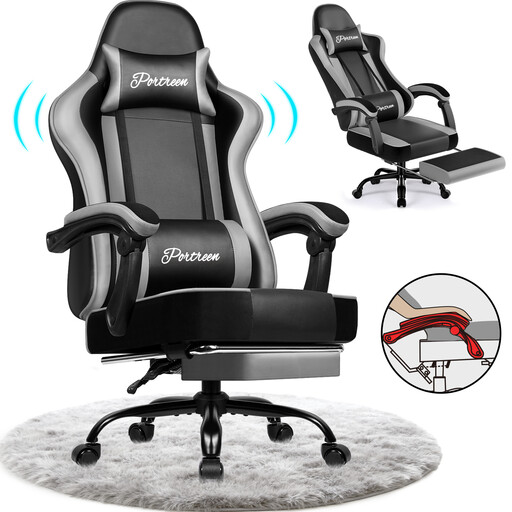
Why this choice suits this profile : Gamers, readers and users who switch between work and relaxation can benefit from a reclining backrest and retractable footrest.
The product details state a tilt range of 90 to 170° and specify that the footrest must be extended and then locked before use.
Stated capacity of 150 kg, headrest, lumbar support, water-repellent faux-leather upholstery and assembly advertised as taking 10 to 15 minutes.
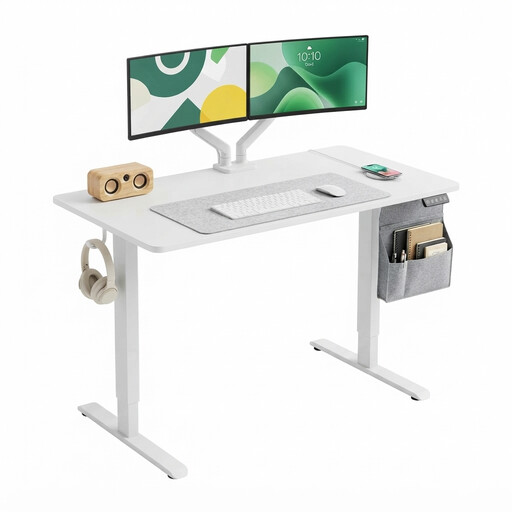
Why this choice suits this profile : Its 120 × 60 cm desktop is ideal for flats, bedrooms and home-office corners where every centimetre counts.
The electric adjustment from 72 to 118 cm and two storable positions mean you do not have to adjust the desk manually every time you change posture.
Stated load of 70 kg, digital display, two hooks and P2-class particleboard desktop according to the product details.
We have brought together a complete, real-time updated selection of products that meet these demanding criteria as well as European safety standards.
Position the top of the screen at eye level, or slightly below, then bring the keyboard closer to avoid raising your shoulders. Your feet should rest flat on the floor; if this is not possible, a separate footrest can complete your setup.
Leave a few centimetres between an electric desk and the wall to prevent rubbing as it moves. Make sure the cables have a little slack and that no objects obstruct the desktop’s movement. For a gaming desk, also allow sufficient depth to position the monitor, keyboard and mouse comfortably.
An office chair with lumbar support does not remove the need to change position regularly. Alternating postures, standing up and taking short breaks all help make using your furniture more comfortable every day.
It depends on the combination you choose: chair only, adjustable desk, storage or a complete set. Start by comparing the adjustments, dimensions, maximum load and included accessories, rather than relying solely on the advertised price.
Consumption varies according to the motor and how often you adjust the desk. The motor only runs while the desk is moving up or down; however, the control display may remain powered depending on the model. Avoid leaving equipment on standby unnecessarily and follow the electrical instructions provided in the manual.
This depends on the supported weight, frequency of use, type of flooring and maintenance. Regularly check the screws, castors, tilt mechanism and gas lift. Any part showing unusual play or signs of damage should be inspected before you continue using the chair.