
Livraison le jour même ou le lendemain

Qualité garantie

Débloquez vos offres de bienvenue: Livraison GRATUITE | Jusqu'à -80 % | 30 jours d'essai gratuits à JoyPlus
Téléchargez l'application
An ill-suited workstation soon makes itself felt: a screen that is too low, a chair that cannot be adjusted properly, feet that do not rest flat on the floor or a desk that is too narrow for your keyboard and accessories. For homeworkers, students and anyone who spends several hours in front of a screen, ergonomic office furniture needs to meet practical criteria rather than rely on vague marketing promises.
Before investing in an ergonomic office chair or an electric height-adjustable desk, it is worth keeping three common pitfalls in mind.
When choosing an office chair with lumbar support, check at least the following:
Folding armrests are particularly practical in a small room: they allow you to slide the chair under the desk once the working day is over. An adjustable headrest is especially useful if you alternate between working, reading and taking breaks in a reclined position. The upholstery is also worth considering: padded fabric offers a more enveloping feel, while mesh promotes air circulation.
Stability also depends on the base and castors. Before placing your order, check that they are compatible with your type of flooring and make sure the castors are intended for indoor use.
An electric sit-stand desk should offer enough range to move from sitting to standing without placing the screen too high or too low. Models with four height memory settings are convenient when you change position regularly.
You should also examine:
For example, the JOYFURNOS desks featured here state a maximum static capacity of 70 kg. Measuring 160 × 70 cm, the larger model is intended for generous workspaces. The 120.1 × 60.1 cm version is easier to install in a bedroom, studio flat or home office corner. Both models offer an adjustment range of approximately 72 to 120 cm and four storable height positions.
An adjustable laptop stand raises the screen to help reduce neck flexion. To keep your arms in a comfortable position, you will generally need to pair it with a separate keyboard and mouse. A lightweight, foldable aluminium stand is equally useful at home or in a coworking space.
When completing your home-working setup, do not overlook lighting, cable management or desktop depth. The aim is not to pile up accessories labelled ergonomic, but to position each item within easy reach without turning your desk into a battlefield.
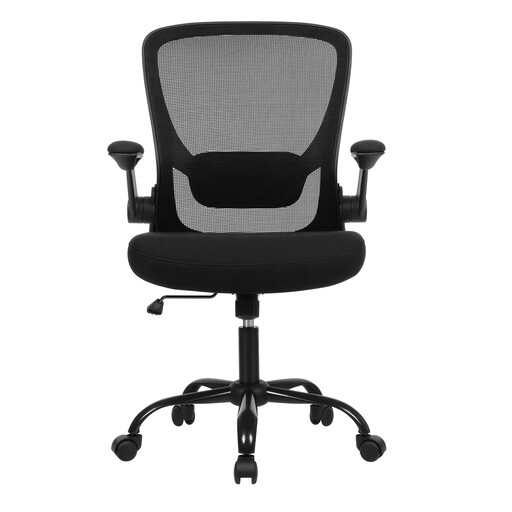
Why this choice suits this profile : This chair combines the essential adjustments for setting up your first home-working station, with stated dimensions of 66 × 60 × 99–107 cm.
The product listing specifies adjustable height and lumbar support, so comfort does not rely solely on fixed padding.
Curved backrest, folding armrests, tilt mechanism and a stated maximum load of 120 kg.
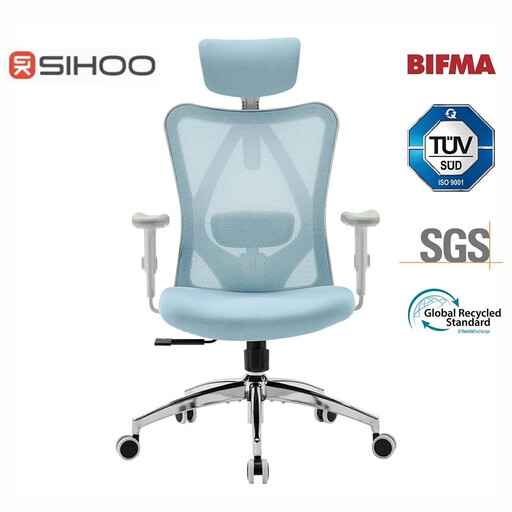
Why this choice suits this profile : Its high backrest and extensive adjustment options make it a strong candidate for a primary desk used every day, for work and video meetings.
The listing details the backrest, headrest, armrest and height adjustments, as well as the tilt lock.
8 cm height adjustment, tilt of up to 126°, 360° rotation and a stated maximum load of 150 kg.
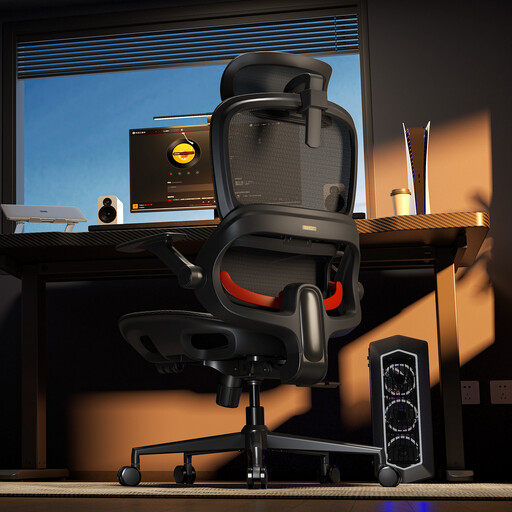
Why this choice suits this profile : Its footrest and three reclining angles suit those who alternate between periods of concentration, reading and extended breaks.
The stated lumbar support moves with you, while the mesh seat helps limit heat build-up compared with some solid upholstery materials.
Integrated footrest, folding armrests, wide headrest and three reclining positions at 110°, 123° and 135°.
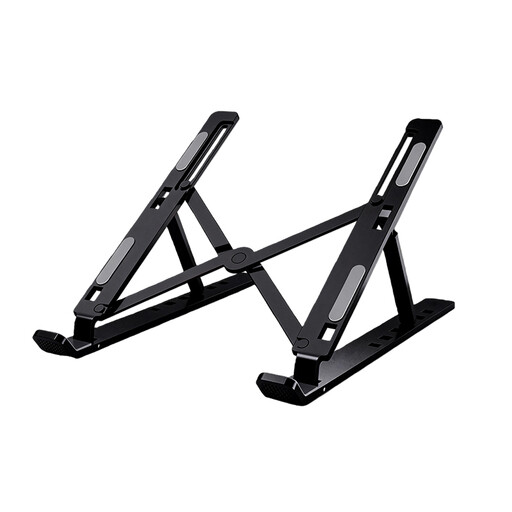
Why this choice suits this profile : Lightweight and adjustable, this stand is suitable for students, small desks and anyone who regularly moves their computer.
Its adjustable design lets you set the screen height, unlike a fixed stand that forces you into a single position.
18-inch format, aluminium construction and a design stated to be lightweight and easy to carry.
We have put together a complete, real-time selection of products that meet these demanding criteria and European safety standards.
Start in a seated position, with your feet flat on the floor and your shoulders relaxed. Adjust the height so that your forearms remain more or less horizontal when using the keyboard. When standing, set the desk so that the screen is directly in front of you without tilting your chin upwards. Ideally, alternate between positions regularly rather than standing for several hours at a time.
It depends on how often it is used, the weight it supports, the quality of the materials and how well it is maintained. Observe the maximum load, tighten the screws from time to time and inspect the castors and reclining mechanisms. Very worn padding, an unstable base or an adjustment that no longer holds are all signs that it is time to replace the chair.
Consumption depends on the motor’s power and how long it operates. The motor only runs during adjustment phases, not throughout the entire day. To limit consumption, save two or three useful heights, avoid repeated adjustments and follow the manufacturer’s recommendations, including any breaks required after continuous motor use.