Joybuy Insights

Ergonomic Office Furniture Guide for a Pain-Free Home Office

Setting up a home office has become a major priority for millions of people. While the idea of working in your slippers is appealing, the reality is often less glamorous: back pain, chronic fatigue... all thanks to unsuitable equipment. The market for ergonomic office furniture is vast, but it's also riddled with marketing promises that lead directly to purchases you'll bitterly regret.

As the Equipment Editor at Joybuy, my mission is to help you navigate this jungle. Together, let's break down the pitfalls to avoid and the criteria that truly matter to make an informed, durable, and, most importantly, healthy choice.

The 3 Pitfalls to Avoid Before Buying Your Equipment

Before we even talk about products, let's review the classic mistakes that cost you dearly—both in your wallet and on your back.

  1. The Mirage of 'Universal' Lumbar Support: Many chairs proudly display a 'lumbar support' label, but this often amounts to nothing more than a fixed bulge. To be truly effective, a lumbar support must be adjustable in height and depth, or even better, be dynamic to adapt to your movements. A poorly positioned support can cause more tension than it relieves.
  2. The Overdose of Useless Adjustments: A spec sheet listing a dozen adjustments can look impressive. But if the fundamental settings—like seat depth or armrest height—aren't right for your body, all those extra options become mere gimmicks. It's not the number of adjustments that counts, but their relevance for your body.
  3. The Instability of Entry-Level Sit-Stand Desks: An electric sit-stand desk is an excellent investment in your health, provided you don't overlook stability. Some models, especially in their highest position, wobble at the slightest touch, making typing a chore. The sturdiness of the steel frame and the maximum supported load are two criteria that are too often forgotten.

The Technical Details That Make All the Difference

For a successful home office space, a few technical points are non-negotiable. They are the true guarantors of your long-term comfort.

For an Ergonomic Office Chair:

  • The Synchronous Mechanism: This is the engine of a good office chair. It ensures the backrest and seat tilt in coordination, maintaining an ideal angle between your torso and thighs. The result: better blood circulation and less pressure on the spine.
  • 3D (or higher) Armrests: Armrests that are adjustable in height, depth, and width (known as '3D') are essential for supporting your forearms at the correct height. They relieve tension in the shoulders and neck and should be able to align perfectly with your work surface.
  • Adjustable Seat Depth: This is a non-negotiable feature. You should be able to press your back against the backrest while leaving a two-to-three-finger gap between the edge of the seat and the back of your knees.

For a Height-Adjustable Desk:

  • The Motor: Opt for an electric sit-stand desk with a smooth and silent motor. Models with position memory are a real bonus: they allow you to switch from sitting to standing mode with a single press, which encourages you to change posture more often.
  • The Frame and Maximum Load: Ensure the frame is made of sturdy steel and that the maximum load can effortlessly support all your equipment (monitors, computer, etc.). A capacity of at least 70 kg (154 lbs) is a good baseline for a standard home office setup.

Recommended Ergonomic Furniture Picks

Rather than a random laundry list, we've matched specific products to typical user profiles. This should help you visualise the equipment that truly fits your daily routine.
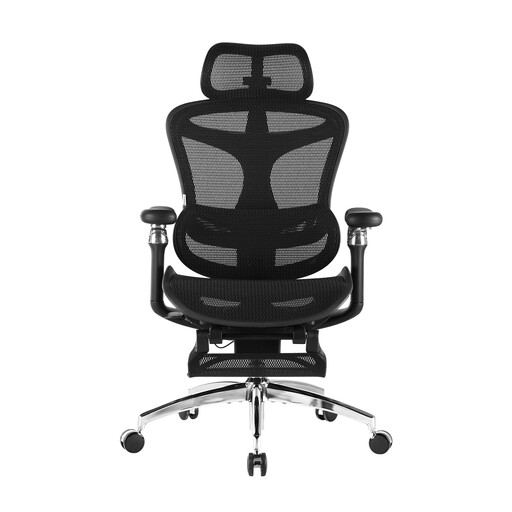
IDEAL FOR: THE POWER USER
SIHOO Doro C300 Pro Ergonomic Office Chair

SIHOO Doro C300 Pro Ergonomic Office Chair

Why we chose it: For those who spend more than 8 hours a day at their screen, every micro-adjustment counts. This model offers an advanced level of customisation, ideal for preventing long-term strain.

How it avoids the pitfall

It avoids the gimmicky 'lumbar support' trap with a truly dynamic system that follows your movements, and the 'useless adjustments' pitfall by focusing on relevant settings like its 6D armrests.

The standout feature

Ultra-soft 6D armrests and a dynamic lumbar support for fine-tuned adjustment and lasting comfort.
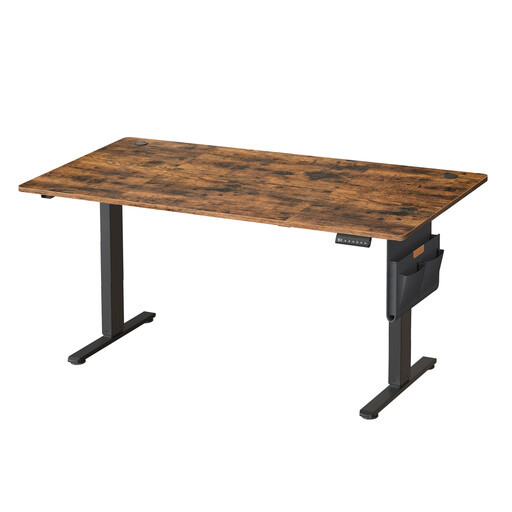
IDEAL FOR: THE FLEXIBILITY ENTHUSIAST
JOYFURNOS Electric Sit-Stand Desk, Height Adjustable, 160 x 70 cm

JOYFURNOS 160 cm Electric Sit-Stand Desk

Why we chose it: Perfect for those who want to integrate more movement into their day. Its large 160 cm desktop provides a comfortable workspace, even with multiple monitors and accessories.

How it avoids the pitfall

To counter the risk of instability, it features a sturdy steel frame and a 70 kg (154 lbs) maximum load, ensuring excellent stability even at its maximum height of 120 cm.

The standout feature

A silent motor with 4 memory presets to switch positions without a second thought.
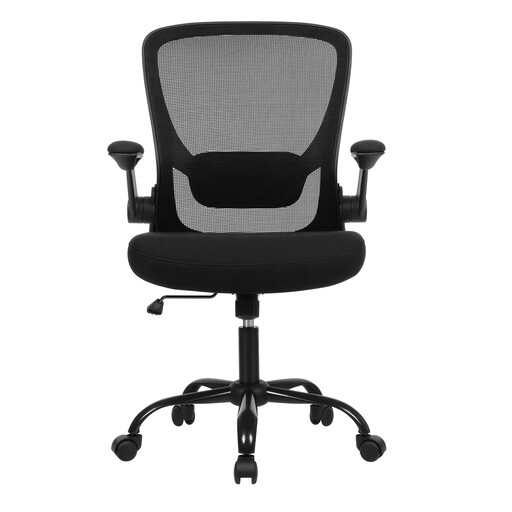
IDEAL FOR: THE BUDGET-CONSCIOUS
JOYFURNOS Ergonomic Office Chair in Black Fabric

JOYFURNOS Ergonomic Fabric Office Chair

Why we chose it: An affordable option that doesn't sacrifice the ergonomic essentials. Perfect as a first setup or for moderate use, with a real bonus for small spaces.

How it avoids the pitfall

It avoids the trap of superfluous adjustments and focuses on what counts: an adjustable lumbar support, a tilt mechanism, and adjustable seat height. All substance, no fluff.

The standout feature

Flip-up armrests to slide the chair under the desk and save space.

Looking for more options?

We have curated a complete selection of products that meet our selection criteria and current safety standards.

Your Office Furniture Questions

Finally, here are the answers to the questions you ask us most often.

How do you properly adjust an office chair?

Proper adjustment is fundamental. Follow these steps:

  1. Seat Height: Your feet should be flat on the floor with your knees forming a right angle (about 90°).
  2. Seat Depth: Leave a gap of two to three fingers between the edge of the seat and the back of your knees.
  3. Lumbar Support: Position it to perfectly follow the natural curve of your lower back.
  4. Armrests: Adjust them to the height of your desk, so your elbows form a 90° angle and your shoulders are relaxed.

What is the lifespan of an ergonomic office chair?

The lifespan of a chair depends on the quality of its components (mechanism, gas lift, casters, upholstery) and how you use it. A quality model, with proper care, can easily last 5 to 10 years. A tip: check the warranty period. It's an excellent indicator of the manufacturer's confidence in its product.

Is an electric sit-stand desk energy-intensive?

No, rest assured, its energy consumption is minimal. The motor only activates for the few seconds it takes to adjust the height. On standby, its power draw is negligible, comparable to any other standby device. The impact on your electricity bill will be virtually invisible.