
Livraison le jour même ou le lendemain

Qualité garantie

Débloquez vos offres de bienvenue: Livraison GRATUITE | Jusqu'à -80 % | 30 jours d'essai gratuits à JoyPlus
Téléchargez l'application
Setting up a workspace with ergonomic office equipment isn’t just about picking a chair that looks modern. A poorly adjusted seat, a desk that’s too low, or a noisy mouse can quickly make remote working, studying, or long gaming sessions far less enjoyable.
Some marketing claims are worth a closer look before you click ‘buy’. Here are the main pitfalls to avoid and the criteria to check when choosing home-office furniture or accessories that genuinely suit your habits.
A curved backrest or a thick cushion isn’t enough to guarantee a comfortable position. An ergonomic office chair must at least allow you to adjust the seat height. Depending on the model, lumbar support, armrests, headrest and tilt may also be adjustable.
Without these adjustments, the chair is likely to suit only one body type. So check the full range of adjustment and the overall height, especially if your desk isn’t height-adjustable.
A high-back chair or one with a footrest can take up far more room than the product photo suggests. Measure the depth available behind your desk, the width between furniture, and the space needed to push the seat all the way back.
With an electric height-adjustable desk, also check the dimensions of the desktop, the minimum height and the maximum static load. A 160 × 70 cm model won’t meet the same constraints as a 120.1 × 60.1 cm desktop.
A compact RGB gaming keyboard can free up space, but its smaller size usually means there’s no numeric keypad. A silent wireless mouse will be welcome in a bedroom or open-plan office, provided you check its power supply, compatibility and the resolution levels on offer.
Your equipment should match how you actually use it, not the number of features highlighted on the box.
To choose a comfortable office chair, compare the minimum and maximum seat heights with the height of your desk. Your feet should rest flat on the floor and your forearms should stay at a natural height when you’re using the keyboard.
The maximum load capacity is a concrete figure you must respect. Don’t rely on a vague impression of sturdiness. Several models featured here state a capacity of 120 kg, while the SIHOO M18 Pro is listed at 150 kg on its product page.
An office chair with adjustable lumbar support lets you position the support area to match your body shape. A thick foam seat can improve comfort, while a mesh backrest helps air circulate, especially in summer.
The tilt should remain stable and be lockable in the positions the manufacturer specifies. For heavy use, also check whether the chair has a headrest, flip-up armrests and a retractable footrest.
An electric height-adjustable desk must stay sufficiently stable when raised to its maximum height. Programmable positions make it easier to switch from sitting to standing, but they won’t compensate for an unbalanced desktop or a poorly organised setup.
Also examine the cable management, the maximum load of 70 kg stated on some models, and the safety instructions. For the JOYFURNOS desk, the product page notes that the overheat protection can interrupt adjustment after two minutes of continuous use.
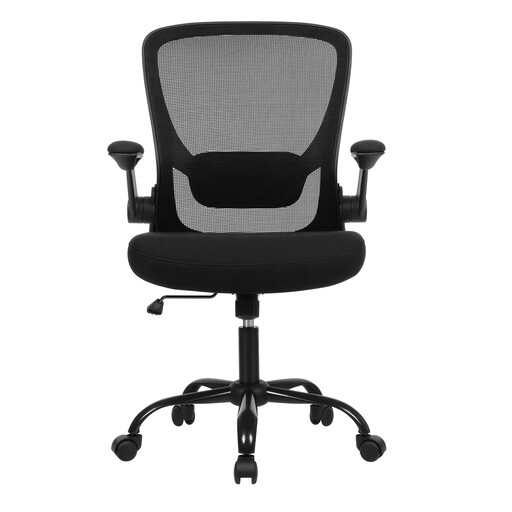
Why this choice suits this profile: This chair is ideal for a first home-office setup, with an adjustable seat, flip-up armrests and a width that works in many spaces.
The listing mentions an adjustable seat height, adjustable lumbar support and a tilt mechanism – so the chair doesn’t rely on looks alone.
Padded seat, breathable fabric, foldable armrests and castors described as quiet. Maximum load stated: 120 kg.
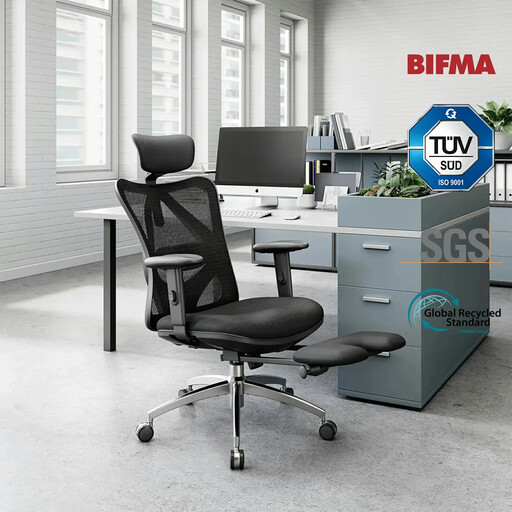
Why this choice suits this profile: With its high back, headrest, lumbar support and footrest, this model is aimed at those who switch between focused work and reclined breaks.
The listed adjustments are detailed: seat height, backrest, headrest, armrests and tilt. The footrest is integrated and retractable.
Breathable mesh backrest, dimensions of 72 × 68.5 × 130 cm and a stated maximum capacity of 150 kg.
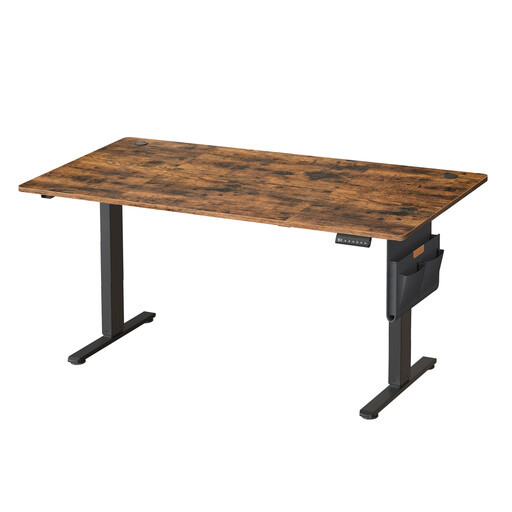
Why this choice suits this profile: This desk is designed for remote workers, creatives and anyone who wants to alternate positions while keeping several devices on the desktop.
The height adjusts from 72 to 120 cm and four positions can be stored. Cable management and storage accessories help keep clutter under control.
Steel frame, 160 × 70 cm desktop, motor described as quiet and a maximum static load of 70 kg.
We’ve put together a comprehensive, real-time updated selection of products that meet these demanding criteria, as well as European safety standards.
To complete your furniture, choose accessories that suit your home workspace:
Start by adjusting the height so your feet rest flat on the floor. Then position the lumbar support at the natural curve of your lower back, and adjust the armrests so you don’t have to raise your shoulders. The tilt should provide a stable, comfortable position for working.
That depends on how often you use it, the weight it supports, the quality of its components and how well you look after it. Respect the maximum load, avoid sitting on the armrests and clean the mesh or fabric with a gentle product. The castors and tilt mechanism should also be checked regularly.
Power consumption depends on the motor and how often you adjust it. The motor mainly runs while the desktop is rising or lowering, not continuously during working hours. To avoid problems, keep cables away from moving parts and follow the manufacturer’s instructions.