
Livraison le jour même ou le lendemain

Qualité garantie

Débloquez vos offres de bienvenue: Livraison GRATUITE | Jusqu'à -80 % | 30 jours d'essai gratuits à JoyPlus
Téléchargez l'application
Whether you're working from home or in the office, spending hours chained to your desk can quickly become a nightmare. Lower back pain, neck strain, sore wrists… These everyday aches are often a symptom of a poorly designed workstation. Investing in ergonomic office equipment isn't a luxury; it's a necessity for protecting your health and productivity. The problem?is that the market is saturated with products and misleading marketing claims. Our mission?is to help you cut through the noise and avoid the common pitfalls to make the right choice.
Before you even start comparing spec sheets, learn to spot the common traps that can cost you dearly—both in money and in back pain.
For a successful home office setup or a more comfortable workspace, ignore the marketing hype and focus on the objective criteria that truly make a difference.
Supporting the natural curve of your lower back is fundamental. There are two main types of lumbar support?:
A good ergonomic office chair must be customizable down to the smallest detail. Check for the following adjustments?:
Ergonomics doesn't stop with the chair. A well-designed wireless keyboard and mouse can significantly reduce strain on your wrists and forearms. A keyboard with the right layout for your region is essential for smooth, intuitive typing. Opting for a wireless set also helps maintain a clutter-free desk and allows you to adjust your position freely.
The perfect chair doesn't exist. The right chair is the one that fits your use case, budget, and body type. Here is our selection, vetted against the criteria we've just detailed.
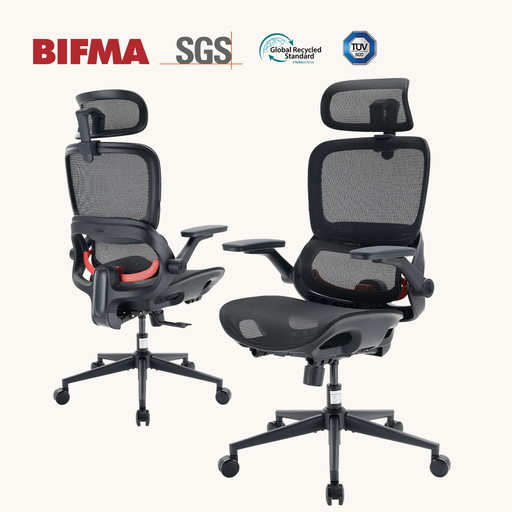
Why we recommend it : Perfect for professionals who work long hours. Its full suite of adjustments and adaptive lumbar support ensure a precision fit for comfort that lasts, even after an 8-hour workday. Available in Ebony and Light Grey.
This chair doesn't just have an "ergo look." It integrates a true adaptive lumbar support system that dynamically follows your movements—light-years ahead of a simple fixed cushion.
Its dynamic lumbar support and 4D armrests (adjustable and flip-up) offer state-of-the-art customization and impressive versatility.
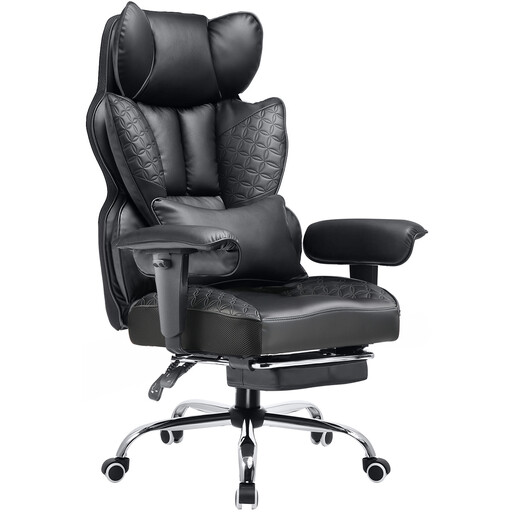
Why we recommend it : Specially designed for heavier or taller individuals, this XXL office chair relies on a reinforced frame, a wide seat, and a high backrest for flawless support.
It counters the "one-size-fits-all" trap by offering generous dimensions and a high weight capacity. It ensures comfort and safety where standard models fall short.
Its reinforced (heavy-duty) frame, high reclining backrest, and integrated footrest make it a true cocoon for both work and relaxation.

Why we recommend it : The perfect option for getting a serious ergonomic setup without breaking the bank. It includes the essential adjustments for good posture, all at a very competitive price.
It avoids the cheap materials trap by using a breathable, durable mesh and a solid frame that supports up to 150 kg (330 lbs). A great promise of longevity in this price segment.
Its excellent feature-to-price ratio : adjustable lumbar support, headrest, and armrests are all included.
Discover our complete collection of products that meet our demanding selection criteria.
1. What is the lifespan of an ergonomic office chair? It all depends on the quality of the materials and how you use it. A good chair with a steel frame, a Class-4 gas lift, and high-density mesh can last you 7 to 10 years. Entry-level models typically last between 2 and 5 years. A good indicator?is the length of the manufacturer's warranty.
2. How do I properly adjust my office chair to prevent back pain? Follow these 3 key steps?:
3. Mesh or PU leather chair?: which one to choose? It's primarily a matter of preference and environment.