
Livraison le jour même ou le lendemain

Qualité garantie

Débloquez vos offres de bienvenue: Livraison GRATUITE | Jusqu'à -80 % | 30 jours d'essai gratuits à JoyPlus
Téléchargez l'application
Whether you're working from home, at the office, or in the middle of a long gaming session, prolonged sitting puts a strain on our bodies. An ergonomic office chair with a footrest emerges as the ideal solution to improve comfort and posture. The problem? The market is flooded with models that make tempting promises but are often disappointing in practice. Before you invest, it's crucial to know how to avoid the most common pitfalls so you don't regret your purchase.
Here are the 3 most frequent mistakes to avoid:
To find that hidden gem—the one that will be a true ally for your back and your productivity—you need to look beyond the marketing claims and analyse a few key technical specifications.
A truly adjustable office chair does more than just go up and down. The adjustments that really make a difference for long-term comfort are:
Lumbar support is the core engine of a good ergonomic chair. While static support (the infamous cushion) can suffice for short periods, dynamic support is preferable for heavy use. The latter automatically adjusts to your posture as you lean forward or back, providing constant, personalised support to the natural curve of your spine. This is a non-negotiable feature for a work-from-home chair used more than 8 hours a day.
A chair's durability depends on elements that are often overlooked at the time of purchase. A steel frame and a metal base are hallmarks of longevity. For upholstery, mesh fabric provides excellent ventilation, perfect for summer, while high-quality PU leather will be easier to maintain. Finally, certifications like BIFMA or SGS are good indicators of reliability: they guarantee that key components (gas lift, casters, structure) have passed rigorous strength and durability tests.
Rather than searching for a one-size-fits-all model that doesn't exist, it's more effective to choose a chair tailored to your needs. Here is a selection of products that excel in different use cases.
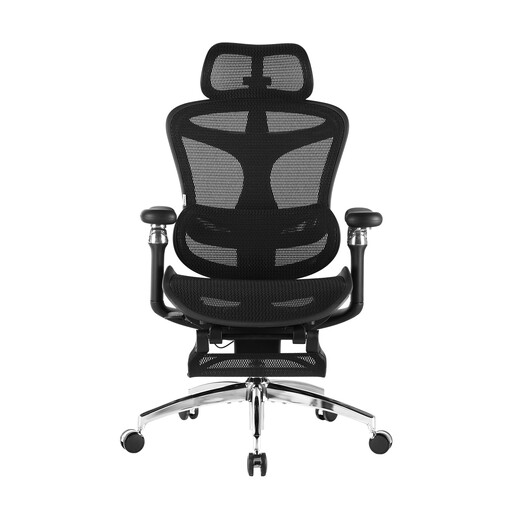
The Verdict: Perfect for those who spend over 8 hours in front of their screen and demand maximum micro-adjustments for a perfect posture, hour after hour.
Its dynamic lumbar support follows the body's movements, avoiding the "wooden board" effect of a poorly positioned static cushion.
The 6D armrests and seat depth adjustment allow for millimetre-perfect customisation for truly tailored support.
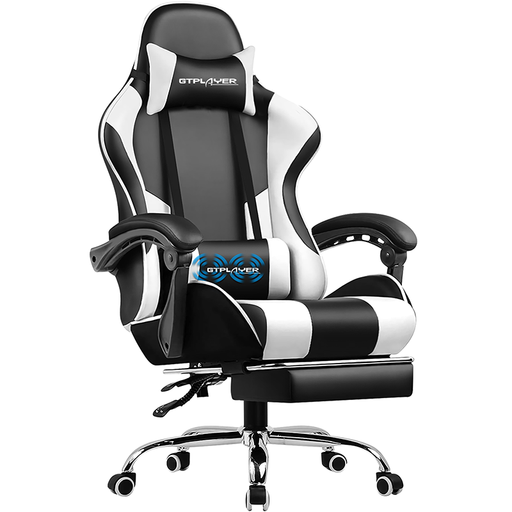
The Verdict: Built for gaming marathons, this gaming chair with a footrest combines a bold look with features designed for relaxation between matches.
Its structure is built on a sturdy metal frame, which prevents the wobbly chair syndrome that can develop after a few months. The massaging lumbar cushion is a real bonus, not just a gimmick.
The combination of a massaging lumbar cushion and a 135° recline transforms breaks into genuine recovery sessions.
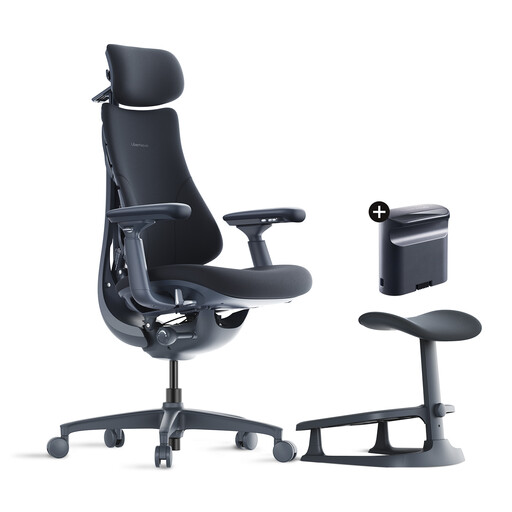
The Verdict: The excellent compromise for mixed use, juggling work hours and relaxation time. The Swiss Army knife of the modern home office setup.
Here, the footrest and the adaptive lumbar support are not mere add-ons. They were designed as a cohesive system, ensuring comprehensive ergonomics that actually work.
Its record-breaking 160° recline and back-stretching function make it a powerful ally for unwinding after a long meeting.
To complement an existing chair or for maximum flexibility, an ergonomic footrest might be the missing piece of your setup. We've selected the top-performing models.
The longevity depends on the quality of the materials and the intensity of your use. A model with a steel frame, a Class 4 gas lift, and certifications (BIFMA, etc.) is designed to last for many years. Maintenance is also a key factor: regularly cleaning the upholstery and periodically tightening the screws can significantly extend its lifespan.
Absolutely. A good gaming chair with a footrest is often an excellent option for remote work because it's designed for long hours of use. If it offers genuine ergonomic adjustments (adjustable lumbar support, 4D armrests), its comfort will be on point. The choice then comes down to aesthetics, which are often more pronounced, and features like a deep recline or a footrest, which are ideal for breaks.
Three adjustments are fundamental: