
Livraison le jour même ou le lendemain

Qualité garantie

Débloquez vos offres de bienvenue: Livraison GRATUITE | Jusqu'à -80 % | 30 jours d'essai gratuits à JoyPlus
Téléchargez l'application
Spending hours at a desk is now a daily reality for millions of people, whether they're working from home, in an office, or studying. The downside to this sedentary lifestyle? Discomfort, tension, and back pain. An ergonomic office chair is no longer a luxury, but a crucial investment in your health and well-being. The problem: the market is flooded with models making often vague marketing promises. It's therefore critical to know how to decipher sales pitches and avoid common pitfalls so you don't regret your investment.
The 3 Pitfalls to Avoid When Buying an Office Chair:
To make the right choice, focus on the technical elements that will make a real difference to your daily comfort and posture.
Effective lumbar support is the cornerstone of a good ergonomic chair for back pain. The key? Its mobility. Demand a mechanism that allows you to adjust its height (and ideally its depth) to fit perfectly into the small of your back. Some models even offer depth adjustment for more or less pronounced pressure. When correctly positioned, it maintains the natural alignment of your spine and relieves pressure on the intervertebral discs, thus preventing fatigue and pain.
Being able to move and change position throughout the day is vital for relieving muscles and promoting blood circulation. Be careful not to confuse a simple tilt function with a true synchronous recline mechanism.
Don't view the maximum weight capacity as just a number. It's an excellent indicator of the chair's overall sturdiness. A chair certified for 150 kg almost always includes a superior gas lift (Class 3 or 4) and a metal or reinforced nylon base, which are light-years ahead of basic plastic. Certifications like BIFMA or SGS are another sign of trustworthiness. These labels guarantee that key components (casters, base, gas lift) have passed a battery of stress and endurance tests. It's the assurance of a long-lasting investment.
Rather than an overwhelming catalogue, we've selected models that meet clear user profiles to guide you to the chair that's truly right for you.
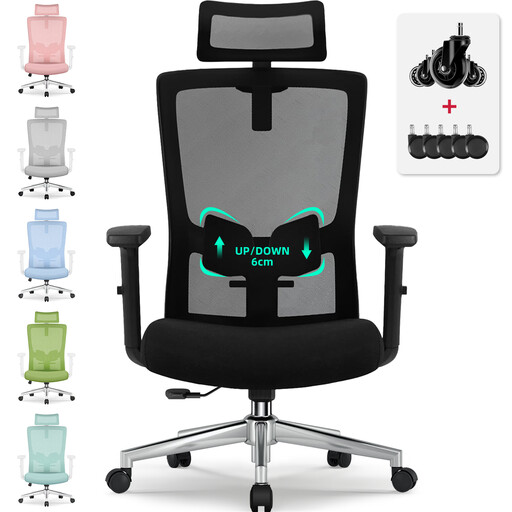
Why it's a match: Perfect for long hours of video calls and spreadsheets, it checks all the boxes for essential adjustments, providing tailored support. Its S-shaped backrest and adjustable headrest ensure optimal support from your neck down to your lower back.
Its adjustable lumbar support with 6 cm of height range offers precision adjustment, a far cry from ineffective fixed supports. The BIFMA and SGS certifications are a guarantee of quality and component durability.
The perfect balance between a full suite of adjustments (lumbar, headrest, recline) and an understated design that won't look out of place in your living room or office.
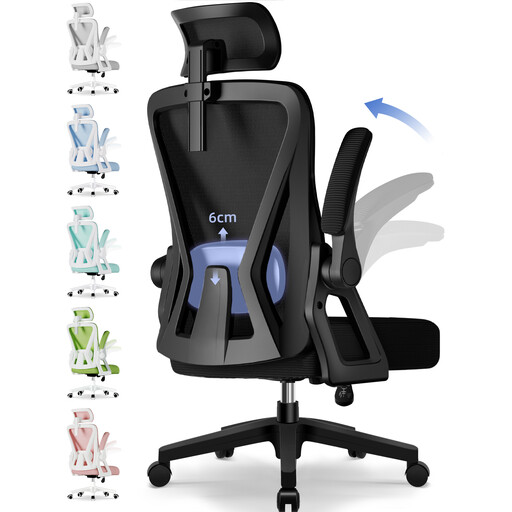
Why it's a match: Perfect for those who juggle intense work sessions with relaxation breaks. Its generous recline and flip-up armrests make it a true chameleon.
Its 135° recline is a genuine relaxation feature, not just a gimmicky tilt. The high-density foam seat and breathable mesh back are designed to stand the test of time.
Its great versatility, with a deep recline for breaks and 90° flip-up armrests that allow it to slide under the desk for optimal space-saving.
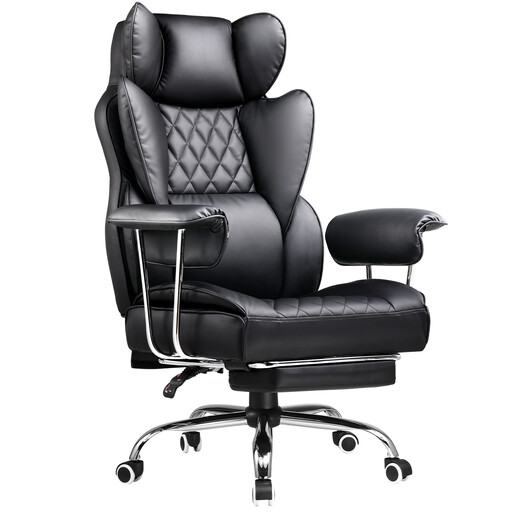
Why it's a match: Built for long gaming or work sessions, this gaming chair offers enveloping support thanks to its high backrest and dedicated lumbar and neck cushions. The integrated footrest is the icing on the cake for decompressing between matches.
Unlike many gaming chairs that focus solely on looks, this one emphasizes its "Heavy Duty" sturdiness. It doesn't sacrifice ergonomics at the altar of design and includes genuinely useful adjustments.
The retractable footrest, which transforms it into a true relaxation chair in the blink of an eye. A real plus for restorative breaks.
Explore our full selection of chairs that meet our quality criteria and current safety standards.
It all depends on the build quality. An entry-level model will show its limits (flattened foam, creaking) in 1 to 2 years. Conversely, a quality chair with a Class 3 or 4 gas lift, a metal base, and high-density foam can easily last you 5 to 10 years, or even longer.
Yes, provided you choose it wisely. "Bucket" style models offer welcome side support but can be less versatile than a classic mesh office chair. If you're set on a gaming chair, make sure it offers real ergonomic adjustments (4D armrests, adjustable lumbar support) and don't just settle for an aggressive look.
Follow these 4 key steps: