
Livraison le jour même ou le lendemain

Qualité garantie

Débloquez vos offres de bienvenue: Livraison GRATUITE | Jusqu'à -80 % | 30 jours d'essai gratuits à JoyPlus
Téléchargez l'application
By the Joybuy Team, Office Equipment Experts | Published July 14, 2026
Remote work has become the norm, and with it, long hours spent in front of a screen. This welcome flexibility, however, has a downside: back pain, neck strain, and chronic fatigue. The culprit is almost always the same: poor posture, often caused by an unsuitable office chair.
Investing in an ergonomic office chair is no longer a luxury, but a necessity for protecting your health and concentration. But with an overwhelming number of options, how do you find your way? Don't worry. We're here to guide you with clear criteria and a selection of models suited for all needs and budgets.
Before diving into our selection, let's break down what separates a simple chair from a truly adjustable and ergonomic office seat. Here are the key points to check before any purchase.
Sitting for hours on end puts a major strain on your lower back. An ergonomic chair with lumbar support is designed to hug the natural curve of your spine, thereby reducing muscle tension. Ideally, this support should be adjustable in height and depth to perfectly match your body shape. Good lumbar support is simply indispensable for anyone who wants to work comfortably over the long term.
An ergonomic seat should adapt to you, not the other way around. A good chair must offer, at a minimum, the following adjustments:
The choice of upholstery is also a matter of comfort. Mesh fabric is particularly popular for its breathability: no more sweaty backs during hot summer days! Lastly, don't overlook the sturdiness of the base and casters, which guarantee stability and longevity. Make sure the casters are suitable for your floor type (carpet or hard floor) for smooth and silent movement.
Now that the basics are covered, here are three models that caught our attention for their excellent value and thoughtful features.
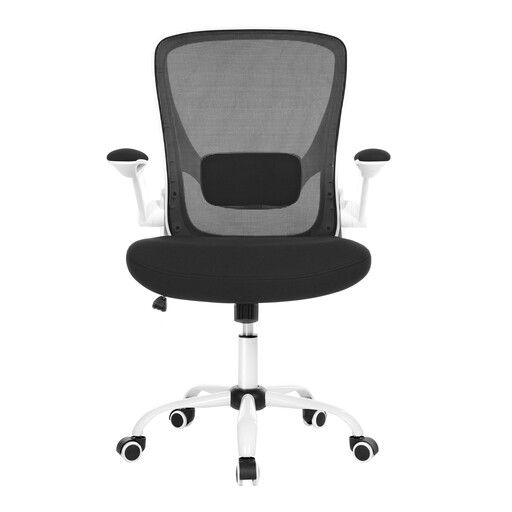
Why it stands out This model is an excellent entry point into the world of ergonomics without breaking the bank. It gets straight to the point with a clever design, especially its flip-up armrests, making it the ideal solution for compact workspaces, student rooms, or home offices where every inch counts.
Its strengths
Who is it for? Ideal for students, apartment-based remote workers, and anyone looking for an effective and discreet computer chair on a budget.
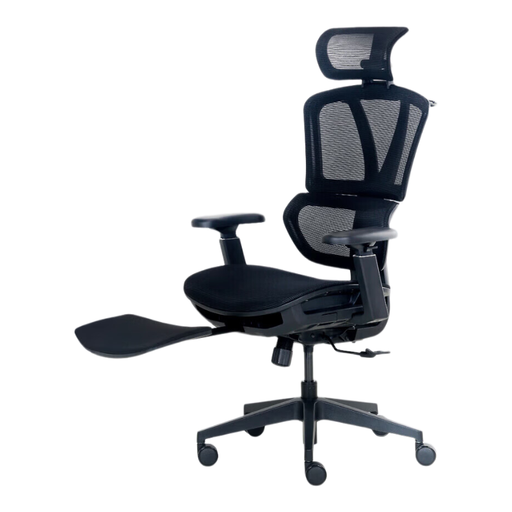
Why it stands out This model blurs the lines between a comfortable office chair and a gaming chair. With its integrated footrest and generous recline, it's designed as much for productivity as for moments of relaxation. Its dual back support offers reinforced stability.
Its strengths
Who is it for? The perfect seat for gamers, developers, and all professionals who spend long hours in front of the screen and want a versatile chair that's equally suited for work and relaxation.

Why it stands out This chair is designed for those who want no compromises on customisation. With a fully adjustable headrest, lumbar support, armrests, and seat height, it adapts to a wide variety of body types. Its maximum static load capacity of 150 kg is a testament to its robustness.
Its strengths
Who is it for? A must-have for demanding users who want total control over their posture. It is also particularly well-suited for larger frames and heavy daily use.
Not convinced by these three models? If your criteria are different, feel free to explore our complete category of study chairs to discover a wider variety of models, styles, and budgets.
Historically, an ergonomic office chair focuses on a minimalist design and maintaining a neutral posture, ideal for work. A gaming chair often adopts a more assertive style (like a racing seat), with a higher backrest and features geared towards relaxation, such as a deep recline or a chair with a footrest. Today, the lines are increasingly blurred, and hybrid models like the Z9 combine the best of both worlds.
Allow a few days, or even a week, to get used to it. If you were accustomed to poor posture, a chair that forces you to sit up straight might feel uncomfortable at first. Be patient and take the time to fine-tune each setting: that's the key to reaping all the benefits.
For several hours of daily use, lumbar support isn't an option—it's essential. It helps maintain the natural "S" curve of your spine, which reduces pressure on the intervertebral discs and prevents lower back pain. An adjustable support is ideal, but a well-designed fixed support is always better than no support at all.