
Livraison le jour même ou le lendemain

Qualité garantie

Débloquez vos offres de bienvenue: Livraison GRATUITE | Jusqu'à -80 % | 30 jours d'essai gratuits à JoyPlus
Téléchargez l'application
Working from home, intense gaming sessions, or long nights studying: spending hours sitting down puts a major strain on our bodies. Discomfort, neck tension, and the infamous "pain of the century"—back pain—are often symptoms of poor seating. Far from being a gimmick, an ergonomic office chair is a true investment in your health and productivity.
But with an overwhelming number of options, how do you find the right one? This guide is here to shed light on the subject and break down the essential criteria. Our goal: to help you choose THE model that's perfectly suited to your needs, whether you're outfitting your home office setup or a student's desk.
Before diving into our top picks, let's review the key points for making an informed decision. Never forget the golden rule: a good ergonomic office chair should adapt to you, not the other way around.
An adjustable office chair is the cornerstone of ergonomics. Make sure the model you're considering offers the following adjustments?:
The number one culprit behind the notorious back pain at the office? Non-existent or poorly designed lumbar support. An ergonomic chair with good lumbar support is therefore essential. It should hug the natural curve of your lower back. The most advanced models take it a step further with dynamic support that adjusts to your movements in real-time, ensuring perfect support regardless of your posture.
The upholstery of your chair is crucial for long-term comfort. Mesh fabric is particularly popular for its breathability: no more sweaty backs during long summer days! For the structure, opt for a sturdy base and frame (steel or aluminium) and check that the casters are suitable for your floor type (hardwood, carpet, etc.).
Our team has scrutinised several models to select only those that truly stand out for their design, adjustability, and value for money.
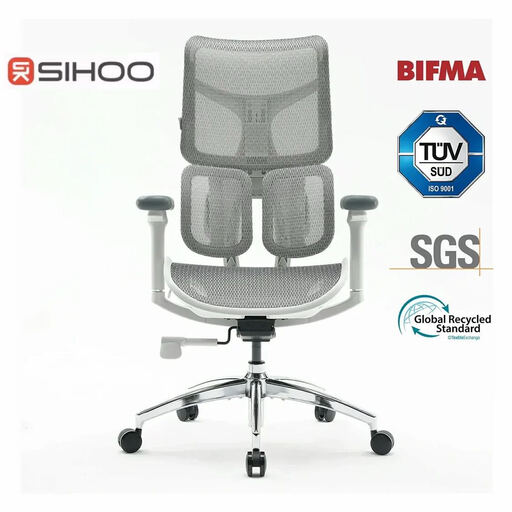
Why it stands out: The Doro S100 is all about cutting-edge adaptive support. Its dual dynamic lumbar support, driven by a four-spring mechanism, adjusts in real-time to your body shape and posture. Even better, its coordinated 4D armrests follow the backrest's recline for perfect forearm support, even in a relaxed position.
Pros:
Who is it for? Ideal for professionals who spend long days sitting and demand the highest level of adjustability and support. Its sleek design makes it a particularly elegant white office chair, perfect for a contemporary interior.
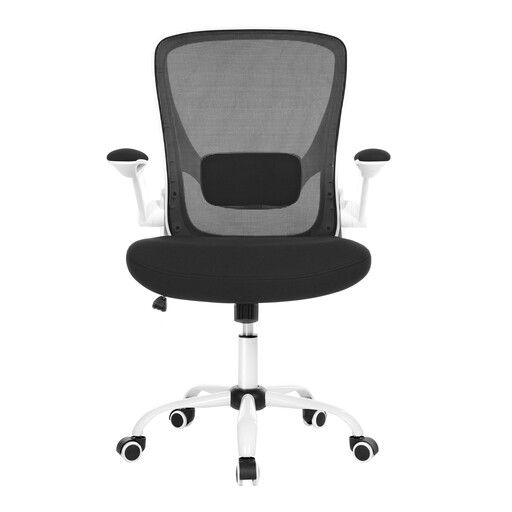
Why it stands out: This Ochama model packs the essentials of ergonomics into a smart, compact design. Its real standout feature: flip-up armrests that allow it to slide under any desk. A precious space-saver in small areas!
Pros:
Who is it for? The quintessential student office chair, or the perfect solution for small apartments and optimised workspaces. It's aimed at those who want the essentials of ergonomics without getting lost in a myriad of complex adjustments.
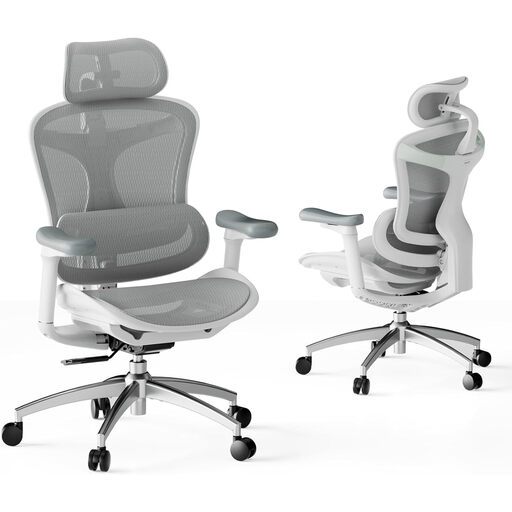
Why it stands out: The Doro C300 focuses on smart technology. Its weight-sensitive mechanism automatically adjusts the backrest's resistance to your body weight, ensuring a perfectly balanced and effortless recline. Its two-part, all-mesh backrest guarantees optimal ventilation.
Pros:
Who is it for? For fans of "smart" technology who want premium, hassle-free comfort. It's the ideal high-end chair for those who prefer their equipment to adapt to them, not the other way around, with minimal manual adjustments.
A good chair is the foundation. But for optimal comfort, the entire workstation matters. If our suggestions don't check all your boxes or if you're looking to create a complete and harmonious setup, we've got you covered.
For a desk that's as functional as it is stylish, explore our other furniture ranges. ? Discover our selection of white desks for the home office
A standard office chair often offers the bare minimum: height adjustment, and that's about it. In contrast, an ergonomic office chair is designed to adapt to your body through a multitude of adjustments (armrests, seat depth, lumbar support, recline...) to promote a healthy posture and reduce strain.
First, set the seat height: your feet should be flat on the floor. Next, adjust the depth: you should be able to fit two or three fingers between the edge of the seat and the back of your knees. Position the lumbar support so it perfectly hugs the small of your back. Finally, adjust the armrests so your forearms rest naturally on them, with your elbows at a 90° angle.
Absolutely. An ergonomic office chair is specifically designed to maintain good posture and better distribute pressure points across the body. By providing targeted support, especially to the lumbar region, it helps significantly reduce the tension and discomfort caused by long hours of sitting. However, a word of caution: for chronic pain, consulting a healthcare professional remains essential.