
Livraison le jour même ou le lendemain

Qualité garantie

Débloquez vos offres de bienvenue: Livraison GRATUITE | Jusqu'à -80 % | 30 jours d'essai gratuits à JoyPlus
Téléchargez l'application
Working from home, gaming, studying... we're all spending more and more time glued to our desks. In this context, a good ergonomic office chair is no longer a luxury, but a crucial investment in your health and comfort. The problem? The market is flooded with models making tempting marketing promises, making it easy to get lost or make the wrong choice.
As the Head of Product Recommendations at Joybuy, I'm here to help you navigate the options. Let's break down the common mistakes to avoid and the criteria that truly make a difference.
Before we even get into the technical details, let's review the classic traps that can turn a promising purchase into a real disappointment.
To make the right choice, focus on the adjustments that have a direct impact on your daily posture and comfort. Here are the three points you absolutely must check.
Back pain is public enemy number one for desk workers. An office chair with lumbar support is therefore essential, but on one condition: it must be truly adjustable. A good support system should be adjustable in height and, on the best models, in depth, to perfectly match the curve of your spine. A fixed support is just a compromise that will rarely suit your body type.
A comfortable office chair is one that adapts to you, not the other way around. Check for the following adjustments; they are fundamental:
Your perceived comfort depends directly on the materials.
To help you put this advice into practice, here are a few models that cater to different user profiles, focusing on adjustability and quality criteria.
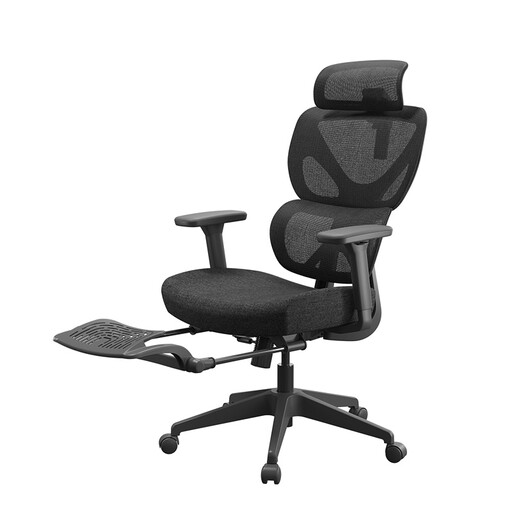
Why it stands out: Perfect for those who juggle focused work with relaxation breaks. Its integrated footrest is a real game-changer for varying your posture and relieving leg strain.
More than just an "ergonomic" label, it incorporates an adaptive lumbar support and adjustable armrests that offer genuine customisation options.
Its 10 cm thick seat and retractable footrest provide superior comfort, ideal for long hours of work or leisure.
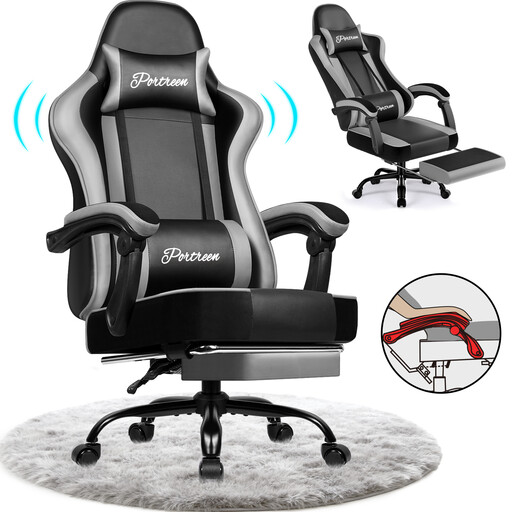
Why it stands out: Built for long sessions, it combines a bold gaming aesthetic with solid ergonomic features. Its generous recline (up to 170°) is perfect for decompressing between matches.
It doesn't sacrifice substance for style. Its structure includes high-density foam and a robust steel frame, setting it apart from flashy, entry-level gaming chairs.
Its easy-to-clean PU leather upholstery is a daily plus. The BIFMA and SGS certifications for its components are a guarantee of reliability and longevity.
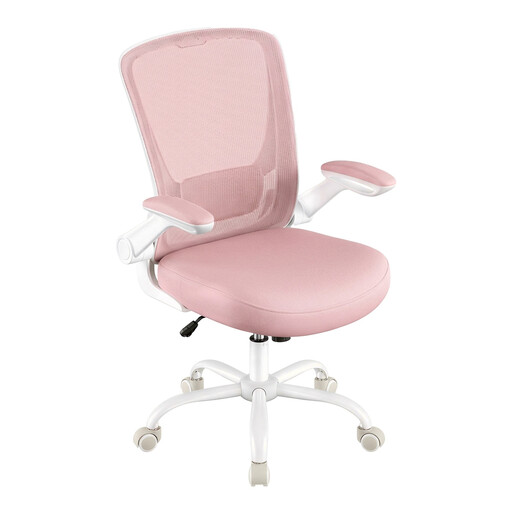
Why it stands out: The perfect solution for a home office, a student's room, or any space where every square inch counts. Its flip-up armrests allow it to slide completely under the desk for maximum space-saving.
Despite its accessible price, this model doesn't skimp on the essentials. It retains an adjustable lumbar support and a comfortable seat, focusing on ergonomic fundamentals rather than unnecessary gimmicks.
Its flip-up armrests are a real bonus for optimising space. Its breathable mesh back ensures good comfort, even after several hours of use.
Explore our full selection of chairs that meet our quality criteria and current safety standards.
A proper adjustment involves 4 key steps:
It all depends on the build quality and the intensity of your use. An entry-level model will show signs of wear (sagging foam, fragile mechanism) after 1 to 2 years. In contrast, a well-made chair (steel frame, high-density foam, certified components) can last you for 5 to 10 years, or even longer.
It depends on the model. Entry-level gaming chairs often just have a rigid "bucket seat" design with simple, removable cushions for lumbar support, which is rarely a sustainable ergonomic solution. However, more premium models integrate true ergonomic mechanisms (adjustable lumbar support, 4D armrests...), making them excellent options for a work-from-home chair. The key is to look beyond the aesthetics and check the adjustment options.