
Livraison le jour même ou le lendemain

Qualité garantie

Débloquez vos offres de bienvenue: Livraison GRATUITE | Jusqu'à -80 % | 30 jours d'essai gratuits à JoyPlus
Téléchargez l'application
Spending hours at your desk, whether for remote work, studying, or gaming sessions, can quickly become an ordeal. Poor posture takes an immediate toll: back pain, neck strain, and dwindling productivity. The market is flooded with all kinds of chairs, but how do you tell a gem from a bad deal?
Before you pull out your credit card, let's review the pitfalls to avoid. Too many buyers fall for marketing promises that fall apart after just a few months of use:
Knowing how to spot these warning signs is the first step toward a smart and lasting investment.
To avoid buyer's remorse, focus on the features that make all the difference for your comfort and health. Here are the points you absolutely must check.
A true ergonomic office chair must adapt to you, not the other way around. The following adjustments are essential:
The lifespan and comfort of your computer chair are directly linked to the quality of its components.
Because every user is unique, here is a selection of models that meet specific needs, all evaluated according to the quality and adjustment criteria we've just covered.

Why we chose it ? This is the ideal model for versatile remote work. Its flip-up armrests are a real bonus for sliding it under the desk to save space. Its mesh back ensures excellent ventilation, even after hours of work.
It offers genuine adjustable lumbar support and a well-designed backrest, a far cry from a simple marketing gimmick. Its breathable mesh prevents overheating and the premature wear typical of entry-level upholstery.
Its versatility and the space-saving design of its flip-up armrests, combined with the breathable comfort of mesh for daily use.
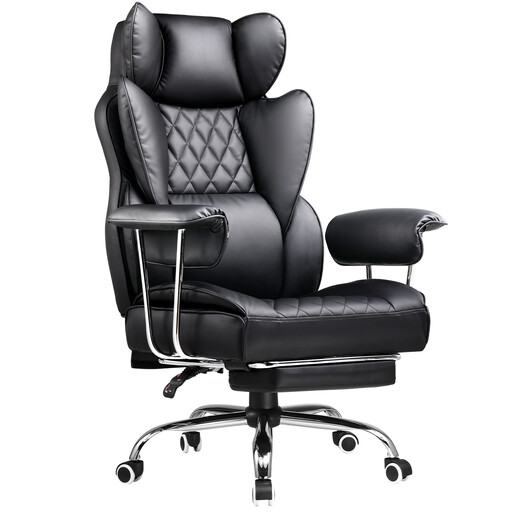
Why we chose it ? Built for screen marathons, this gaming chair provides total support with its high back, lumbar cushion, and headrest. Its generous recline and integrated footrest are perfect for unwinding between meetings or gaming sessions.
It goes beyond the simple "gaming" look. It includes a full suite of genuinely useful adjustments, like a deep recline and a footrest—features often missing from standard office chairs that fully justify its positioning for intensive use.
The immersive comfort of its bucket seat, its deep recline, and its integrated footrest. The perfect combo for juggling work and relaxation.
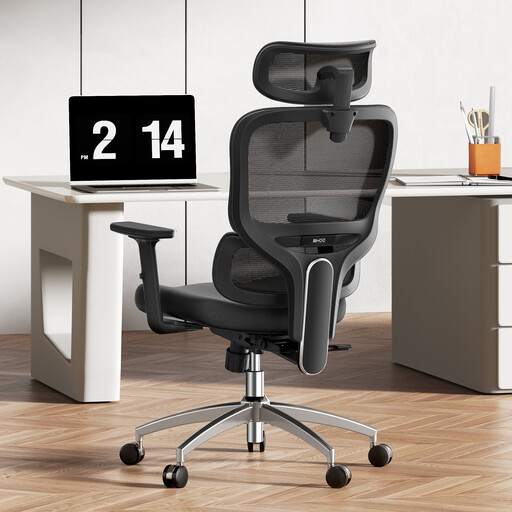
Why we chose it ? For those who want a cutting-edge technical solution for back pain. This model's standout feature is its 3D dynamic lumbar support, which adapts to your movements in real time for constant, tailored support.
It goes beyond classic ergonomics by integrating an active support system. No more poorly adjusted static chairs: this one moves with you, providing a tangible and measurable benefit for your back health.
Its 3D dynamic lumbar support, coupled with multiple adjustments (headrest, armrests), offers fine-tuned customisation and active support throughout the day.
We have selected a full range of products that meet our demanding selection criteria and current safety standards.
It all depends on the quality of the materials, your usage, and maintenance. An entry-level model will show its limits after 1 to 2 years. In contrast, a well-made chair with a metal frame and dense foam can easily last you 5 to 10 years. The warning signs to watch for: a sagging seat, play in the mechanism or base, and a deteriorating upholstery.
A good initial setup is essential. Follow these steps:
Absolutely. A gaming chair is often an excellent option for a remote work chair, as it is specifically designed for long-term comfort. These models typically offer excellent support, a very generous reclining office chair function, and welcome bonuses like a footrest. The choice will mainly come down to aesthetics, which are often bolder than a classic office chair's, and your personal preference: do you prefer an enveloping bucket seat or a more breathable mesh back?