
Livraison le jour même ou le lendemain

Qualité garantie

Débloquez vos offres de bienvenue: Livraison GRATUITE | Jusqu'à -80 % | 30 jours d'essai gratuits à JoyPlus
Téléchargez l'application
Remote work, gaming, long days at the office… we are spending more and more time sitting down. The result? An aching back, a stiff neck, and persistent fatigue. Far from being a simple gadget, a good ergonomic office chair is a true ally for your health and productivity. It's a long-term investment in your well-being.
But when faced with a jungle of models, how do you make the right choice? Don't worry. We've broken down the essential criteria and selected the best chairs currently available to help you find the one that's truly right for you.
Before diving into our selection, let's review the crucial points to check to find the comfortable office chair made for you.
A good ergonomic chair should adapt to your body, not the other way around. Make sure the model that catches your eye offers at least these fundamental adjustments:
Back pain often stems from insufficient support for the natural curve of the lower back. A desk chair with lumbar support is therefore not an option; it's a necessity. There are two main types:
The choice of upholstery and bonus features should not be overlooked: they directly impact your daily comfort and the lifespan of your chair.
We have selected three models that stand out from the crowd, each catering to a specific user profile.
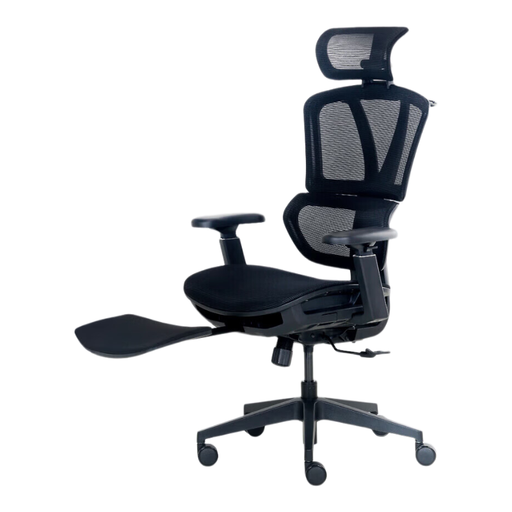
ochama×J.ZAO Z9 Smart Chair - Ergonomic office chair
Why it stands out: This hybrid model is for those who refuse to choose between a serious office chair and a comfortable gaming seat. Its design includes dual-back support for enhanced lumbar comfort and an integrated footrest—a feature that is still too rare but invaluable for relaxation.
Advantages:
Who is it for? For those who juggle intense work and gaming sessions, and who want an all-in-one chair without sacrificing support.

Ochama Black Ergonomic Mesh Computer Chair – 70x71x(114-124)cm
Why it stands out: This chair focuses on customisation and breathability. Its full mesh backrest and multiple adjustment points make it an excellent choice for staying cool and focused, even in the middle of summer or during marathon workdays.
Advantages:
Who is it for? Ideal for remote workers and office employees who work long hours and for whom coolness and precise adjustments are non-negotiable.
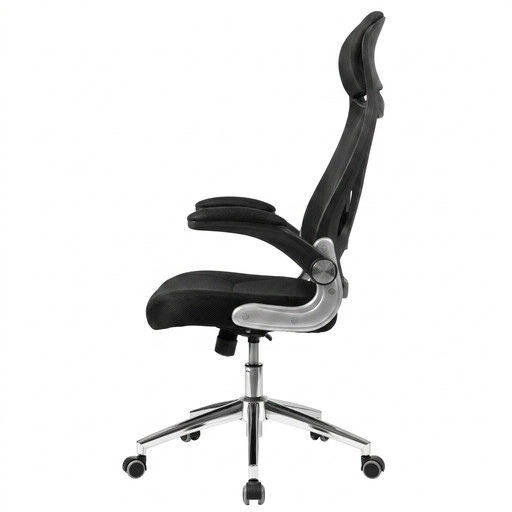
Ochama Office chair, desk chair, executive chair, swivel chair
Why it stands out: Its key feature: flip-up armrests. This ingenious functionality allows it to be slid completely under the desk to free up space. A real plus in studios or small rooms.
Advantages:
Who is it for? Perfect for students, those working in a small space (studio, bedroom…), and anyone looking for a functional ergonomic chair that can be discreet.
Our selection only covers a fraction of the possibilities. To discover other models, styles, and budgets, feel free to explore our complete collection.
Discover all our office chairs and seats
1. What is the difference between an ergonomic office chair and a standard chair? A standard chair offers basic support with few or no adjustments. In contrast, an ergonomic office chair is designed to conform to your body and encourage good posture through multiple adjustments (height, backrest, armrests, lumbar support). The result: less fatigue and a significantly reduced risk of pain and tension.
2. Can a gaming chair be used for remote work? Absolutely. Many models, like the Z9 Smart Chair in our selection, are at the crossroads of both worlds. Gaming chairs often offer excellent support with their high backrests, headrests, and sometimes a footrest. The crucial point is to verify that it has the essential ergonomic adjustments for a healthy work posture.
3. Is there an adjustment period for an ergonomic chair? Yes, allow for a few days. This is the time it takes for your body, especially if it was used to poor posture, to get accustomed to being properly supported. Take the time to carefully adjust each setting to fully enjoy its benefits.