
Livraison le jour même ou le lendemain

Qualité garantie

Débloquez vos offres de bienvenue: Livraison GRATUITE | Jusqu'à -80 % | 30 jours d'essai gratuits à JoyPlus
Téléchargez l'application
Working from home, in the office, or gaming... the hours in front of the screen add up, and your back is letting you know. A stiff neck, an aching lower back, and creeping fatigue—these aren't signals you have to live with. Investing in a good ergonomic office chair is no longer a luxury, but a necessity for protecting your health and maintaining performance.
The market is flooded with options and marketing promises. To help you cut through the noise, we've broken down what makes a great chair and selected the models that truly stand out. Follow our guide.
Before you settle on a model, it's essential to understand the key criteria that separate a simple seat from a true ally for your back. Here are the points you absolutely must check.
A good office chair must adapt to your body, not the other way around. This is non-negotiable. Here are the essential adjustments:
This is arguably THE most important criterion. Good lumbar support, ideally adjustable in height and depth, conforms to the natural curve of your lower back to prevent slouching. It prevents poor posture and drastically reduces pressure on the vertebrae, a primary cause of chronic pain associated with remote work.
The ability to recline the backrest is crucial for varying your posture throughout the day. A reclining office chair allows you to lean back to relax your back muscles. Some models, often branded as gaming chairs, offer a generous recline of up to 135° or more, perfect for relaxing breaks.
As for materials, comfort and practicality vary:
After analysing dozens of models, our editorial team has selected three chairs that stand out for their ergonomics-to-price ratio, design, and suitability for different uses.
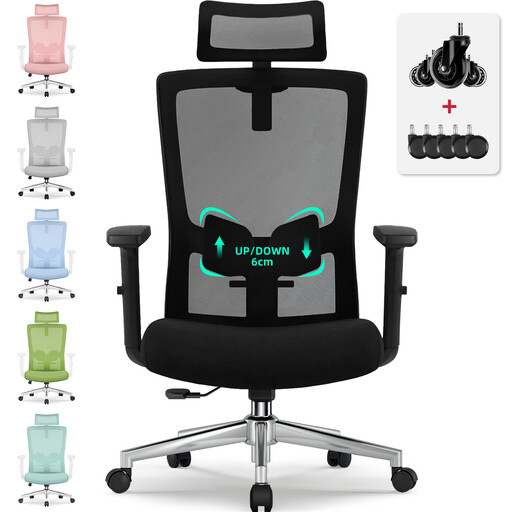
Why it stands out: This chair gets straight to the point: cutting-edge ergonomics with no frills. Its S-shaped backrest follows the spine, while the lumbar support (adjustable by 6?cm) and adjustable headrest allow for a precision fit. The BIFMA and SGS certifications for the gas lift and base are a true guarantee of durability and safety.
Advantages:
Who is it for? For professionals working from home or in the office who need a comfortable and highly adaptable office chair capable of providing unwavering support throughout the day.
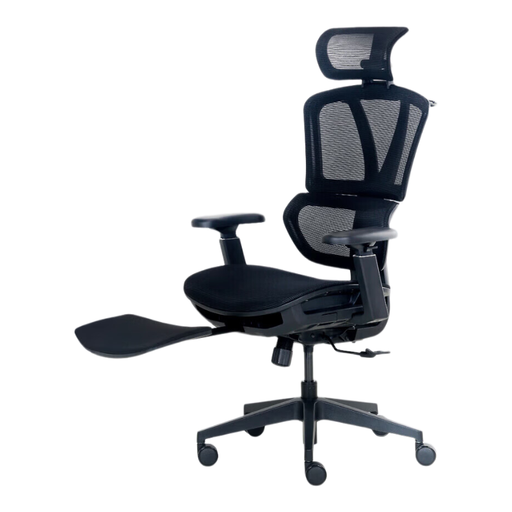
Why it stands out: The Z9 Smart Chair bridges the gap between the worlds of gaming and the office. Its secret weapon? A retractable footrest that transforms it into a relaxation cocoon in the blink of an eye. Its two-part backrest is designed for enhanced lumbar support, and the small integrated hanger is the kind of clever detail we love.
Advantages:
Who is it for? Ideal for versatile users: gamers, developers, or remote workers who love to switch from an intense work posture to a near-horizontal relaxation position.
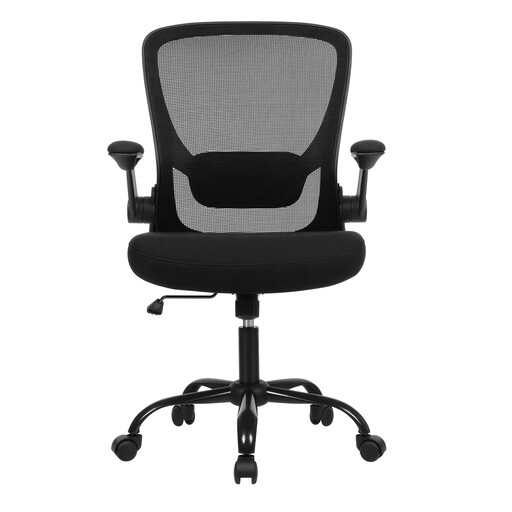
Why it stands out: This model focuses on simplicity and efficiency, with a secret weapon for small spaces: its flip-up armrests. Once raised, they allow the chair to slide completely under the desk for maximum space-saving. Its fixed but well-padded lumbar support and fabric seat make it a smart and accessible choice for daily use.
Advantages:
Who is it for? Perfect for those working in a home office or a compact space. It's an excellent choice for enjoying the benefits of ergonomics in a practical and budget-friendly format.
The models featured here are designed for maximum mobility thanks to their casters. If your space or taste leans towards a more stationary solution, such as for a meeting room or a minimalist office nook, other options are available.
? Discover our selection of grey office chairs without casters to explore other styles.
A standard chair often provides the bare minimum: a seat and height adjustment. An ergonomic office chair, on the other hand, is a tool designed to conform to and support your body. Thanks to its multiple adjustments (lumbar support, armrests, headrest, recline...), it adapts to your specific body shape to encourage good posture, reduce fatigue, and prevent long-term pain.
Yes, as long as it's truly ergonomic! Many gaming chairs include excellent features like adjustable lumbar support, a deep recline, and 4D armrests. Their design is often more pronounced, but their comfort qualities are perfectly suited for long workdays, as demonstrated by the Z9 Smart Chair model.