
Livraison le jour même ou le lendemain

Qualité garantie

Débloquez vos offres de bienvenue: Livraison GRATUITE | Jusqu'à -80 % | 30 jours d'essai gratuits à JoyPlus
Téléchargez l'application
Spending long hours sitting at a desk has become a daily reality for millions, whether for remote work, studying, or gaming sessions. The result is often poor posture, which can quickly lead to tension in the back, neck, and shoulders, harming both your comfort and your productivity. Investing in a suitable ergonomic office chair is therefore not a luxury, but a necessity for your daily well-being.
As the head of buying guides at Joybuy, my mission is to help you make an informed decision. In this guide, we'll review the essential criteria for making the right choice, along with a selection of models suited for every need and budget.
Before diving into our selection, let's review the key points that will help you find the perfect comfortable office chair for you.
A good ergonomic chair must, above all, adapt to your body shape. Make sure it offers the following adjustments:
The chair's upholstery plays a major role in comfort, as well as its durability and maintenance. Fabric is breathable and pleasant, faux leather is easy to clean, while mesh offers excellent ventilation, which is highly appreciated during long summer days.
Style shouldn't be overlooked. A designer office chair can blend seamlessly into your home decor, while a more understated and functional model will suit a more traditional work environment. Also, remember to check the quality of the castors: a wheeled office chair with quiet, smooth-gliding wheels ensures peace and quiet and will protect your floors (especially hardwood!).
How you plan to use the chair will determine which type you should go for.
We have selected three models that stand out for their features, style, and target audience.
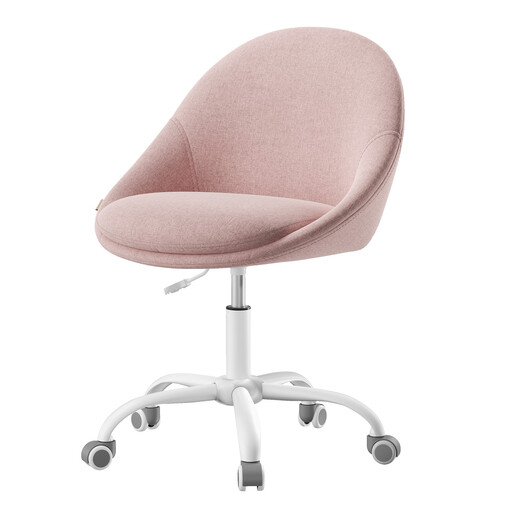
Why it stands out
This model focuses on design with its bold colour, perfect for energising an office or a student's room. With its clean lines and compact size, it's a piece of furniture that is as stylish as it is practical.
Key features
Who is it for? Perfect for students or for remote work in a small space. It's an excellent secondary office chair or for moderate daily use, without sacrificing style.
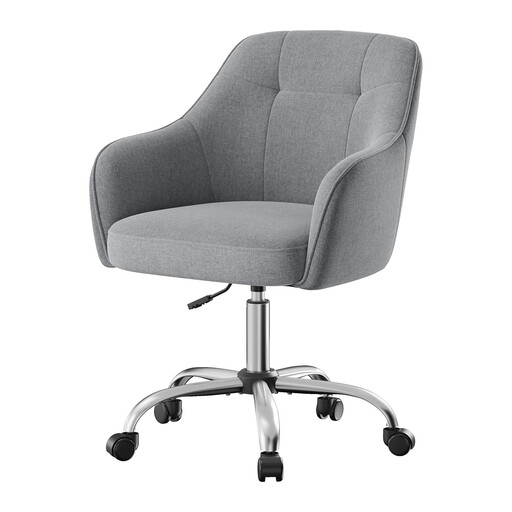
Why it stands out
With its understated look and linen-effect fabric upholstery, this chair fits naturally into a modern home office. It combines an elegant design with ergonomic features designed for long-lasting comfort.
Key features
Who is it for? This office chair is aimed at professionals who spend long hours sitting and are looking for a comfortable, understated model with excellent value for money.
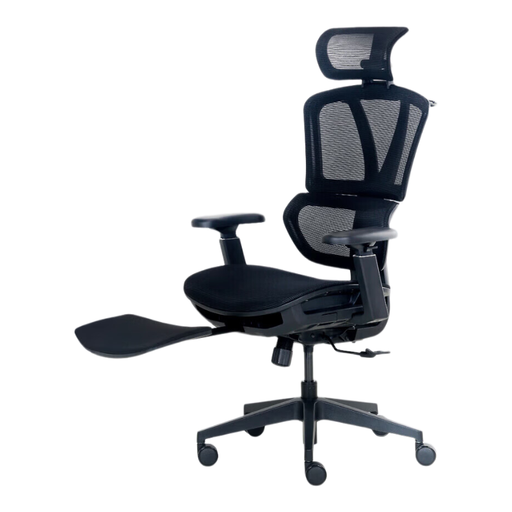
Why it stands out
This model positions itself as a true Swiss Army knife, halfway between a pure ergonomic office chair and a gaming chair. Its design is engineered for maximum support, thanks in particular to its articulated back support and retractable footrest.
Key features
Who is it for? For heavy users: gamers, developers, and anyone who spends more than 8 hours a day in front of a screen. It's the discerning choice for those who refuse to compromise on comfort and adjustability.
A good chair is the cornerstone of a comfortable office, but other elements can transform your workspace. To fine-tune your setup with furniture that's as smart as it is practical, like storage ottomans or side tables, take a look at our Table Ottoman category.
While both aim for comfort, their approaches differ. The ergonomic office chair focuses on an understated design and precise adjustments (adjustable lumbar support, 4D armrests, etc.) for an optimal working posture. The gaming chair, on the other hand, has a more distinct style (bucket seat, bright colours) and includes features designed for relaxation, such as a generous recline or removable neck and lumbar pillows.
It usually takes a few days, or even a week, to get used to it. Your body, often accustomed to poor posture, needs to adjust. Don't hesitate to experiment with all the settings to find the configuration that's perfect for you.
Here is a simple checklist for an optimal basic setup: