
Livraison le jour même ou le lendemain

Qualité garantie

Débloquez vos offres de bienvenue: Livraison GRATUITE | Jusqu'à -80 % | 30 jours d'essai gratuits à JoyPlus
Téléchargez l'application
Whether working from home or in the office, spending hours glued to our chairs has become the new normal. And with it comes a host of issues: back pain, neck tension, and poor posture are now commonplace. An ergonomic office chair is therefore not a luxury, but a genuine investment in your health and productivity. The problem: the market is saturated with models making often misleading marketing promises. As the head of product recommendations at Joybuy, my mission is to help you navigate this jungle.
Before you start, here are the pitfalls to avoid so you don't turn a smart investment into a costly mistake:
To avoid falling for the hype, focus on the technical features that truly make a difference. Here are the three non-negotiable points to check before you pull out your credit card.
This is the most critical factor in preventing back pain: supporting the natural curve of your spine. A good office chair with lumbar support must offer much more than a simple bulge in the backrest.
Demand support that is at least height-adjustable to position it right in the small of your back. More advanced models offer adaptive support that follows your movements, ensuring constant contact and flawless support throughout the day. This is a fundamental criterion for an ergonomic chair for remote work intended for intensive use.
An ergonomic chair should adapt to you, not the other way around. An adjustable office chair worth its salt must allow you to configure several key elements:
The choice of materials has a direct impact on the comfort and lifespan of your chair.
To put theory into practice, here is our selection of models that meet different needs, all evaluated according to the objective criteria we've just detailed.
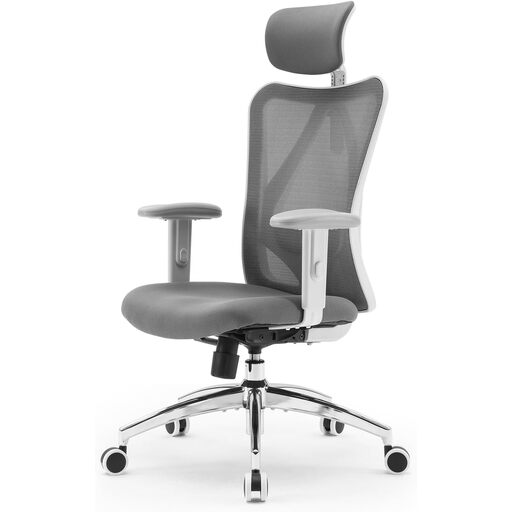
Our take: The SIHOO M18 is an excellent entry-point for anyone looking to get a serious setup without breaking the bank. It checks all the essential boxes for versatile daily use (work, study, leisure).
It avoids the "pseudo-ergonomic" trap by offering a full suite of adjustments (lumbar support, headrest, height, tilt, armrests) for a custom fit.
Its breathable mesh back and W-shaped seat, padded with high-density foam, ensure long-lasting comfort, even after long hours of work.
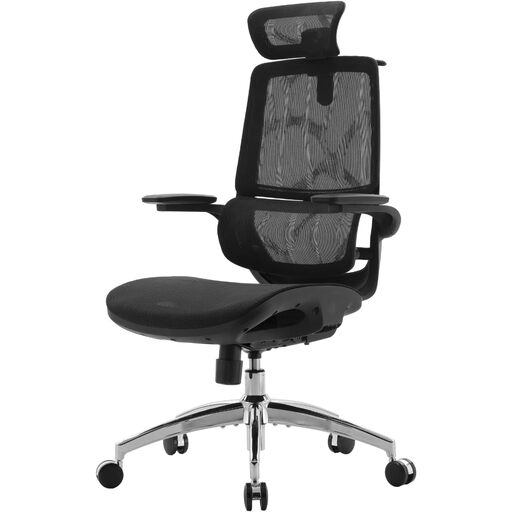
Our take: For those who regularly work 8+ hour days, standard support isn't enough. This model kicks things up a notch with its advanced back support system, built for intensive use.
It sidesteps the pitfall of flimsy materials with its two-part backrest and adaptive lumbar support that dynamically adjusts to your movements. The result: constant, precise support, right where you need it.
Its synchronised 3D armrests follow the backrest's recline. This means your arms always remain perfectly supported, a game-changer for reducing shoulder fatigue during long sessions.
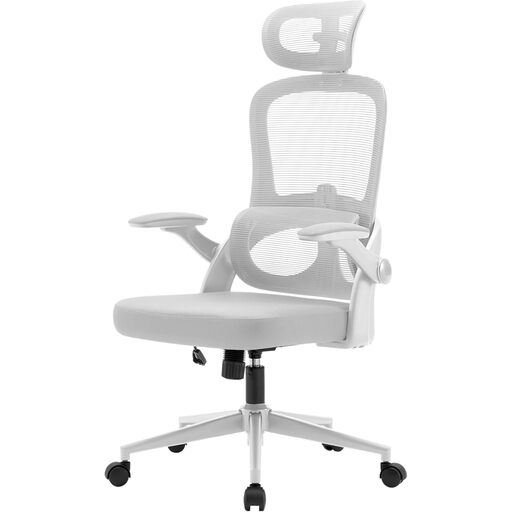
Our take: The perfect choice for those who don't want to choose between style and ergonomics. Its sleek design is an ideal solution for more compact workspaces.
It avoids the trap of sacrificing function for style. Its modern look with a white frame doesn't forget the essentials: real adjustable lumbar support and adjustable armrests.
Its flip-up armrests are a real space-saver. Once raised, they allow the chair to slide completely under the desk. Smart!
We have curated a complete selection of products that meet our strict requirements for ergonomics and safety.
Start with the seat height: your feet should be flat on the floor with your knees at a 90° angle. Next, adjust the lumbar support so it perfectly matches the curve of your back. Finally, set the armrests so your elbows also form a 90° angle when your forearms are resting on them. Ideally, your gaze should be level with the top third of your monitor.
It all depends on the quality of the materials and how you use it. An entry-level model might last 2 to 3 years. A mid-range or high-end chair, with a robust frame and certified components, can easily last for 5 to 10 years, or even longer, with minimal maintenance.
Comfort is a matter of personal preference, but each material has its pros. Mesh is praised for its breathability, a real plus in the summer or if you tend to sweat. Leather (or faux leather) offers a premium look and is easy to wipe clean, but it's less breathable. Fabric is warm and comfortable but more susceptible to stains. For long work sessions, a mesh back is often the wisest choice.