
Livraison le jour même ou le lendemain

Qualité garantie

Débloquez vos offres de bienvenue: Livraison GRATUITE | Jusqu'à -80 % | 30 jours d'essai gratuits à JoyPlus
Téléchargez l'application
Spending hours at your desk, whether at home or in the office, should never mean pain or discomfort. Yet, choosing an ergonomic office chair often feels like an uphill battle. Between marketing jargon and endless spec sheets, it's easy to make a mistake. We'll guide you through cutting through the noise, identifying the essential features, and investing in a model that truly fits your needs and is built to last.
Before diving into the features to look for, it's crucial to recognise the seemingly good ideas that can cost you dearly—both in your wallet and your back.
To invest in equipment that will preserve your comfort for the long haul, focus on a few non-negotiable technical criteria.
For an ergonomic chair with lumbar support, the only criterion that matters is its adaptability. Look for models that offer:
A good chair should adapt to you, not the other way around. Here are the essential adjustments for an office chair for remote work that delivers on its promises:
A chair's durability is directly linked to the quality of its components. Rely on objective, verifiable indicators:
To help you see how these criteria apply in practice, here are a few options that cater to different user profiles.
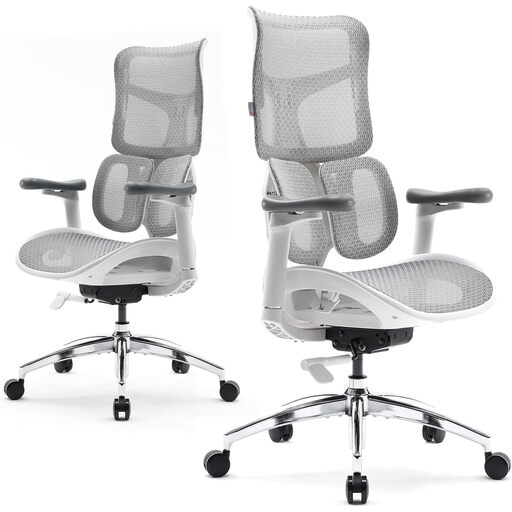
Why we recommend it : For those who spend more than 8 hours a day in front of their screen, customisation isn't an option. This model offers a full suite of adjustments to fit every body type and posture, limiting long-term fatigue.
It shatters the concept of superficial ergonomics with its 4D armrests and 5-level adjustable backrest. It provides fine-tuned adjustment where competitors often settle for the bare minimum.
Its dual dynamic lumbar support adjusts to your posture in real time. The aluminium frame and BIFMA/SGS certifications are true guarantees of sturdiness and longevity.
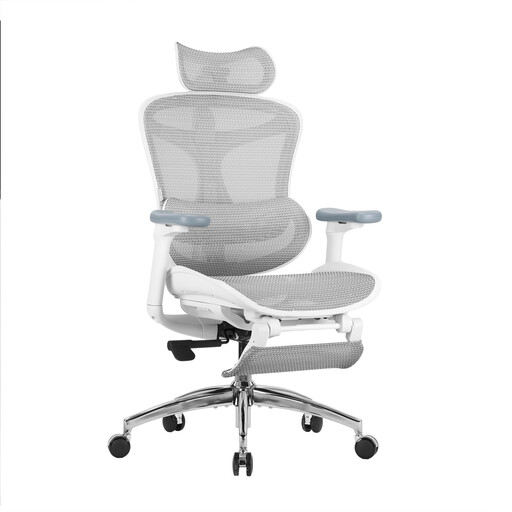
Why we recommend it : Perfect for those who want an effective solution for back pain without spending hours on adjustments. The focus here is on intelligent lumbar support and near-instant comfort.
It avoids the "gimmicky" lumbar support trap with a dynamic system that follows the body's movements. This provides active support, a far cry from the simple, useless fixed bulge on some models.
Its ultra-soft 3D armrests and adjustable backrest ensure tailored comfort. The integrated footrest is a real bonus for breaks or moments of relaxation.
Explore our full selection of chairs that meet our quality criteria and the most demanding safety standards.
It all depends on the quality of the materials and your usage. An entry-level model will show its limits after 1 to 2 years. Conversely, a quality chair with an aluminium frame, high-resilience mesh, and BIFMA-certified mechanisms can easily last 7 to 10 years, or even longer. It's a true investment in your daily health and comfort.
Absolutely, but on one condition: the mesh must be high-quality. Unlike foam cushions that tend to compress and retain heat, a technical mesh office chair has two key advantages: constant ventilation, which is ideal in the summer, and perfect weight distribution that prevents pressure points. It conforms to the body's shape while ensuring firm, lasting support.
A good setup is the foundation. To configure your office chair for back pain, follow these steps: