
Livraison le jour même ou le lendemain

Qualité garantie

Débloquez vos offres de bienvenue: Livraison GRATUITE | Jusqu'à -80 % | 30 jours d'essai gratuits à JoyPlus
Téléchargez l'application
Remote work, studying, gaming sessions… Spending hours in a seated position has become a part of our daily lives. This sedentary lifestyle is not without consequences: discomfort, neck tension, and back pain have become a common lot for many of us. The ergonomic office chair presents itself as the miracle solution, but be warned: the market is saturated with marketing promises and vague claims that can easily lead to buyer's remorse.
As the Head of Product Recommendations at Joybuy, my mission is to help you see things more clearly. Let's break down the most common pitfalls together and identify the essential criteria for choosing a chair that will truly change your daily life.
The 3 Pitfalls to Avoid When Buying an Office Chair:
To make the right choice, focus on objective features that guarantee your comfort and the durability of your investment. Here are the three non-negotiable points to scrutinize.
Good lumbar support is the key to preventing back pain. A simple fixed bulge in the backrest is not enough. You absolutely must look for an ergonomic chair with lumbar support that is adjustable, at a minimum, in height and, ideally, in depth. This fine-tuning allows it to perfectly match the natural curve of your spine, thus relieving pressure on your vertebrae over the hours.
Staying still is the worst thing you can do. A good reclining office chair should follow your movements. While a simple tilt mechanism is common, aim for a "synchronous" mechanism: the seat tilts in tandem with the backrest, offering better support and stimulating blood circulation. The ability to lock the recline in multiple positions is also a real plus for alternating postures throughout the day.
The skeleton of your chair is its base and its gas lift. They are the guarantors of your safety. Insist on components certified by recognised standards like BIFMA or SGS. This is your assurance that they have been tested to withstand years of intensive use. Regarding the upholstery:
Rather than an endless list, we have selected specific models for concrete needs. The goal: to help you find the chair that truly suits you.
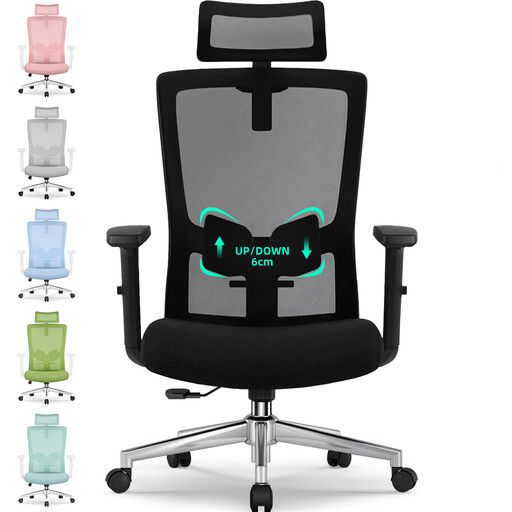
Its profile: Perfect for remote work or studying, this chair offers an excellent compromise between essential features and a controlled budget. It's the smart choice for mixed use, without breaking the bank.
It doesn't just settle for a vague "ergonomic" promise. It offers a genuine lumbar support adjustable by 6 cm and an adjustable headrest, which knocks out the "one-size-fits-all" trap.
Its breathable mesh backrest and recline of up to 135° ensure versatile comfort. The BIFMA and SGS certifications for the gas lift and base are a true guarantee of sturdiness and safety.
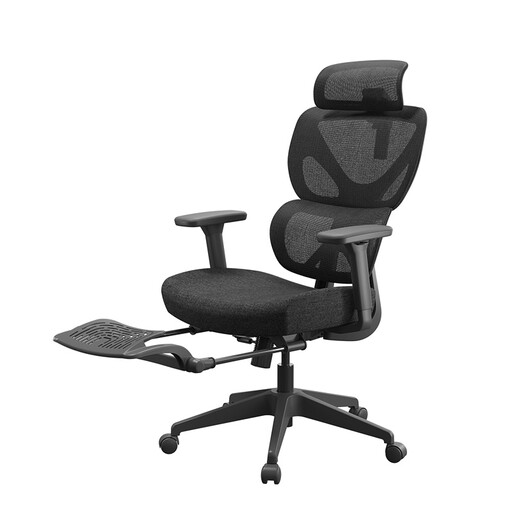
Its profile: Designed for those who spend more than 8 hours a day in front of their screen. Its advanced adjustments aim for maximum comfort to handle long days without accumulating fatigue.
It stands out with a 10 cm thick seat cushion and an elastic lumbar support that follows your movements. Goodbye to the trap of materials that sag and lose their support.
The integrated footrest is the star feature for breaks and moments of relaxation. Combined with the rotating armrests and dynamic lumbar support, it offers tailor-made ergonomics.
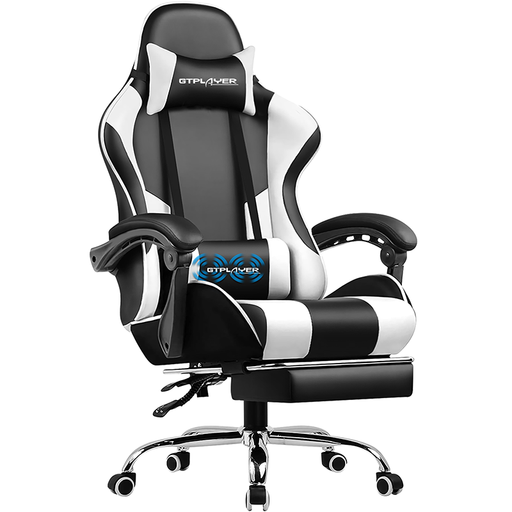
Its profile: This gaming chair combines an assertive look with features designed for relaxation, like a footrest and a massaging lumbar cushion. Ideal for unwinding after an intense gaming session.
It proves that a gaming chair can be much more than just a racing-style seat with an aggressive look. With its vibrating lumbar cushion and 135° recline, it provides tangible benefits that go beyond mere marketing claims.
The duo of a retractable footrest and a lumbar massage cushion (powered by USB) makes it a true cocoon for gaming and relaxation. Its faux leather upholstery wipes clean with a sponge.
We have put together a complete selection of chairs that meet our quality criteria and European safety standards.
What is the lifespan of a good office chair? The lifespan depends on the quality of the materials and the intensity of use. An entry-level model will show signs of wear after 2 to 3 years, while a high-quality chair with a metal base and certified components can last for 7 to 10 years, or even longer. Regular maintenance (tightening screws, cleaning) will further extend its life.
Is a gaming chair suitable for remote work? Absolutely, provided you choose wisely. Many gaming chair models incorporate excellent ergonomic features: adjustable lumbar and neck support, adjustable armrests, and advanced recline mechanisms. They are a very comfortable alternative to a classic office chair, especially if you like enveloping seats and extras like a footrest.
How do you properly adjust your chair to prevent back pain? Here are the 3 essential adjustments: