
Livraison le jour même ou le lendemain

Qualité garantie

Débloquez vos offres de bienvenue: Livraison GRATUITE | Jusqu'à -80 % | 30 jours d'essai gratuits à JoyPlus
Téléchargez l'application
Spending hours at your desk, whether working from home or in the office, should never mean pain or discomfort. Yet, poor seating is often the cause of persistent back pain and chronic fatigue. The market is flooded with models claiming to be “ergonomic,” but how can you tell a true ally for your back from a mere marketing ploy?
My mission, as Head of Product Recommendations at Joybuy, is to help you see things more clearly. Together, let's break down the pitfalls to avoid and the essential criteria for choosing the ergonomic office chair that will protect your long-term well-being.
Before we even talk about technical specs, let's start by identifying the classic mistakes that turn a purchase into a regret.
To avoid these traps, focus on objective technical features. These are the true guarantee of a comfortable office chair that is genuinely suited to your needs.
A good office chair with lumbar support is defined by its customisation options. Make sure it includes these three adjustments:
Being able to tilt your backrest is vital for varying your posture throughout the day. Opt for a synchronous mechanism, which tilts the backrest and seat in a coordinated motion. This promotes better blood circulation and provides constant back support, even when semi-reclined. The ability to lock the tilt in multiple positions is a real bonus.
For perfect posture, especially if you are shorter or if your desk isn't adjustable, an ergonomic footrest is a very wise addition. It ensures your feet are properly supported, which reduces pressure on the lower back and improves circulation. Some office chairs with a built-in footrest even offer an all-in-one solution for relaxation breaks.
Because every body type is unique, here are models that cater to different user profiles, all selected based on the adjustment and design criteria we've just detailed.
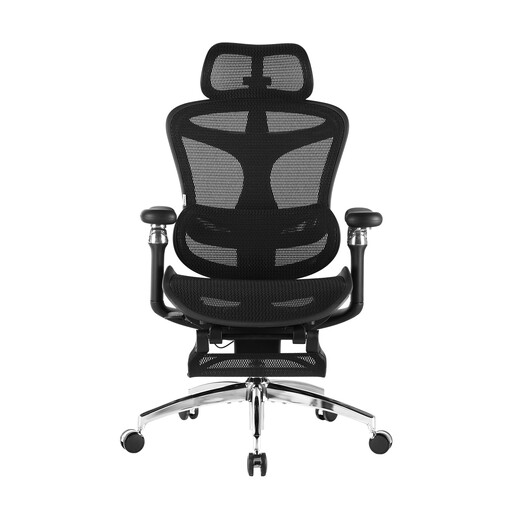
Why this model? Ideal for professionals working from home who spend more than 8 hours a day seated. This model focuses on advanced customisation to adapt to the body's micro-movements throughout the day.
It avoids the "all-ergonomic" trap with advanced adjustments like 6D armrests and dynamic lumbar support that adapts to your movements, offering active rather than passive ergonomics.
Dynamic lumbar support and ultra-adjustable 6D armrests for fine-tuned adjustment and lasting comfort.
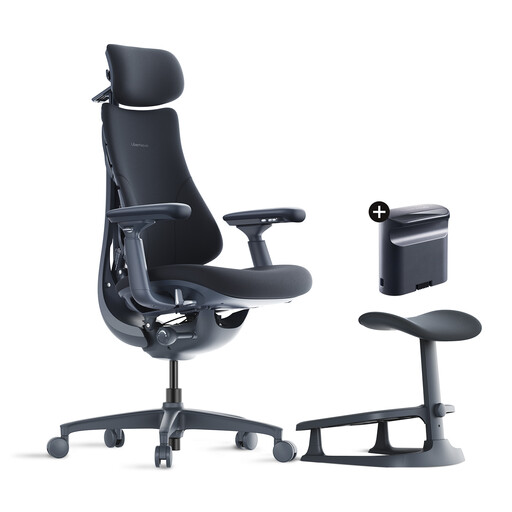
Why this model? Perfect for those who want a versatile chair that can transition from an intense work session to a relaxing break. The integrated footrest and deep recline make it an excellent choice for mixed use.
It doesn't sacrifice support for the sake of comfort. Despite its generous 160° recline, it maintains adaptive lumbar support that preserves posture, avoiding the "comfy but slouchy" chair syndrome.
Up to 160° recline angle and an integrated footrest for maximum versatility between work and relaxation.
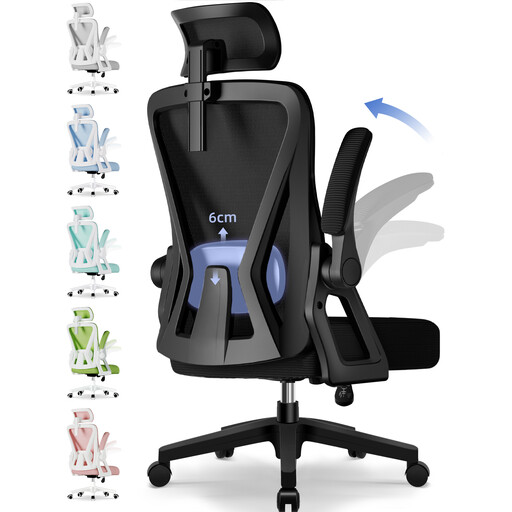
Why this model? A very solid option for students or those setting up a home office on a controlled budget. It includes all the essential ergonomic adjustments without sacrificing sturdiness, which is a crucial point.
It avoids the "too good to be true" trap by focusing on durability: its 150 kg weight capacity and certified gas lift are hallmarks of sturdiness often missing from entry-level models.
Full set of adjustments (headrest, lumbar support, armrests, height) and a 150 kg weight capacity.
Discover our full selection of products that meet our selection criteria and current standards.
The lifespan depends primarily on the quality of the materials and the intensity of your use. An entry-level model will show signs of wear (sagging foam, loose mesh) after 1 to 2 years. Conversely, a well-made chair with a steel frame, a Class 3 or 4 gas lift, and high-density mesh can easily last you 5 to 10 years. The manufacturer's warranty is often an excellent indicator.
Not always, but it is highly recommended in two specific situations. First, if your feet don't touch the floor completely, even with the seat at its lowest setting. Second, to encourage a more dynamic posture. An ergonomic footrest allows you to vary the position of your legs, which stimulates blood circulation and reduces pressure on your lower back. It's a small investment for a considerable gain in comfort.
To relieve back pain, adjusting the lumbar support is the absolute priority. Adjust its height so it fits into the small of your back. Next, set the seat height so your feet are flat on the floor and your knees are at a 90° angle. Leave a gap of two to three fingers between the edge of the seat and the back of your knees. Finally, adjust the armrests so your forearms can rest on them without shrugging your shoulders. Keep your back straight and firmly against the backrest.