
Livraison le jour même ou le lendemain

Qualité garantie

Débloquez vos offres de bienvenue: Livraison GRATUITE | Jusqu'à -80 % | 30 jours d'essai gratuits à JoyPlus
Téléchargez l'application
Whether you work from home or in an office, the reality is the same: spending hours in a seated position puts a heavy strain on your back, shoulders, and neck. Far from being a luxury, an ergonomic office chair is a true investment in your well-being and productivity. But with a flood of options on the market, how do you find the right one?
This guide is here to break down the essential features and present our selection of top models, helping you make an informed choice, free from marketing jargon.
Before you take the plunge, let's review what separates a simple seat from a true ergonomic office chair. Here are the three essential points to check.
For any office chair worthy of the name, spinal support isn't an option: it's the number one criterion. Good lumbar support is therefore paramount. It can be fixed or, ideally, adjustable in height and depth to perfectly fit your body shape. It ensures you maintain a healthy posture and prevents the lower back pain so common after long hours of work.
A chair is only truly ergonomic if it adapts to you, not the other way around. Make sure it includes the following adjustments:
The choice of upholstery directly impacts your daily comfort. The mesh office chair is appealing for its excellent breathability, ideal for preventing overheating. Fabric offers a softer, warmer feel, while leather (or faux leather) adds a touch of elegance and is easy to clean.
Also, consider the overall structure. A high-back office chair provides complete support up to the shoulders and head: a real bonus for taller individuals or for those who like to lean back to think.
To guide you, here are three models that caught our attention, each catering to different needs and budgets.

What Sets It Apart
This model is an excellent entry point for anyone looking for a complete solution without breaking the bank. It combines a breathable mesh back with an arsenal of essential adjustments, including adjustable lumbar support and a headrest, which is rare at this price point.
Pros
Who Is It For?
Ideal for professionals working from home and students who spend long hours at their desks and are looking for a comfortable chair with full adjustments, from head to lower back.
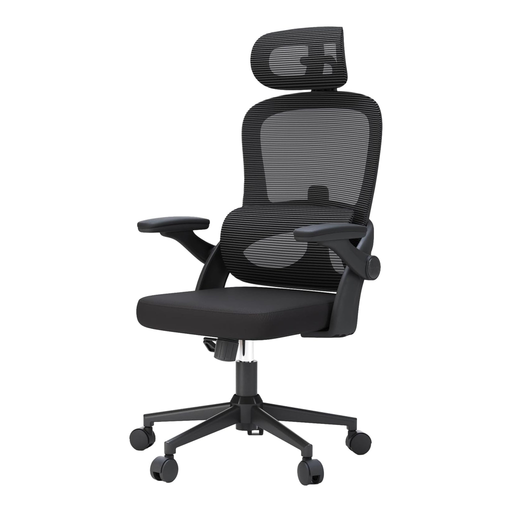
What Sets It Apart
The SIHOO M102C is a step up, with more advanced customisation options. Its 3D armrests (adjustable front-to-back, side-to-side, and pivoting) and its 6 cm adjustable lumbar support guarantee a precision fit.
Pros
Who Is It For?
This computer chair is aimed at demanding users who want total control over their posture. It is particularly suitable for tall or heavy individuals thanks to its wide seat and high load capacity.
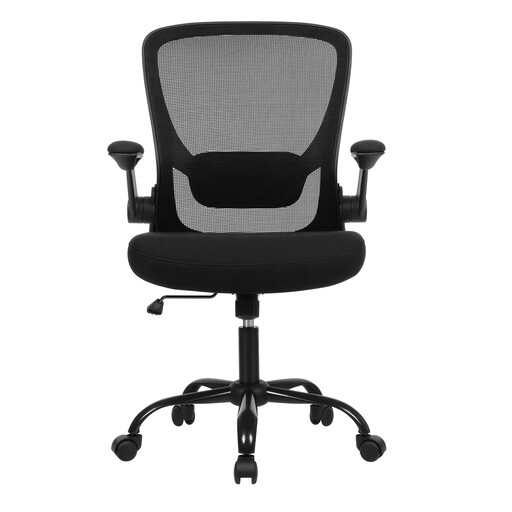
What Sets It Apart
This model prioritises simplicity and tactile comfort with its fabric upholstery. It integrates essential features, like padded lumbar support and flip-up armrests, into a minimalist and compact design, perfect for a home office.
Pros
Who Is It For?
Perfect for those who prefer the softness of fabric over mesh and need a practical solution for their home workspace. Its flip-up armrests are a major asset for optimising small spaces.
Our selection highlights black models, a classic, versatile colour that fits into most decors. If you want to explore other styles, materials, or colours for your workspace, feel free to take a look at our catalogue.
? Discover our full collection of black furniture
A standard office chair simply provides a place to sit. An ergonomic office chair, on the other hand, is designed to actively support your body. It features multiple adjustments (height, lumbar support, armrests, tilt) to adapt to your body shape, encourage good posture, and prevent musculoskeletal disorders (MSDs), a common plague of office work.
An adjustment period of a few days to a week is completely normal. If you were using a poorly suited chair, your body will need time to unlearn poor habits and adopt a healthier posture. Take the time to experiment with the different settings to find the configuration that works best for you.
Sit all the way back in the chair. Adjust the height of the lumbar support so that it fits the curve of your lower back (your natural lumbar curve), usually just above your beltline. It should neither push you forward nor create a gap. The goal is to feel present yet comfortable support that maintains the natural curve of your back without forcing it.