
Livraison le jour même ou le lendemain

Qualité garantie

Débloquez vos offres de bienvenue: Livraison GRATUITE | Jusqu'à -80 % | 30 jours d'essai gratuits à JoyPlus
Téléchargez l'application
Spending long hours in front of a screen, whether at home or in the office, should never mean back pain and fatigue. An ergonomic office chair isn't a luxury, but a genuine investment in your health and comfort. The problem? The market is flooded with models where marketing promises often hide poor ergonomics.
As the Head of Product Recommendations at Joybuy, my mission is to help you navigate the options. Here are the pitfalls to avoid and the essential criteria for making the right choice, with no regrets.
Too many buyers regret their purchase after just a few months. The most common reason? Marketing promises that fail to conceal serious design flaws.
To be confident in your investment, forget the marketing jargon and focus on objective, verifiable technical features.
A good office chair with lumbar support goes far beyond a simple curved backrest. It must offer active and adjustable support. Look for a mechanism (either built-in or via a cushion) that is adjustable in height and, if possible, in depth. This is what allows it to perfectly conform to the curve of your spine—a detail that makes all the difference in preventing back pain after long hours of work.
A worthy adjustable office chair offers much more than just height adjustment. The following mechanisms are crucial for your comfort:
The comfort of a remote work chair also depends on details that aren't obvious at first glance. The seat must be made of high-density foam, guaranteeing it won't sag after a few months. As for the upholstery, the choice depends on your priorities:
Rather than an overwhelming list of technical specs, we've matched specific models to user profiles. The goal: to help you find the chair that truly meets your needs.
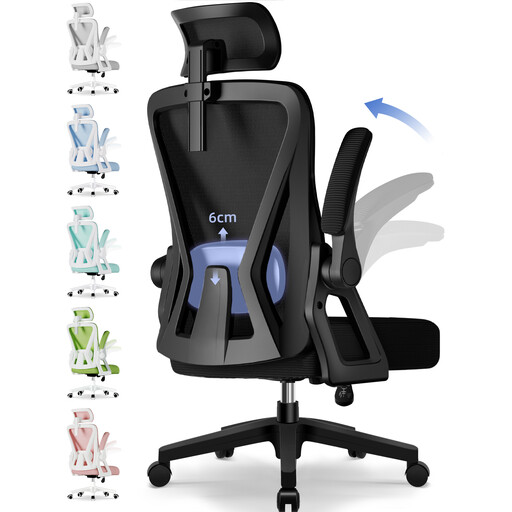
Why it's the right choice: Designed for intensive use, this chair offers a complete arsenal of adjustments (headrest, lumbar, armrests, tilt up to 135°) to sculpt the chair to your body and encourage posture changes throughout the day.
It goes beyond a simple "ergonomic" shape. Every crucial contact point (neck, lower back, forearms) is actively adjustable for tailored support.
Its S-shaped backrest and fine-tuned adjustments ensure total spinal support. Its weight capacity (150 kg) and robust materials are guarantees of durability.
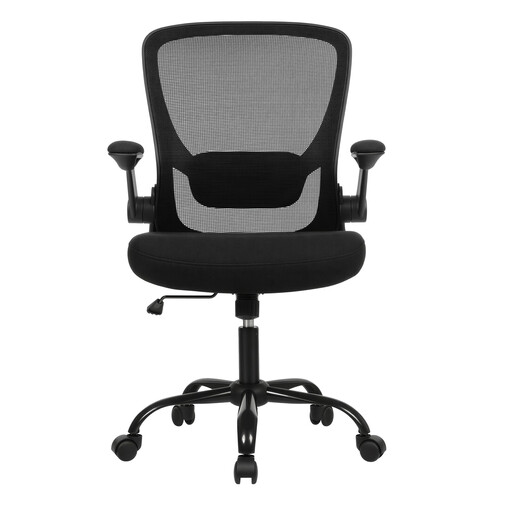
Why it's the right choice: This model focuses on the essentials and does them well: effective lumbar support, a comfortable seat, and very practical flip-up armrests. The smart choice for those who prioritise comfort over gadgets.
Rather than focusing on looks, it prioritises function: support and seat comfort take precedence over gadgets. The result is excellent value for money.
Its flip-up armrests allow the chair to slide under the desk, a welcome space-saver. The thick seat and breathable fabric ensure long-lasting comfort.
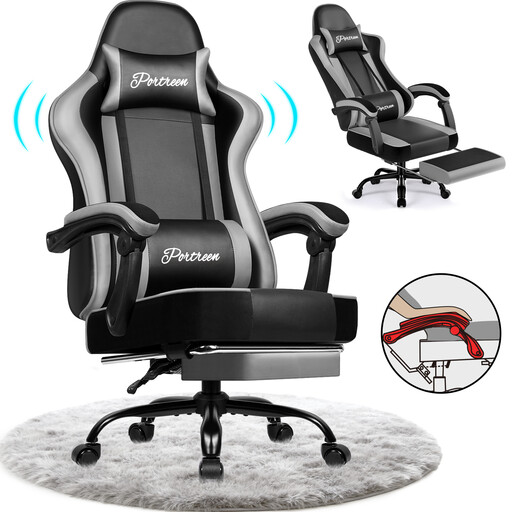
Why it's the right choice: It successfully blends a gaming-inspired design with genuine ergonomic features. Its deep recline (up to 170°) and integrated footrest make it the perfect ally for switching between intense work sessions and moments of relaxation or gaming.
Behind its look, you'll find a robust steel frame and high-density foam. BIFMA and SGS certifications are a guarantee of safety and longevity, which is rare in this category.
The telescopic footrest is a real plus for breaks and relaxation. Its PU leather upholstery is water-resistant and can be cleaned with a simple wipe.
We have curated a complete list of products that meet our demanding selection criteria and current safety standards.
The golden rule is the 90-degree angle rule. Sit with your back fully against the backrest. First, adjust the height so your feet are flat on the floor and your knees are bent at approximately 90°. Next, your elbows should form a similar angle when your forearms are resting on the desk or armrests. Finally, adjust the lumbar support to match the natural curve of your lower back without creating excessive pressure.
It all depends on the build quality. An entry-level model will show signs of wear (flattened foam, play in the mechanism) in just 1 to 2 years. Conversely, a quality chair, equipped with a certified gas lift (Class 3 or 4) and high-density foam, can easily last you for 5 to 10 years, or even longer.
Yes and no—it depends on the model. Many gaming chairs sacrifice ergonomics for a "bucket seat" design, which is often too restrictive and lacks essential adjustments (like adjustable lumbar support). However, hybrid models like the one we feature above intelligently blend the best of both worlds. The advice remains the same: rely on the technical specifications (mechanisms, materials) and not just the "gaming" label.