Whether for long days of remote work, marathon gaming sessions, or simply a quest for daily comfort, choosing the right office chair has become a major priority. The problem? The market is flooded with models that claim to be "ergonomic" without actually having the right features. My role, as a Product Specialist at Joybuy, is to guide you through the jungle of spec sheets and marketing promises. The goal: to find the chair that truly fits your needs and budget, without making a costly mistake.
But before you check out, be vigilant! Here are 3 common pitfalls that too often turn a good investment into a costly regret.
The 3 Mistakes to Avoid When Buying an Office Chair
Navigating all the options can quickly become a headache. While many chairs promise the world, certain design flaws only become apparent with use, after several weeks.
- The "Fake" Lumbar Support Trap: Many entry-level chairs feature lumbar support that is, in reality, just a fixed, useless bump in the backrest. True support must be adjustable in height and, ideally, in depth to perfectly match the curve of your back. A poorly positioned support can even do more harm than no support at all.
- Ignoring Foam Density and Upholstery Quality: A seat that feels plush at first can quickly flatten out. Low-density foam will sag within a few months, creating painful pressure points and turning your seat into a wooden plank. Similarly, poor-quality mesh upholstery will stretch out, while low-end faux leather will eventually crack and peel.
- Choosing a Chair Unsuited to Your Body Type and Use Case: A chair is never a one-size-fits-all solution. The backrest height, seat width, and height adjustment range must be appropriate for your build. A chair designed for someone 1.65 m tall will be uncomfortable and ineffective for someone 1.85 m tall, and vice versa.
The Technical Criteria to Check Before Any Purchase
To avoid these traps, rely on objective criteria. Here are the 3 non-negotiable points to scrutinise to find a trueergonomic office chair.
1. Adjustment Mechanisms: The Key to Ergonomics
Ergonomics lies in the chair's ability to adapt to you, not the other way around. Check for the following adjustments:
- Seat Height: Essential for keeping your feet flat on the floor with your knees bent at a 90° angle.
- Adjustable Lumbar Support: As we've discussed, it must be able to move up and down to fit perfectly into the small of your back.
- Adjustable Armrests: Ideally adjustable in height (2D), but also in depth and angle (3D or 4D), they are crucial for relieving tension in the shoulders and neck.
- Tilt Mechanism: A synchronous mechanism is the holy grail: it coordinates the tilt of the backrest and seat for optimal support in all positions. At a minimum, aim for a tilt function with a position lock to allow you to change posture throughout the day.
2. Materials: A Guarantee of Durability and Comfort
The lifespan of your chair is directly linked to the quality of its components.
- Upholstery:Mesh is the champion of breathability, perfect if you tend to get warm. Classic fabric is warmer and often very durable. Faux leather (PU), on the other hand, is easy to wipe clean but is less breathable.
- Padding: Look for high-density foam (generally above 30 kg/m?). This guarantees lasting support and will prevent the "wooden plank" effect after a few months of use.
- Base and Casters: A metal (steel or aluminium) base is a sign of sturdiness compared to nylon, although some high-end nylons are very effective. Finally, check that the casters are suitable for your floor: hard casters for carpet, soft casters for hardwood and hard floors.
3. Matching Your Profile: Work, Play, or Relaxation?
Your intended use is the criterion that will guide everything.
- For Intensive Remote Work (> 6h/day): Prioritise a thoroughbred ergonomic office chair with a full range of adjustments (precise lumbar support, 4D armrests, headrest).
- For Gaming: A gaming chair is recognisable by its high backrest, bucket seat design, and generous recline, sometimes to a fully flat position with a footrest. If chosen well, it can absolutely serve as an excellent office chair.
- For Relaxation and Versatile Use: A stylish recliner or rocking chair, like a beautiful Scandinavian-inspired chair, will be perfect for a reading nook or an occasionally used office.
Our Recommended Chair Picks
To move from theory to practice, here are a few models that perfectly illustrate these criteria, meet specific needs, and avoid the pitfalls we've mentioned.
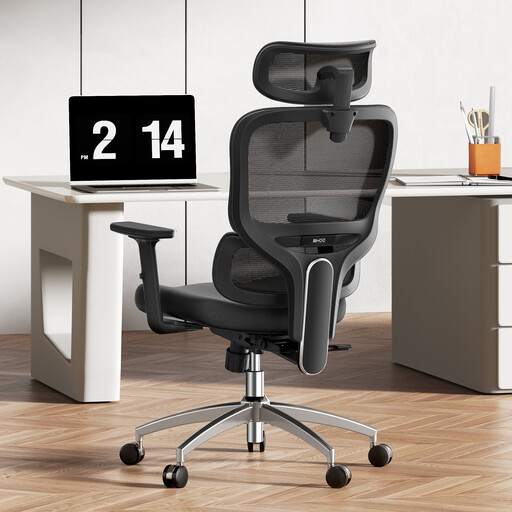
PROFILE: THE INTENSIVE REMOTE WORKER
Why we recommend it: Designed for office marathoners, this chair focuses on precision adjustments to ensure a healthy posture. Its breathable mesh back and full suite of adjustments (headrest, armrests, lumbar support) allow you to sculpt the seat to your body.
The Pitfall Avoided
Unlike gimmicky, fixed lumbar supports, its 3D dynamic system not only adjusts in height but also moves with your body. The result: constant, active support.
The Key Feature
Its winning combination: a truly dynamic lumbar support and an ultra-breathable mesh back. It's the logical choice for intensive use, especially if you're prone to overheating.
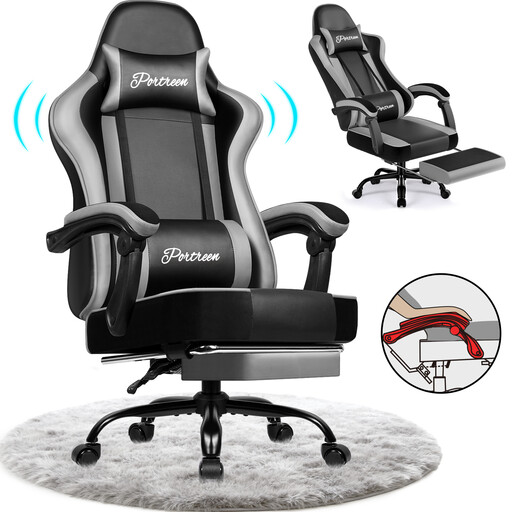
PROFILE: THE VERSATILE USER (OFFICE & GAMING)
Why we recommend it: The ideal companion for those who juggle between Excel spreadsheets and gaming sessions. Its wide recline range and retractable footrest let you switch from a focused work posture to total relaxation mode in an instant.
The Pitfall Avoided
It goes beyond the simple "gaming" look to offer true versatility. With its 170° recline and integrated footrest, it combines two products in one, saving you from investing in a separate recliner.
The Key Feature
Its incredible versatility! The combination of a near-flat recline and a footrest makes it a true Swiss Army knife for working, gaming... and even napping.
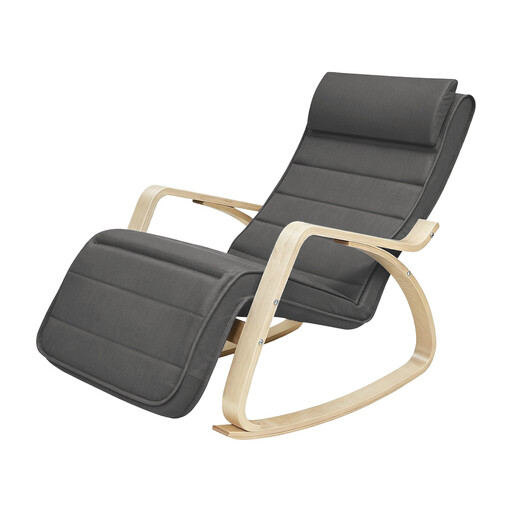
PROFILE: THE DESIGN & RELAXATION ENTHUSIAST
Why we recommend it: Ideal for creating a cosy reading nook in the living room or bedroom. Its Scandinavian design in birch wood adds a touch of elegance, while its adjustable footrest provides a level of comfort far beyond that of a simple decorative chair.
The Pitfall Avoided
It doesn't pretend to be something it's not. It's a pure relaxation chair (rocking chair) that embraces its function with real comfort features, like its 5-position adjustable footrest. Here, ergonomics serves relaxation, not work.
The Key Feature
The successful marriage of a clean Scandinavian design and customisable comfort, thanks to the adjustable footrest. Perfect for escaping with a good book.
Looking for other hidden gems?
We have curated a complete range of chairs for you that meet our selection criteria and safety standards.
Frequently Asked Questions (FAQ)
What is the lifespan of an ergonomic office chair?
It all depends on the build quality and your usage. An entry-level model will show its limits (sagging foam, creaking) within 1 to 2 years. Conversely, a quality chair with a metal base, dense foam, and a good mechanism can easily last you 5 to 10 years, or even longer with minimal maintenance.
Is a mesh chair better than a fabric or faux leather one?
Each upholstery has its pros and cons:
- Mesh: The champion of ventilation, ideal for those who get warm easily. However, pay attention to the quality of the mesh to ensure it doesn't stretch over time.
- Fabric: Warm and pleasant to the touch, it offers a wide choice of colours. Its weak point: it's more susceptible to stains.
- Faux Leather (PU): Unbeatable for maintenance (a simple wipe is enough) and for a professional look. On the downside, it's not very breathable, and low-end versions age poorly (cracking, peeling).
How do I properly adjust my office chair?
Here are the 3 basic adjustments to make for good posture:
- Seat Height: Your feet should rest flat on the floor, with your thighs horizontal (knees at a 90° angle).
- Seat Depth (if adjustable): Leave a gap of 2 to 3 fingers between the edge of the seat and the back of your knees.
- Lumbar Support: Position it in the small of your back. It should support your natural curve without forcing it or creating pressure points.