
Livraison le jour même ou le lendemain

Qualité garantie

Débloquez vos offres de bienvenue: Livraison GRATUITE | Jusqu'à -80 % | 30 jours d'essai gratuits à JoyPlus
Téléchargez l'application
Remote work, studying, gaming… we spend hours glued to our desks. The result? Discomfort and back pain have become a daily reality for many of us. The perfect solution seems obvious: an ergonomic office chair. But faced with a jungle of options and marketing promises, how do you sort through the noise?
As the Head of Product Recommendations at Joybuy, my mission is to help you find clarity. Let's skip the technical jargon and get straight to the point. Here are the pitfalls to avoid and the real criteria for making an informed choice.
The 3 pitfalls to avoid at all costs:
To avoid these traps, focus on a few non-negotiable technical features. These features, not the marketing spiel, are what guarantee a comfortable office chair for daily use.
This is THE key to preventing back pain. A fixed support is rarely effective because every spine is unique. Opt for an office chair with adjustable lumbar support, ideally in both height AND depth. This allows you to precisely fit the support to the curve of your lower back, promoting a healthy posture throughout the day.
A chair's adjustability defines its level of ergonomics. Here are the points to check:
The choice of material has a direct impact on comfort and maintenance.
Because every user is unique, here is our selection designed for different profiles, always based on our objective criteria.
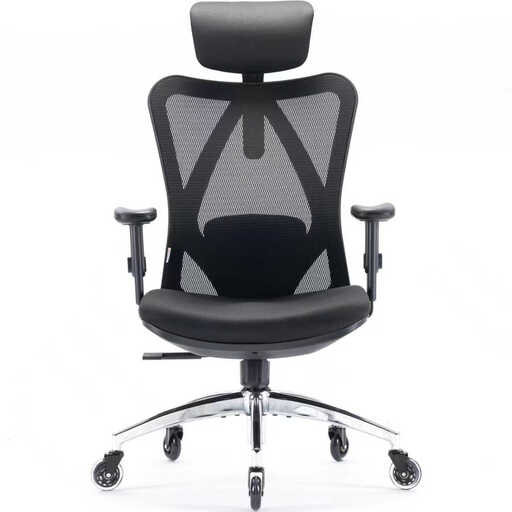
Why we recommend it: Built for long sessions, this chair offers ultra-comprehensive adjustments. Perfect as a primary remote work office chair, where postural support is non-negotiable.
It doesn't just slap on an "ergonomic" label: it proves it with five distinct adjustment zones, including an adjustable headrest, lumbar support, and armrests for a tailored body alignment.
Its breathable mesh back ensures excellent air circulation, a major plus for staying focused (and dry) for hours. Its BIFMA certification is a guarantee of durability.
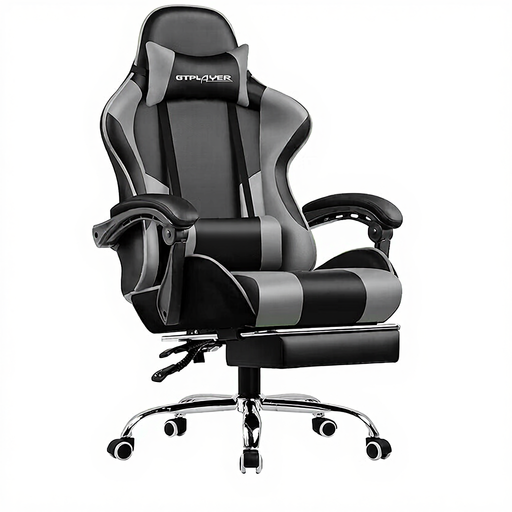
Why we recommend it: For those whose desk is both a workspace and a relaxation zone, this hybrid chair takes comfort to the next level. It merges the benefits of a gaming chair with those of a recliner.
Beyond its looks, it packs real comfort features: a 150° recline, a retractable footrest, and even a massaging lumbar cushion. A true value-add for unwinding.
The integrated footrest is a game-changer. It transforms this work chair into a true reclining office chair for breaks, a reading session, or a video game match.
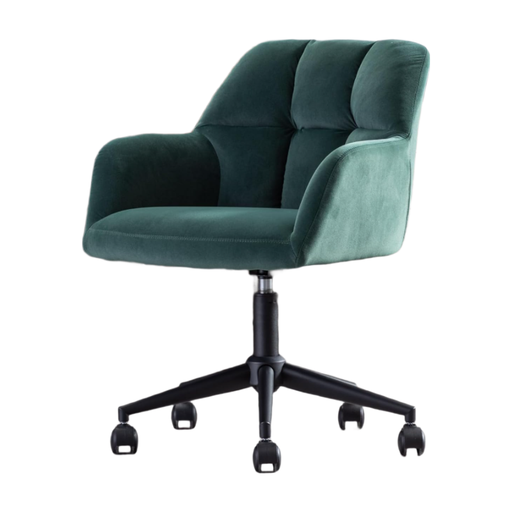
Why we recommend it: Ideal for a home office where style matters as much as comfort. It serves as a comfortable accent chair for moderate use, while also being a genuine decorative piece.
It doesn't pretend to be something it's not: a chair for 8 hours of intensive work. It embraces its status as a designer seat and provides the essentials (adjustable height, swivel function) for occasional use. No false promises.
Its velvet upholstery and refined design bring a touch of warmth and elegance that a technical chair can never offer.
Explore our complete selection of chairs that meet our quality criteria and current standards.
A good adjustment is simple and quick. Follow these steps:
It all depends on the build quality and your usage. An entry-level model will show its limits after 1 to 2 years. Conversely, a quality chair (metal frame, high-density foam, BIFMA certification testing for resistance and durability) can easily last you 5 to 10 years with proper care.
The choice depends on your priorities: