
Livraison le jour même ou le lendemain

Qualité garantie

Débloquez vos offres de bienvenue: Livraison GRATUITE | Jusqu'à -80 % | 30 jours d'essai gratuits à JoyPlus
Téléchargez l'application
Working from home, long gaming sessions, or study marathons: spending hours sitting down has become a part of our daily lives. The downside quickly becomes apparent: discomfort and back pain. An ergonomic office chair is no longer a luxury, but a crucial investment in your health. Yet, faced with a market saturated with marketing promises, it's easy to get lost.
Before you decide, let's break down the most common pitfalls that lead to buyer's remorse:
To avoid these pitfalls, you need to focus on objective technical specifications. They are the true guarantors of a chair's quality and adaptability.
Lumbar support is crucial for preventing back pain. It must follow the natural curve of your lower spine. There are two main types:
Adjustable armrests allow you to rest your arms at a 90-degree angle, relieving tension in your shoulders and neck. The adjustment levels are often designated by the terms 2D, 3D, or 4D:
For a work-from-home chair used daily, 3D or 4D adjustment offers invaluable flexibility to adapt to different tasks (typing, reading, resting).
The choice of material directly impacts comfort, durability, and maintenance:
Instead of an impersonal list, we have selected models for specific user profiles to help you find the one that meets your real needs.
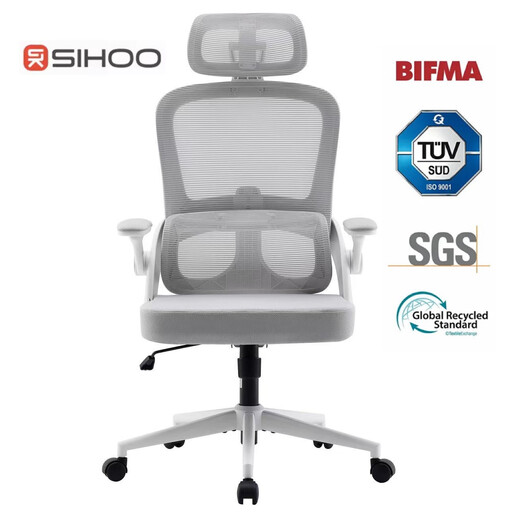
Why it's a match: Ideal for those who put in long hours of work. It offers an excellent balance between comprehensive adjustments and an understated design that fits easily into any home office.
This model doesn't just settle for the "ergonomic" label. It offers a height-adjustable lumbar support (6 cm) and 3D armrests, providing tangible and effective customisation.
Its comprehensive support system (head, back, lumbar, arms) and breathable mesh back make it a prime ally for intensive use.
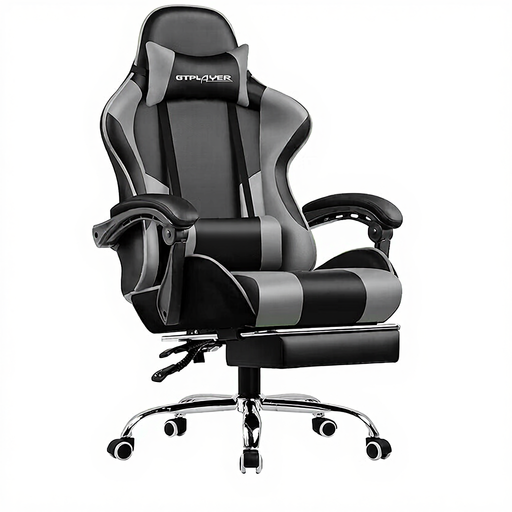
Why it's a match: Designed for gaming or work marathons, this chair focuses on enveloping comfort, with features designed for moments of relaxation.
It goes beyond a simple recline by offering a reclining chair with a footrest (up to 150°). This meets the need for complete relaxation, a feature often overlooked by more traditional office chairs.
The combination of the massaging lumbar cushion (USB-powered) and the retractable footrest provides ideal comfort for sessions that go on for hours.
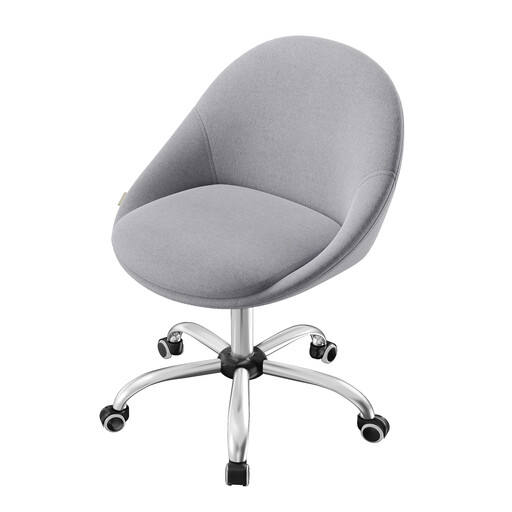
Why it's a match: Perfect for a secondary desk, a student's room, or a vanity area. The focus is on style, versatility, and a minimal footprint.
This model doesn't pretend to offer complex ergonomic adjustments. Its main advantage: an armless design, which allows it to be tucked completely under a desk for optimal space-saving.
Its compact design and heathered fabric upholstery allow it to blend into home decor, extending its use far beyond the office.
These recommendations are just a starting point. Other models might be a better fit for your needs.
A chair's longevity depends on the quality of its components and its maintenance. An entry-level model may show signs of wear (sagging foam, fragile mechanism) after a year or two. A well-made chair, with a steel frame, high-density foam, and certifications (like BIFMA), can last from 5 to 10 years, or even longer. Regular cleaning and periodically tightening the screws can extend its lifespan.
Proper adjustment is key to fully benefiting from its ergonomics. Here are the key steps:
Yes, a gaming chair can be an excellent option for work, as it is designed for optimal comfort over long periods. It often offers advanced adjustments, such as a deep recline and support cushions for the head and lumbar region. However, its aesthetic (bucket seat design, bright colours) can clash with some office environments. If you prioritise functionality, it's an excellent choice. If style is an important criterion, a more understated ergonomic office chair will likely be more suitable.