
Livraison le jour même ou le lendemain

Qualité garantie

Débloquez vos offres de bienvenue: Livraison GRATUITE | Jusqu'à -80 % | 30 jours d'essai gratuits à JoyPlus
Téléchargez l'application
By the Joybuy Product Recommendation Officer, July 18, 2026
Whether for remote work, studying, or gaming sessions, a significant part of our day is now spent sitting down. Prolonged poor posture is a gateway to strain, discomfort, and the dreaded back pain. Investing in a good office chair is therefore not a luxury, but a necessity for preserving your well-being and focus.
But with an overwhelming number of options, how do you find your way? This guide is designed to give you clear benchmarks and objective criteria, free from marketing jargon, to help you choose THE ergonomic office chair that's right for you.
Before diving into our selection, let's review the fundamental criteria for making an informed choice.
The lumbar support is arguably the most crucial element of an ergonomic chair. It must conform to the natural curve of your lower back (the lumbar hollow) to relieve pressure on your vertebrae.
Look for models with height and depth-adjustable lumbar support. This dual adjustment is essential for tailoring the support to your unique body shape. Be aware that poorly adjusted support can be worse than no support at all. Whether it's a removable cushion or an integrated mechanism, the key is customisation.
Far from being a gimmick, adjustable armrests are essential for preventing strain in the shoulders, neck, and wrists. The ideal setup? Your forearms resting flat, forming a 90-degree angle with your upper arms as you type.
There are several levels of adjustment:
4D armrests offer maximum flexibility: you can position them perfectly for work, but also move them aside or lower them for greater freedom of movement.
The choice of upholstery directly impacts comfort, especially during long work sessions.
The final choice will depend on your preferences, as well as the temperature of your room.
Let's move on to our selection of chairs that stand out for their ergonomics and value in 2026.

Standout Feature: This model is the perfect example of a balance between essential features and an accessible price point. It combines a breathable mesh back with a full suite of adjustments, including an adjustable headrest and lumbar support.
Highlights:
Who is it for? The smart choice for remote work professionals or office employees looking for a complete and reliable ergonomic solution for daily, or even intensive, use.
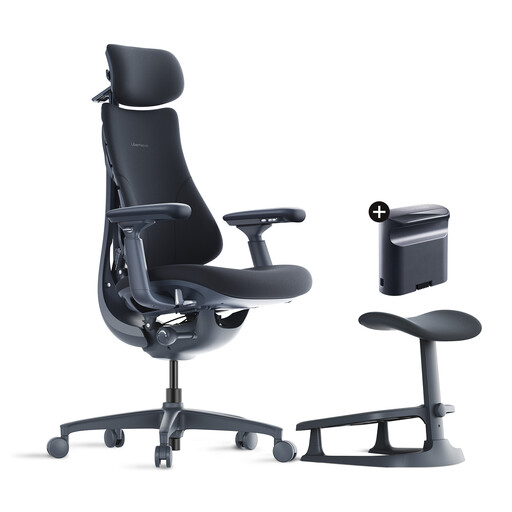
Standout Feature: This chair takes the concept of versatility to the next level. With its retractable footrest and generous recline, it transforms into a true relaxation haven in an instant.
Highlights:
Who is it for? For those who work long days and want to be able to take real, relaxing breaks without leaving their desk.
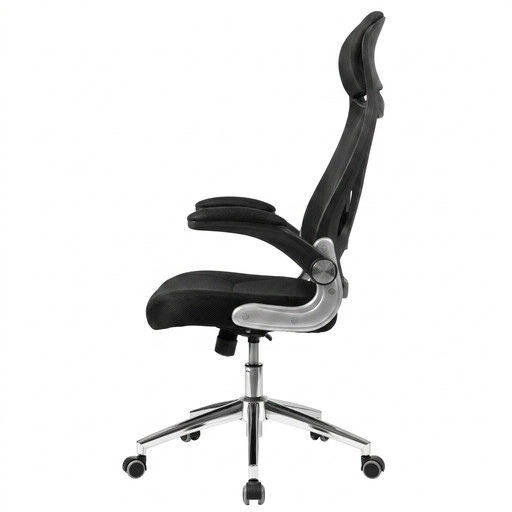
Standout Feature: Its key advantage: foldable armrests. A simple and ingenious solution for optimising space in a studio, small office, or student dorm.
Highlights:
Who is it for? The ideal solution for students, small apartments, or anyone with a limited workspace looking for a practical, space-saving chair.
Our selection highlights versatile and effective black models. But style is also a matter of personal taste. To explore other colours, materials, and designs, and to find the chair that will blend seamlessly into your decor, feel free to browse our complete collection.
? Discover more options in our Black Tables and Chairs collection
A standard office chair often only offers a basic adjustment: seat height. An ergonomic chair, in contrast, is designed to adapt to the user's body. It offers a multitude of adjustments (seat height and depth, armrests, lumbar support, recline...) to promote a healthy posture and limit the physical strains of prolonged sitting.
Let's be clear: an ergonomic office chair is not a substitute for medical advice. However, by providing proper support (especially for the lumbar region) and encouraging better posture, it actively helps reduce muscle tension and pressure on the spine, which are often responsible for back pain related to office work.
A short adjustment period is often necessary. If your old chair was poorly suited, it might take your body a few days to a week to get used to this new, healthier posture. Take the time to explore all the settings to adjust them to your body. Don't hesitate to fine-tune these adjustments over the first few days until you find the perfect configuration.