
Livraison le jour même ou le lendemain

Qualité garantie

Débloquez vos offres de bienvenue: Livraison GRATUITE | Jusqu'à -80 % | 30 jours d'essai gratuits à JoyPlus
Téléchargez l'application
Back pain is an all-too-common companion for those who spend their days sitting, whether in the office or at home. An ergonomic office chair is therefore not a luxury, but an essential investment in your health and productivity. But with an overwhelming number of options on the market, how do you choose the right one? This guide is here to break down the essential features and present our selection of top-rated models.
To ensure you make the right choice, let's review the key features that make all the difference and will help you find the ideal work-from-home chair.
A good ergonomic office chair must first and foremost contour to and support the natural curve of your spine. Effective, adjustable lumbar support is therefore essential. Look for an office chair with lumbar support that is adjustable in height and, ideally, in depth. This tailored fit is crucial for reducing pressure on the lower back and preventing pain after long hours of work.
The principle of ergonomics is simple: the chair should adapt to you, not the other way around. Therefore, check for the following customisation options:
Materials are not just about aesthetics; they determine your daily comfort and the lifespan of your chair. A breathable mesh office chair is particularly popular. Highly breathable, it promotes air circulation and prevents overheating—a real plus in the summer. For the seat, choose high-density foam, which ensures long-term comfort and resists sagging. Finally, a robust metal base and a certified gas lift are indispensable for safety and stability.
To guide you, we have scrutinised several models based on their adjustability, support, and material quality.
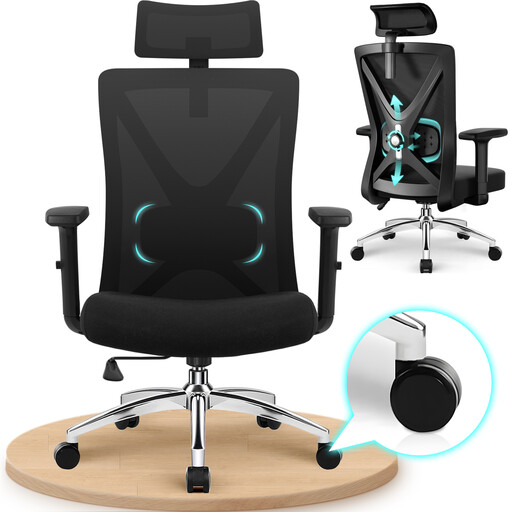
What sets it apart: This GTIMEX model is all about personalised support. Its S-shaped backrest contours to the spine, while its lumbar support offers fine-tuned adjustment in height (6?cm) and depth (3?cm). The seat, made of 8?cm thick foam, is designed for long-lasting comfort. The entire chair is built on a robust frame that supports up to 150?kg.
Pros:
Who is it for? For those seeking precise lumbar adjustment and a sturdy chair, while also benefiting from good ventilation for long remote workdays.

What sets it apart: The Ochama chair focuses on convenience with its flip-up armrests. When raised, they allow the chair to slide under the desk for instant space-saving. Its 53?cm wide seat and 8?cm foam cushion ensure good comfort, while the mesh back provides optimal ventilation.
Pros:
Who is it for? Ideal for small spaces (studios, bedrooms, etc.) where every square inch counts, without sacrificing ergonomic fundamentals.
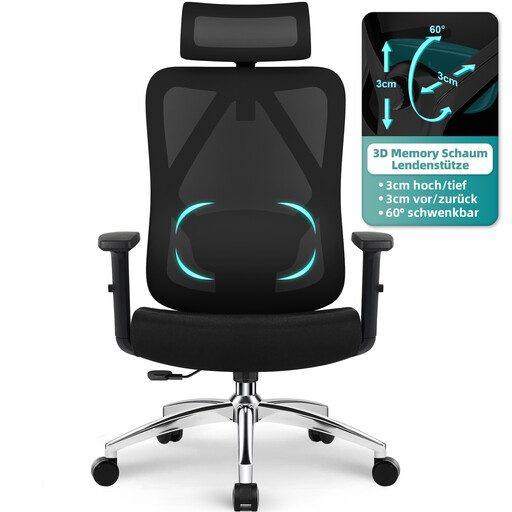
What sets it apart: This second GTIMEX model is a step up, featuring a 3D lumbar support made of memory foam. Adjustable in height, depth, and even rotation (60°), it provides dynamic support that follows your movements. Its impressive weight capacity (200?kg) and a backrest that locks at three angles (90°, 115°, 135°) make it equally suited for focused work and relaxation.
Pros:
Who is it for? For highly demanding users, those who spend long hours in front of a screen, or anyone looking for a definitive solution to back pain. A powerhouse of adjustability, robustness, and support.
Our selection highlights highly versatile models, but choosing a chair remains a deeply personal decision. To explore other options, including chairs with specific cushions or different features, feel free to browse our complete catalogue.
Discover our collection of ergonomic office chairs with cushions
A standard chair often offers only minimal features, such as seat height adjustment. An ergonomic office chair, on the other hand, is designed to keep you in a healthy posture through a multitude of adjustments: lumbar support, armrests, seat depth, recline, headrest, and more. Its goal is to adapt to your body to reduce fatigue and prevent musculoskeletal disorders (MSDs).
Expect an adjustment period of a few days to a week. If your old chair was poorly suited for you, your body has likely developed bad posture habits. Sitting up straight might feel strange at first, but this new posture will quickly become natural and much more comfortable as your muscles readjust.
Here is a simple 4-step method for the perfect setup: