
Livraison le jour même ou le lendemain

Qualité garantie

Débloquez vos offres de bienvenue: Livraison GRATUITE | Jusqu'à -80 % | 30 jours d'essai gratuits à JoyPlus
Téléchargez l'application
Whether you work from home or in the office, spending hours glued to a chair has become the norm. Yet, choosing a suitable ergonomic office chair often feels like an uphill battle. Faced with a jungle of models and marketing claims, it's easy to get lost and end up with buyer's remorse. As the expert for the Home & Tech section, my mission is to help you cut through the noise and make the right choice, far from the siren song of marketing.
But before we get to our top picks, let's review the common pitfalls that can turn an investment in your back's health into a real headache.
To avoid falling into the trap, focus on objective features. Here are the three non-negotiable points to verify before you pull out your credit card.
Good lumbar support is the cornerstone of a chair that truly takes care of your back. A simple fixed bulge in the lower backrest is insufficient, as every body is unique.
Insist on adjustable lumbar support—in height and, ideally, in depth. This allows you to precisely position the support to match the natural curve of your spine. Well-positioned support helps maintain a healthy posture and reduces the tension that builds up during long workdays.
A worthy adjustable office chair must offer much more than just seat height adjustment. The mechanisms that control the movement of the backrest and seat are at the heart of the matter.
The seat is your main point of contact. Low-density foam will sag in record time, taking comfort down with it. Opt for high-density or cold-cured moulded foam, which provides much better long-term support.
For the backrest, a mesh covering promotes air circulation, a major advantage for staying comfortable, especially in the summer. Make sure it is high-quality mesh, sufficiently taut and durable to avoid deforming under your weight over time.
With these criteria in mind, here is a selection of models that check all the boxes, for different profiles and budgets.
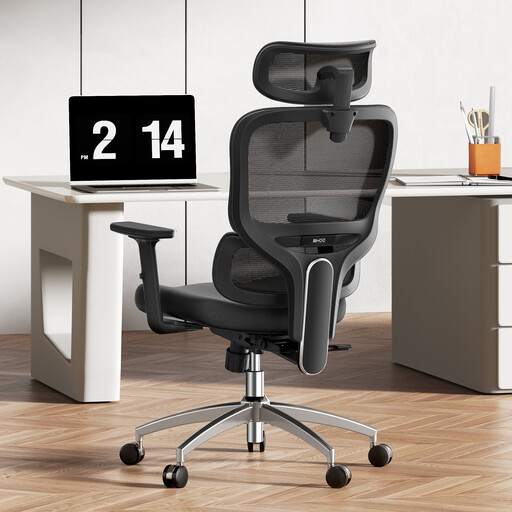
Why we chose it: Ideal for those who put in 8+ hour days. It focuses entirely on active support and precise adjustments to maintain comfort and focus.
It doesn't settle for a simple curve. Its "3D dynamic" lumbar support promises a precise adjustment that adapts to the user's movements, going far beyond basic static support.
The dynamic lumbar support and polyurethane adjustable armrests offer tailored support for long work sessions, a feature often reserved for much pricier models.
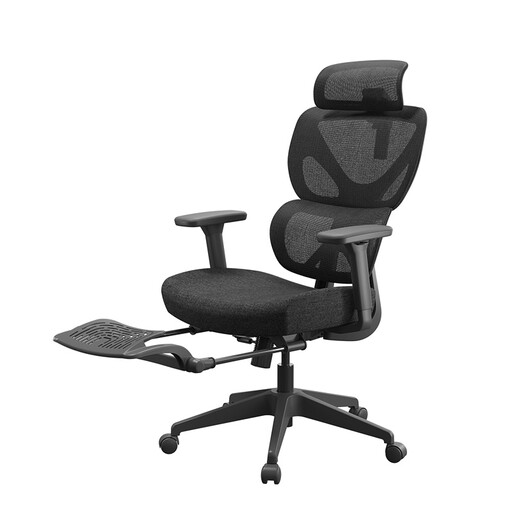
Why we chose it: Perfect for those who like to take proper breaks without leaving their desk. The footrest and deep recline make it a versatile choice, equally suited for work and relaxation.
The footrest isn't just a gimmick. It's part of a complete system (deep recline, lumbar support, headrest) for a total relaxation experience, not just an accessory.
The combination of an office chair with a footrest and a generous recline allows you to switch from an active work posture to a fully relaxed position in the blink of an eye.
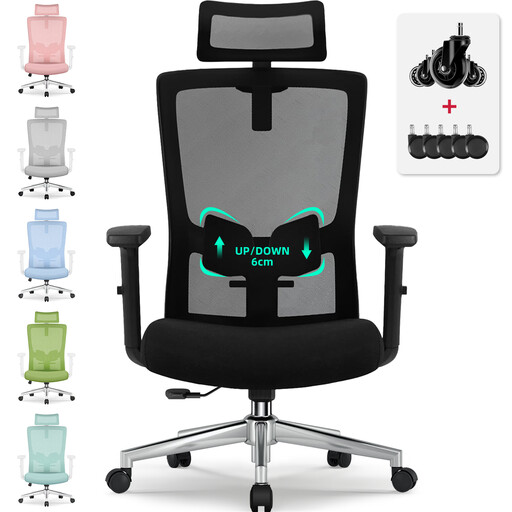
Why we chose it: An excellent starting point for students or a first home office. It checks all the essential ergonomic boxes without breaking the bank.
It doesn't just rely on the "ergonomic" label. It offers concrete, verifiable adjustments: 6 cm of lumbar support travel, up to a 135° recline, and an adjustable headrest. The manufacturer even mentions BIFMA and SGS certifications—true marks of reliability.
It offers a complete set of adjustments (lumbar, recline, headrest), making it a very serious contender for a first remote work ergonomic chair.
We have curated a complete selection of chairs that meet our specifications and safety standards.
The lifespan heavily depends on the quality of the materials and the intensity of use. An entry-level model might fail after 1 to 2 years (sagging foam, fragile mechanism). A mid-range or high-end ergonomic office chair, with a robust frame and quality materials, will easily last between 5 and 10 years, or even longer.
It's an excellent choice if you juggle work and relaxation. It helps relieve pressure on your legs and allows you to adopt a nearly reclining rest position during breaks. For purely office use in an upright posture, it's not essential, but it remains an undeniable comfort asset for those who appreciate being able to radically change their position throughout the day.