
Livraison le jour même ou le lendemain

Qualité garantie

Débloquez vos offres de bienvenue: Livraison GRATUITE | Jusqu'à -80 % | 30 jours d'essai gratuits à JoyPlus
Téléchargez l'application
Whether you work from home or in the office, the reality is the same: spending hours glued to your chair can quickly become a nightmare. Poor posture opens the door to back, shoulder, and neck pain. Investing in an ergonomic office chair isn't a luxury—it's a necessity for maintaining your well-being and productivity.
This guide is designed to give you clear, practical advice for choosing the perfect chair for your body type and work habits. We'll break down the essential features, without the marketing jargon, to help you make a truly informed decision.
With a jungle of available models, it can be tough to know where to start. To guide you, here are three fundamental criteria for finding a comfortable office chair that's built to last.
An ergonomic seat should adapt to you, not the other way around. The key to good posture lies in a fully adjustable office chair. Make sure it includes the following adjustments?:
To combat back pain, proper support is essential. An excellent office chair with lumbar support follows the natural curve of your spine. This support can be fixed or, preferably, adjustable in height and depth for a custom fit.
If you're prone to neck strain, an ergonomic chair with an adjustable headrest is a game-changer, especially during breaks or moments of reflection.
The choice of materials is crucial not only for comfort but also for the lifespan of your chair.
To put theory into practice, here is our selection of models that excel in comfort and adjustability, perfect for intensive use, especially as a work-from-home office chair.

Key Features?: This model is all about customisation. With its reclining backrest, soft lumbar cushion, and multiple adjustment points (seat, headrest, armrests), it's designed to adapt to different body types and situations, from intense work sessions to relaxing breaks.
Highlights?:
Who is it for? For professionals and students who spend long hours in front of their screens and need an ultra-versatile chair to effortlessly maintain good posture.
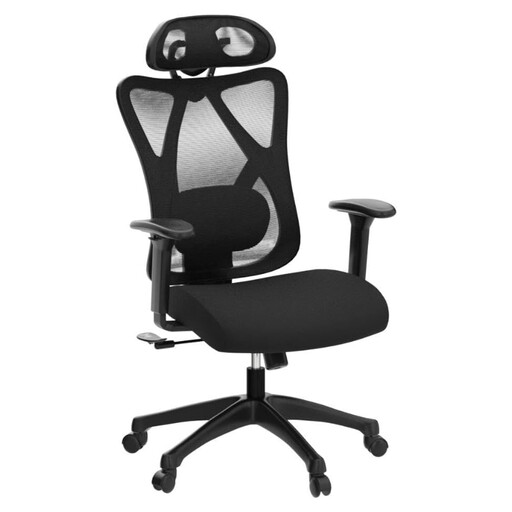
Key Features?: This chair combines a robust steel frame with high-precision adjustments. Its 3D adjustable lumbar cushion is a major plus for relieving lower back pressure, while its solid base and gas lift ensure excellent durability.
Highlights?:
Who is it for? For those seeking a heavy-duty, comfortable office chair with first-class back support for intensive daily use.
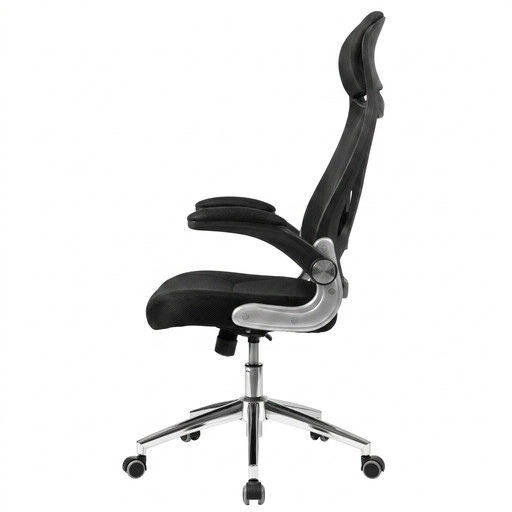
Key Features?: This model is the clever solution for small spaces. Its flip-up armrests allow you to slide it under your desk in a flash to free up space. Comfort isn't compromised, thanks to a rocking function and generous padding.
Highlights?:
Who is it for? Perfect for working from home in a limited space or for a student's room. It's aimed at those who want a functional and compact chair without compromising on comfort.
Our selection is just a preview. Because every office is unique and so are your needs, feel free to explore our full catalogue to find the perfect fit.
Discover our complete collection of office furniture
A standard office chair only covers the basics?: adjustable height and casters. An ergonomic office chair, on the other hand, goes much further. It offers a full suite of adjustments (lumbar support, 3D/4D armrests, seat depth, synchronized tilt...) designed to conform to your body, encourage good posture, and reduce the fatigue and pain associated with long hours of sitting.
Allow a few days, or even a week, to get accustomed to it. An ergonomic chair is designed to correct your posture, which might surprise your muscles at first! Take the time to fine-tune each setting so it's perfectly adapted to your body. This is the key to enjoying all its benefits.
Follow these 4 simple steps?: