
Livraison le jour même ou le lendemain

Qualité garantie

Débloquez vos offres de bienvenue: Livraison GRATUITE | Jusqu'à -80 % | 30 jours d'essai gratuits à JoyPlus
Téléchargez l'application
Spending hours glued to a desk, whether working from home or in the office, has become our daily reality. Yet, comfort often remains an afterthought. A poor chair doesn't just tank productivity?: it can also lead to chronic pain. The ergonomic office chair market is vast, but it's riddled with pitfalls that can turn an investment in your well-being into a major disappointment.
My role, as Head of Product Selection at Joybuy, is to help you see things more clearly. Let's break down the mistakes to avoid and the essential criteria for making an informed purchase.
Before we even talk specs, it's crucial to sidestep the false promises and hidden flaws that can cost you dearly.
To avoid making a mistake, rely on objective features. Here are the three pillars of an excellent swivel office chair.
A good chair must adapt to you, period. Prioritise the following adjustments?:
Robustness is crucial for safety and durability.
The upholstery and padding are what guarantee your daily comfort.
To help you get a clearer picture, here's how these criteria translate into practice with a few models suited for different user profiles.
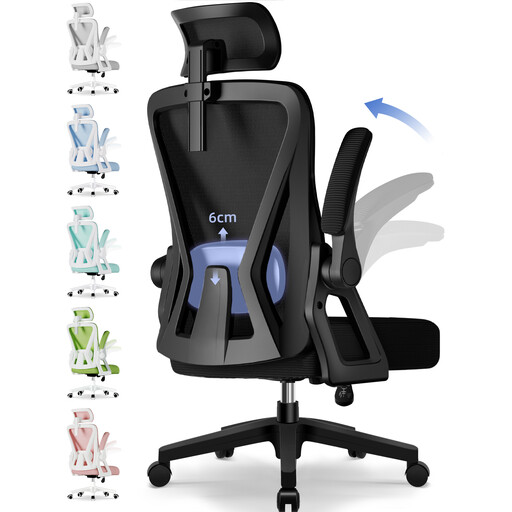
Its Profile : Perfect for professionals who work from home or students who put in long hours at their desk. This chair offers a full suite of adjustments for tailored support, from morning to night.
It avoids the "fake ergonomic" pitfall with concrete, measurable adjustments : adjustable lumbar support with 6 cm of travel, an adjustable headrest, and a recline function up to 135°.
Its high-elasticity nylon mesh back ensures excellent breathability, while the seat features high-density foam. Its 150 kg maximum load and robust base make it a safe investment.
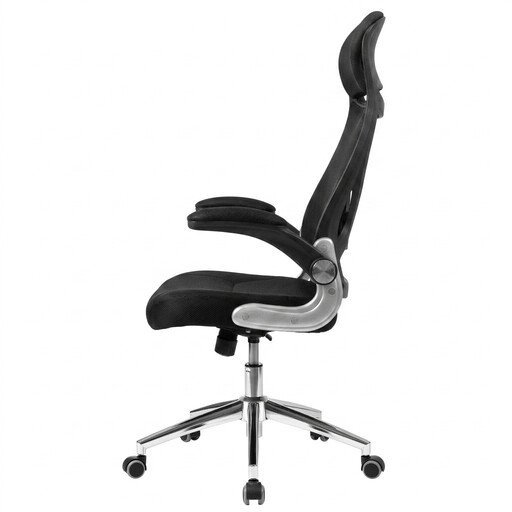
Its Profile : The perfect solution for small spaces. Its flip-up armrests allow the chair to slide completely under the desk, freeing up valuable floor space.
It doesn't sacrifice essentials for the sake of saving space. It retains good lumbar support, a tilt function, and a comfortable seat, avoiding the pitfall of a compact but uncomfortable chair.
The flip-up armrests are its key feature for easy storage. The dense foam padding and 150 kg maximum load capacity guarantee comfort and safety.
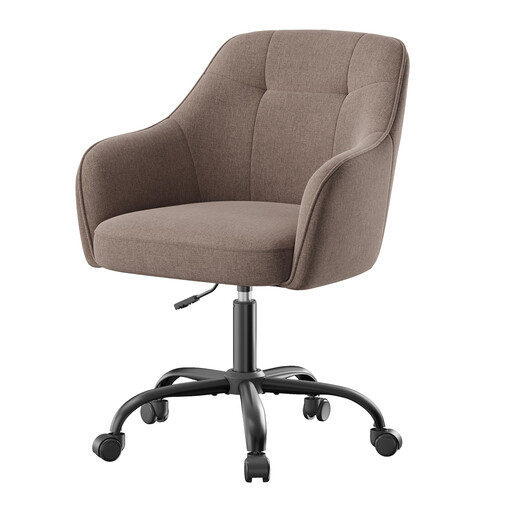
Its Profile : Perfect for a secondary office, a student's room, or a workspace where design matters. Its modern look and soft upholstery blend beautifully into a curated interior, ideal for a few hours of use per day.
This model is honest : it's not built for heavy use. It avoids the trap of overpromising by focusing on comfort for short sessions and an elegant design, while still providing basic adjustments.
Its modern design with an integrated back and armrests. The cotton-linen blend fabric offers a soft and pleasant feel. Bonus : assembly is a breeze.
We have curated a complete selection of chairs that meet our selection criteria and current safety standards.
Longevity depends on the quality of materials, frequency of use, and maintenance. An entry-level model will show its limits after 1 or 2 years. Conversely, a high-quality chair (steel frame, high-density foam) can easily last 5 to 10 years. A good indicator?? The length of the manufacturer's warranty.
Not necessarily. A headrest is most useful if you like to recline your backrest to relax or think. It provides excellent neck support in that case. If you primarily work in an upright position facing your screen, its utility is more debatable.
A proper adjustment takes just a few minutes. Follow these 4 key steps?: