
Livraison le jour même ou le lendemain

Qualité garantie

Débloquez vos offres de bienvenue: Livraison GRATUITE | Jusqu'à -80 % | 30 jours d'essai gratuits à JoyPlus
Téléchargez l'application
Whether you're working from home, in the office, or pulling long study sessions, spending hours sitting down puts a major strain on our backs. And the culprit is often easy to spot: an unsuitable office chair. The problem is, the market is flooded with models claiming to be "ergonomic," making the choice incredibly difficult. To avoid regretting your investment after just a few months, it's crucial to sidestep the most common pitfalls.
We'll explain how to sort through the options and make an informed choice.
A flashy design or a rock-bottom price often hides deal-breaking flaws. Here are the three traps to avoid at all costs:
To ensure you make the right choice and guarantee long-term comfort and a healthy posture, focus on these essential technical criteria.
A good office chair for remote work is one that adapts to you, not the other way around. Make sure it includes the following adjustments:
The lifespan of your chair will depend directly on the materials used.
Because every user is unique, here is our selection of recommended models for different profiles to help you find the perfect fit.
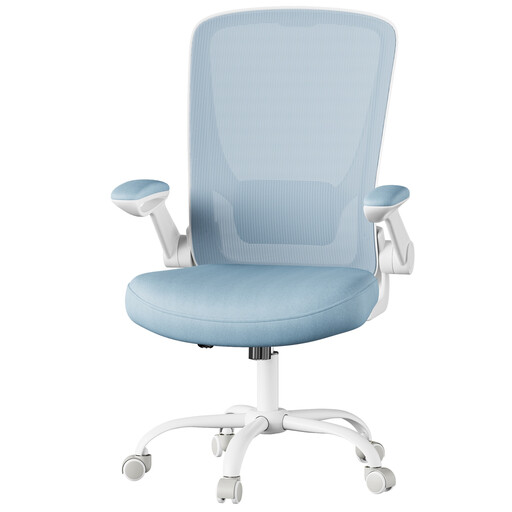
The verdict: Perfect for setting up a first home office or for a student. This model gets the essentials right by offering indispensable ergonomic adjustments, all in a compact footprint ideal for small spaces.
This chair doesn't just settle for the "ergonomic" label: it includes real height-adjustable lumbar support and flip-up armrests—truly functional features.
Its flip-up armrests allow you to slide the chair under any desk. A valuable space-saver for everyday use.
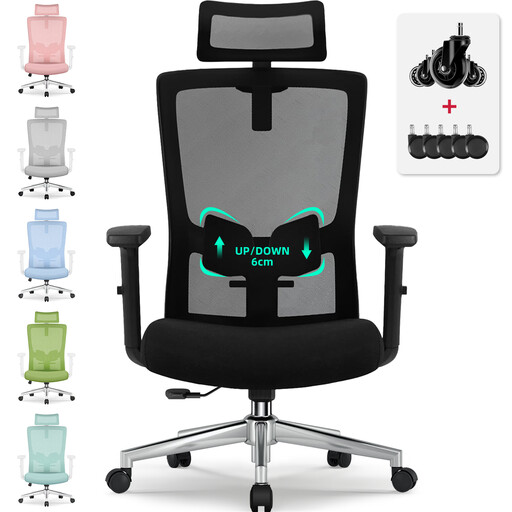
The verdict: Designed for those who spend more than 8 hours a day in front of a screen. It deploys the full arsenal of adjustments (headrest, lumbar, tilt) for tailored support and rock-solid durability.
Here, quality isn't just a talking point: BIFMA and SGS certifications for the gas lift and base guarantee proven strength and safety for intensive use.
Its S-shaped backrest, lumbar support adjustable by 6 cm, and adjustable headrest provide full spinal support, from the cervical area down to the lumbar region.
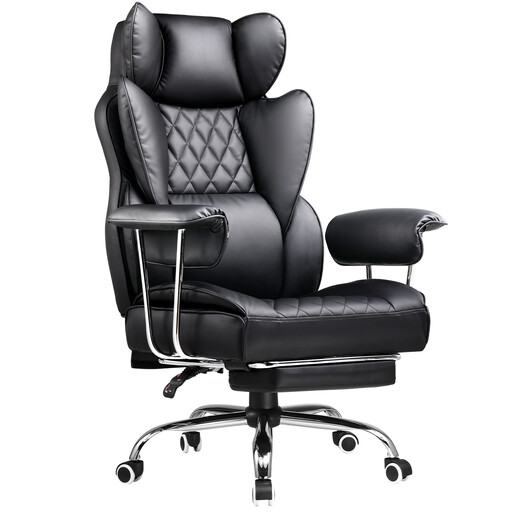
The verdict: The ideal companion for those whose desk is used for both work and entertainment. Its generous recline and integrated footrest make it a true chameleon, switching from focus to relaxation mode in an instant.
Far from gaming chairs with aggressive designs but spartan comfort, this model combines its look with genuinely useful features: a high back, lumbar support, and a retractable footrest.
The footrest and extra-deep recline combo allows you to switch from an upright work posture to a nearly flat napping mode. Maximum versatility.
A good chair is the foundation. But for a truly ergonomic and harmonious workstation, the desk is just as crucial.
Discover our selection of desks, chosen for their quality and functionality, which will form the perfect pair with your new chair.
For an optimal setup, follow these steps:
It all depends on the quality of the materials and the intensity of use. An entry-level model will hardly last more than 2 or 3 years. In contrast, a high-quality chair (steel frame, high-density foam) can last for 7 to 10 years, or even longer. A good indicator is the length of the warranty offered by the manufacturer, which reflects their confidence in the product's longevity.
Mesh upholstery has one key advantage: its breathability. It ensures excellent air circulation, which is a real blessing in the summer or in a poorly ventilated room. However, be aware that the mesh must be high-quality and well-tensioned to provide firm, lasting support. Some users may prefer the comfort of a dense foam seat, which distributes pressure more evenly over time. Ultimately, the choice will depend on your personal preference and environment.