
Livraison le jour même ou le lendemain

Qualité garantie

Débloquez vos offres de bienvenue: Livraison GRATUITE | Jusqu'à -80 % | 30 jours d'essai gratuits à JoyPlus
Téléchargez l'application
Whether you're working from home, at the office, or in the middle of a gaming session, spending hours glued to a desk has become a daily reality. Prolonged poor posture is a recipe for back pain, neck tension, and plummeting productivity. Far from being a luxury, a well-chosen ergonomic office chair is a true investment in your health and daily comfort.
This guide is here to help you navigate the jungle of available models and find THE perfect comfortable office seat for you, without drowning you in marketing jargon.
Before diving into our selection, let's review the essential criteria for making the right choice.
An ergonomic chair should adapt to your body, not the other way around. Look for the following adjustments:
A chair's durability and comfort largely depend on its design and materials.
Your intended use will determine the best type of chair. A classic office chair is optimised for an upright, dynamic work posture. A gaming chair offers a more enveloping bucket-seat design and features dedicated to relaxation, like an integrated chair with a footrest. Finally, a plusher recliner chair will be purely focused on relaxation.
Let's move on to our selection of models that caught our eye for their design and features, tailored for different user profiles.
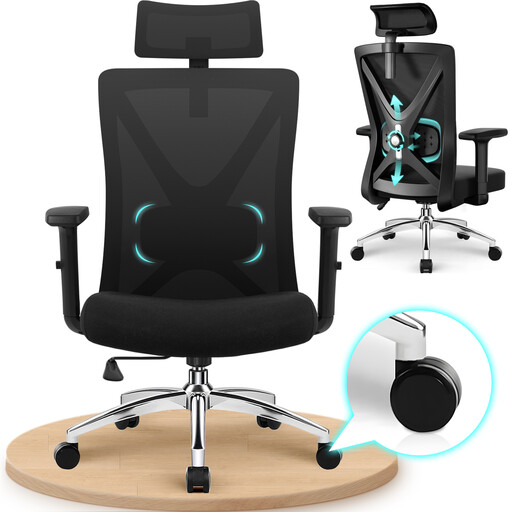
Why this model stands out
This chair gets straight to the point, focusing on the fundamentals of ergonomics for intensive office use. Its high-density mesh back ensures excellent ventilation, while its S-shaped design follows the natural curve of the spine. Its real standout feature: an adjustable lumbar support that moves both vertically (6 cm) and horizontally (3 cm), a level of customisation rarely seen at this price point.
Key Features
Who is it for?
For professionals working from home or in the office who spend more than 6 hours a day seated and are looking for a breathable, highly customisable chair to say goodbye to back pain.
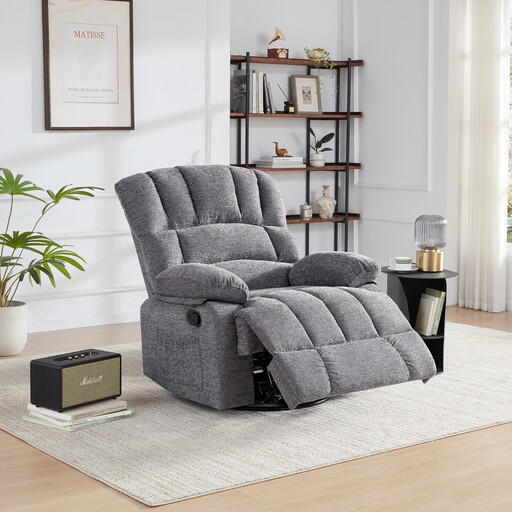
Why this model stands out
Here we leave the world of pure office work for a model entirely dedicated to comfort and relaxation. This generously sized recliner chair is a true invitation to unwind. Its dual function, with 360° swivel and 30° rocking capabilities, makes it a versatile companion for the living room or a reading nook.
Key Features
Who is it for?
For those looking for a relaxation chair for their living room, perfect for reading, watching a movie, or taking a nap. While less suited for intensive office work, it's unbeatable when it comes to pure comfort.
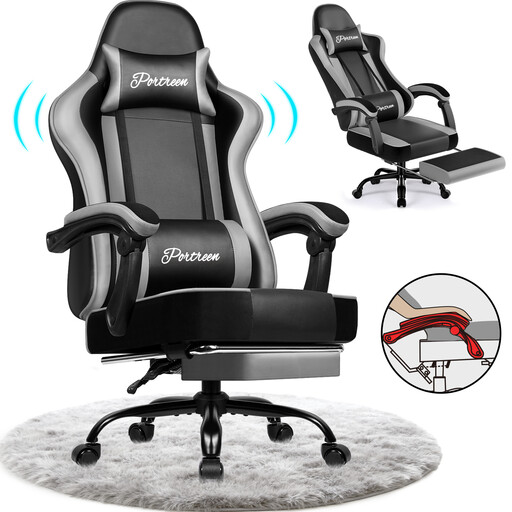
Why this model stands out
This gaming chair combines a bold look with versatile ergonomics. Its key feature: a record-breaking recline (from 90° to 170°) paired with a telescopic footrest. This allows you to switch from an upright work posture to a near-horizontal nap mode. The faux leather upholstery is advertised as being water-resistant and... scratch-resistant to cats. A detail that matters!
Key Features
Who is it for?
For gamers and remote workers who love bold designs and want the ability to switch into total relaxation mode between work or gaming sessions.
Weren't convinced by the models in our selection? Or perhaps you're looking for a very specific grey airflow recliner chair to combine style with breathable comfort? We invite you to explore an even wider range.
Discover our full collection of office chairs and recliners here
The classic ergonomic office chair focuses on an understated aesthetic and an optimal working posture. The gaming chair, on the other hand, adopts a sportier design (bucket-seat style), with a higher backrest to support the neck and shoulders, and comfort options designed for long gaming sessions (extreme recline, footrests, etc.).
Sit all the way back in the chair, with your back firmly against the backrest. Adjust the height of the adjustable lumbar support so that it nestles into the small of your back (just above your beltline). It shouldn't push you forward or leave a gap. The support should be firm but never uncomfortable.
If you're used to a poor-quality chair, your body will need an adjustment period, which can range from a few days to a week. A good ergonomic chair forces you into a correct posture, which can engage muscles that aren't used to being worked. Take it slow and spend time fine-tuning each setting to fit your body.