
Livraison le jour même ou le lendemain

Qualité garantie

Débloquez vos offres de bienvenue: Livraison GRATUITE | Jusqu'à -80 % | 30 jours d'essai gratuits à JoyPlus
Téléchargez l'application
By the Joybuy Team, Your Product Experts
Working from home, long gaming sessions, or intense study marathons? The result is the same: spending hours sitting down puts a major strain on your back, neck, and shoulders. An ergonomic office chair isn't a luxury—it's an essential investment in your daily comfort and focus.
But with an overwhelming number of options, it's hard to know where to start. This guide is here to help you make sense of it all by breaking down the key criteria and showcasing a selection of models for every need and budget. Our goal: to give you everything you need to make the right choice.
Before you start shopping, it's crucial to understand the features that truly make a difference. Here are the key points to check to find the chair that's right for you.
A good adjustable office chair should adapt perfectly to your body shape. The must-have adjustments are:
An ergonomic chair with lumbar support is designed to hug the natural curve of your lower back. This support helps you maintain a healthy posture and prevent the aches that come from hours of work. Some models offer adjustable lumbar support (height or depth) for an even more precise fit.
The choice of materials directly impacts both comfort and durability. A mesh back is a champion of breathability—an undeniable asset during long workdays or summer months. The seat, meanwhile, should feature high-density foam to ensure lasting comfort that won't sag over time.
Far from the austere models of the past, today's designer office chair stylishly complements your home decor. Manufacturers offer sleek lines and a variety of colours that blend functionality with aesthetics.
To guide you, we've selected three models that stand out for their performance and value.
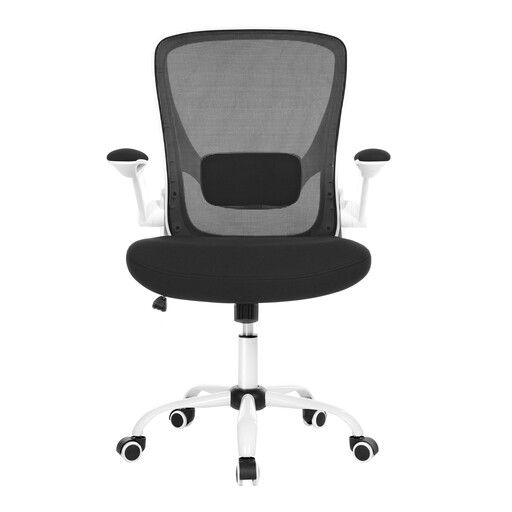
Why this model stands out: This is the perfect option for those seeking essential ergonomics in a compact design. Its flip-up armrests make it an excellent solution for small spaces, like a student's room or a home office nook in the living room.
Key Features:
Who is it for? Ideal for students, remote workers with limited space, or as a first ergonomic chair that is both functional and affordable.
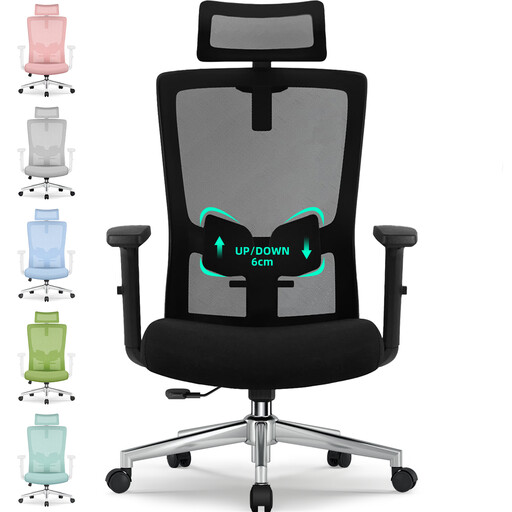
Why this model stands out: This chair takes things to the next level with advanced adjustments for the headrest, lumbar support, and recline. It's designed for those who spend very long days at their desk and require maximum support. The BIFMA and SGS safety certifications are a true mark of reliability.
Key Features:
Who is it for? Professionals and heavy users (including casual gamers) looking for a highly adjustable ergonomic office chair for tailored comfort, even after many hours.
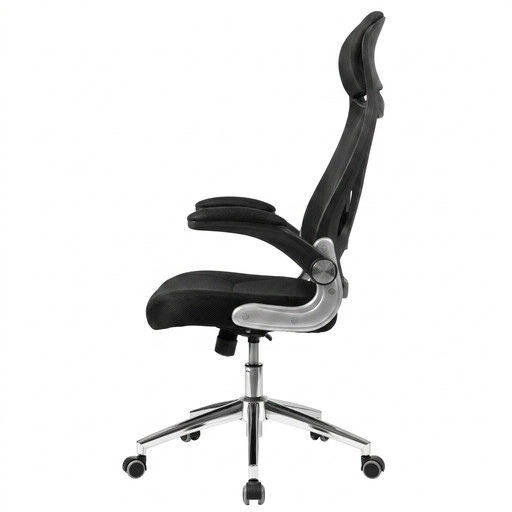
Why this model stands out: This office chair offers the best of both worlds: the plush comfort of an executive seat, with its integrated headrest and generous padding, and the practicality of flip-up armrests. It's an excellent compromise between comfort, functionality, and versatility.
Key Features:
Who is it for? This versatile model is suitable for both a home office and a professional environment, for users who appreciate the comfort of an executive chair without sacrificing flexibility.
Our selection is just a preview. To discover more models, designs, and features, explore our full catalogue!
? Discover our complete collection of swivel office chairs
A standard office chair simply provides a place to sit, whereas an ergonomic office chair is designed to actively support your body. It has multiple adjustments (height, armrests, lumbar support, tilt) to adapt to your body shape, reduce pressure points, and encourage a healthy posture.
An adjustment period of a few days to a week is completely normal. If you were previously using a non-supportive chair, your body may need time to readjust to a correct posture. Take the time to fine-tune all the settings to find the configuration that works best for you.
Here is a simple 3-step method: