
Livraison le jour même ou le lendemain

Qualité garantie

Débloquez vos offres de bienvenue: Livraison GRATUITE | Jusqu'à -80 % | 30 jours d'essai gratuits à JoyPlus
Téléchargez l'application
Spending hours at your desk, whether working remotely or in the office, should never be synonymous with pain. Yet, poor posture is the number one cause of tension that builds up in the back, neck, and shoulders. Investing in an ergonomic office chair is therefore essential to protect your well-being and concentration.
The only problem: the market is saturated with confusing marketing promises. As a Product Specialist at Joybuy, my mission is to help you cut through the noise. Let's scrutinise the most common pitfalls and the criteria that truly make a difference.
Before we break down the technical specifications, let's review the design flaws that can turn a good chair into an instrument of torture after just a few months.
To avoid these traps, focus on the few technical features that really make a difference.
The number one criterion for an office chair with lumbar support is the quality of its adjustment. Prioritise models where the support can slide vertically to perfectly match the curve of your spine. The best ergonomic chairs go even further by offering depth adjustment for more or less pronounced support. This is the detail that makes all the difference in preventing lower back pain after several hours of work.
A good ergonomic office chair should adapt to you, not the other way around. Beyond the standard height adjustment, here are the settings you absolutely must check:
The upholstery has a direct impact on comfort and durability. A mesh office chair is popular for its breathability, which is ideal for preventing overheating during long workdays. Fabric, while softer to the touch, is less breathable in comparison.
Also, take a look at the base (the part with the casters). A steel or aluminum base is a guarantee of sturdiness and stability, capable of supporting heavier loads. However, a nylon base is still sufficient for standard use.
To illustrate these criteria in practice, here is our selection of models suited to different needs and budgets.
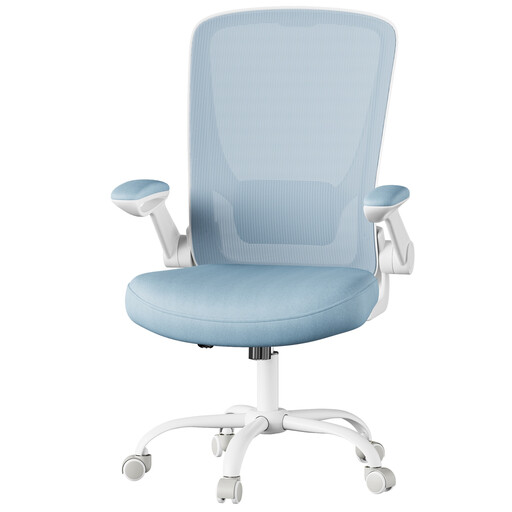
Why it's a great fit: Perfect for a home office where every square inch counts. It includes essential ergonomic adjustments without breaking the bank. It's an excellent first step toward transforming your work comfort.
It checks all the right boxes: height-adjustable lumbar support, a dense and resilient foam seat, and flip-up armrests that solve the tricky problem of storing it under a desk.
Its flip-up armrests are a real bonus for optimising space in a small office or a student's room.
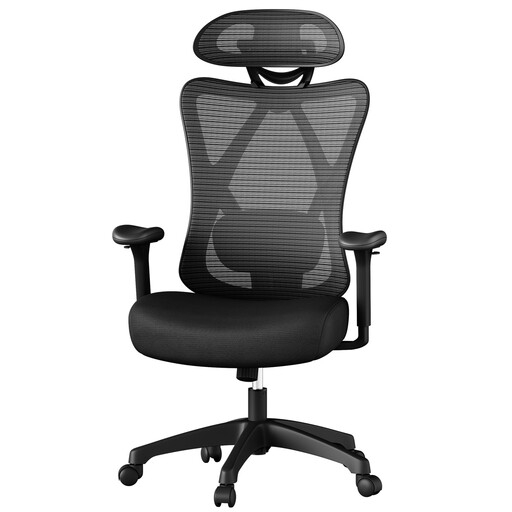
Why it's a great fit: Designed for those who work long days at their desk. Its robust build and numerous adjustments help maintain a healthy posture and allow for varied positions, ensuring lasting comfort.
It counters the three classic pitfalls with a soft and adaptable lumbar cushion, a thick foam seat, and adjustable armrests. A direct and effective solution.
Its maximum load capacity of 150 kg and smooth tilt mechanism make it a reliable and versatile ally for intensive use.
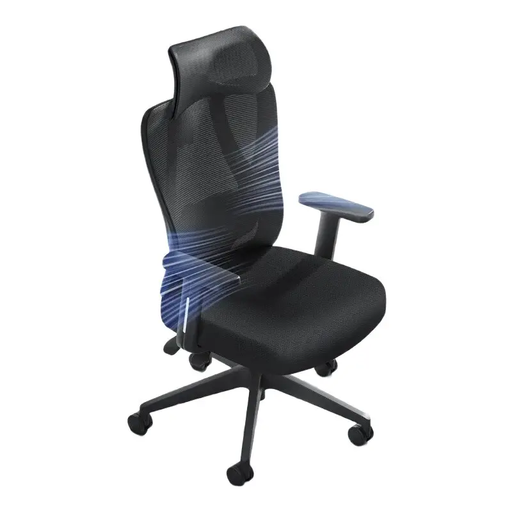
Why it's a great fit: For demanding users who want a premium seating experience, for both work and play. This model combines high-quality materials with state-of-the-art adjustment mechanisms.
Its 4D pivoting lumbar support is the antithesis of a "gimmick" feature: it offers dynamic adjustment that follows your movements. The high-density seat is built to last, and the full suite of adjustments guarantees a customised posture.
The 4D dynamic lumbar support, which adapts to your movements in real-time, provides active and personalised support throughout the day. The pinnacle of comfort.
We have selected a complete range of chairs that meet our quality criteria and European safety standards.
It all depends on the quality of the materials and the intensity of use. A model with a steel base, a Class 3 or 4 gas lift, and high-density foam can easily last you 5 to 10 years. Conversely, entry-level models often show signs of wear (sagging foam, play in the mechanisms) after only 1 to 3 years. Regular maintenance, such as simply tightening the screws, can significantly extend its lifespan.
Here is a simple 4-step method to follow:
Yes, provided you choose a quality model. Mesh offers unparalleled ventilation, a decisive advantage during long work sessions, especially in the summer. Good models use high-quality mesh that is taut enough to distribute weight evenly without creating uncomfortable pressure points. Often, the ideal compromise is an ergonomic office chair that combines a mesh backrest for breathability and a high-density foam seat for maximum comfort.