
Livraison le jour même ou le lendemain

Qualité garantie

Débloquez vos offres de bienvenue: Livraison GRATUITE | Jusqu'à -80 % | 30 jours d'essai gratuits à JoyPlus
Téléchargez l'application
Whether for remote work, studying, or a gaming session, spending hours glued to your chair puts a real strain on your body. Neck tension, back pain, poor posture… Do these symptoms sound familiar?? It's likely a sign that your current seat isn't up to the task. Far from being a luxury, an ergonomic office chair is an essential investment in your well-being and productivity.
But faced with the jungle of available models, it can be hard to know where to start. Don't panic: we're here to help you decipher the criteria that truly matter and choose the chair that's made for you, without the marketing fluff.
To ensure you make the right choice, here are the essential points to check before you buy. Keep one golden rule in mind: a good office chair should adapt to you, not the other way around.
The secret to ergonomics is customisation. A good chair must be able to adjust with precision to your body shape. Make sure it offers the following adjustments:
This is the one feature you should never overlook. Good lumbar support is essential to maintain the natural curve of your spine and say goodbye to back pain. Some models offer fixed support, while others include a cushion or a mechanism that is adjustable in height and depth. If you have a sensitive back, adjustable support is a must-have for truly personalised comfort.
The choice of material has a direct impact on comfort and maintenance:
Enough theory, let's get practical. We've selected three models that stand out from the crowd, each catering to a different profile and budget.
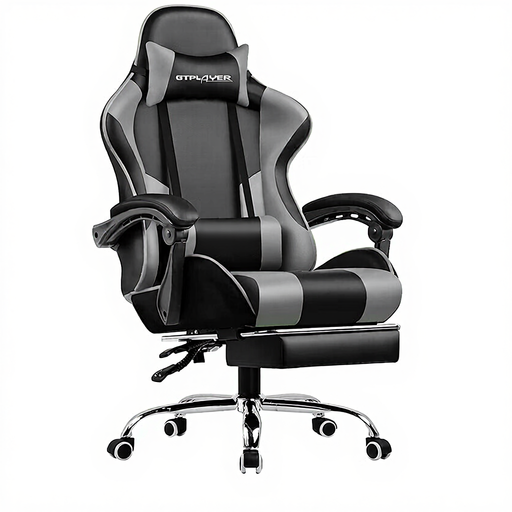
What Makes It Special: This GTPLAYER model combines the look of a gaming seat with some rather rare comfort options. Its key feature is its massaging lumbar support (powered by USB) which helps relax your back during long sessions. The retractable footrest lets you switch to nap mode in the blink of an eye.
Key Features:
Who is it for? Ideal for gamers, streamers, or remote workers looking for an "all-in-one comfort" chair to switch between work and relaxation without leaving their desk.

What Sets It Apart: The Ochama chair gets straight to the point with a simple and effective ergonomic design. Its breathable mesh backrest is its best asset for preventing overheating. It stands out with its 150 kg weight capacity, a guarantee of sturdiness that will suit most body types. The headrest, lumbar support, and armrest adjustments allow you to fine-tune it to perfection.
Key Features:
Who is it for? An excellent choice for professionals in the office or at home and students looking for an effective, breathable, and robust chair for intensive daily use.
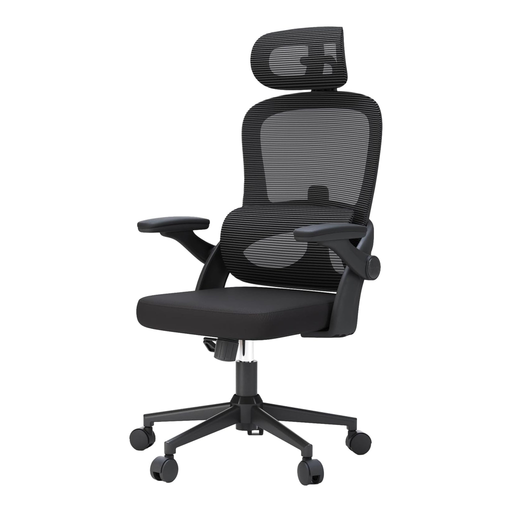
What Sets It Apart: The SIHOO M102C goes all-in on advanced adjustments for surgical precision. It features 3D adjustable armrests (up/down, forward/backward, pivot) and an independent lumbar support, adjustable in height over a 6 cm range. This allows you to position the support exactly where it's needed. The clever feature: the armrests can be flipped up to slide the chair under the desk and save space.
Key Features:
Who is it for? Aimed at demanding users who want total control over their posture, especially for their arms and lower back. Perfect for taller individuals or those who need very specific dorsal support.
A good chair is the foundation, but for a truly ergonomic workstation, you need to consider the whole setup. To optimise your space and be able to alternate positions, an adaptable desk can make all the difference.
To complete your workspace, discover our selection of height-adjustable desks.
Although both aim for long-term comfort, their approaches are not quite the same. The ergonomic office chair prioritises precise adjustments and a healthy posture for productivity (adjustable lumbar support, 3D/4D armrests, breathable mesh). The gaming chair, on the other hand, often adopts a "bucket" seat design inspired by auto racing, with removable cushions and a deep recline, designed for a more "relaxed" or even slouched posture typical of gaming sessions.
Follow these few steps:
The lifespan of a chair depends on the quality of its components (mechanism, gas lift, castors, upholstery) and the intensity of its use. An entry-level model will show its limitations after only 1 to 2 years. A mid-range or high-end chair, like those in our selection, is built to last between 5 and 10 years, or even longer. The warranty period is an excellent indicator of the manufacturer's confidence in its product's longevity.