
Livraison le jour même ou le lendemain

Qualité garantie

Débloquez vos offres de bienvenue: Livraison GRATUITE | Jusqu'à -80 % | 30 jours d'essai gratuits à JoyPlus
Téléchargez l'application
With the rise of remote work and the longer hours we spend in front of our screens, one reality has become clear: the importance of proper seating. An ergonomic office chair is no longer a luxury, but an essential investment in your well-being and productivity. The problem? The market is a jungle of marketing promises and confusing, endless spec sheets.
As a product expert at Joybuy, my mission is to help you cut through the noise. Let's skip the jargon and focus on what truly matters. Here’s how to avoid the common pitfalls and choose a chair that will support you for years to come.
Before you even start comparing spec sheets, you need to recognise the misleading sales pitches that lead directly to buyer's remorse.
office chair may look stylish, but it can quickly become an ordeal as soon as the temperature rises. For extended use, a breathable office chair made of mesh or high-quality fabric is a much wiser choice.To make the right choice, focus on these three pillars that make all the difference in a truly comfortable office chair.
A good adjustable office chair must allow you to fine-tune:
chair with lumbar support offers a support that is adjustable in height (and ideally in depth) to perfectly match the curve of your back.The mechanism is the engine of your chair. The synchronous mechanism is the holy grail: it coordinates the recline of the backrest and the seat to encourage movement, without ever compressing your stomach or back when you lean back.
The seat should support your thighs without creating pressure points behind your knees. A "waterfall" edge seat (with a slight downward slope) is ideal for promoting good circulation. As for upholstery, technical mesh ensures perfect ventilation, while high-quality fabrics and high-density foams guarantee comfort and longevity.
Rather than an endless list, here are three models that meet specific needs, selected based on the criteria we've just established.
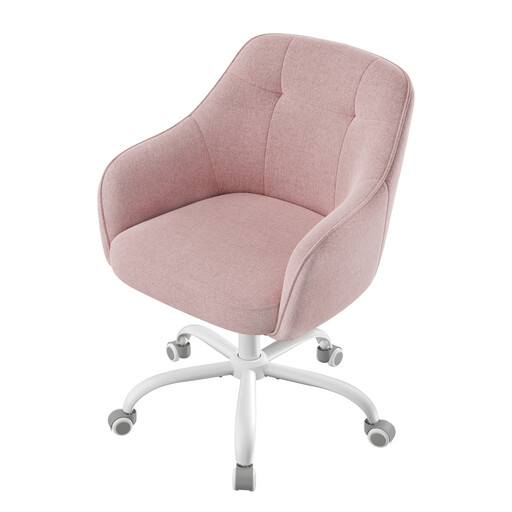
The Verdict: Perfect for those who want a stylish solution for a secondary office or a student's room. It's the ideal alternative to a dining chair for a few hours of work, combining a great design with essential comfort.
This model gets straight to the point, with no false promises. It focuses on the essentials: an ergonomically shaped backrest and a reliable height adjustment. Goodbye, superfluous gadgets.
Its modern look and soft-touch fabric will easily fit into any contemporary interior. Bonus: assembly is a breeze.
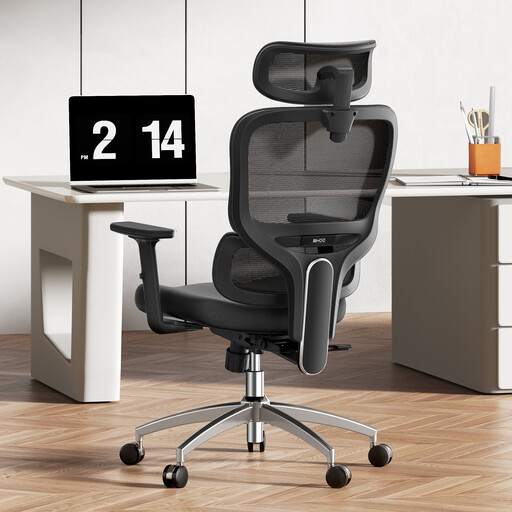
The Verdict: Built for professionals who put in long hours, whether at home or in the office. It features a full suite of adjustments for tailored, long-lasting support, which is essential for saying goodbye to end-of-day aches and pains.
This chair tackles the two worst enemies of comfort head-on: fixed lumbar support and materials that cause sweating. Its lumbar support is dynamic and adjustable, while its mesh back ensures optimal air circulation.
The winning trio—precise lumbar support, adjustable armrests, and a breathable backrest—makes it an ultra-comprehensive solution for intensive use as an `ergonomic remote work chair`. The headrest is the cherry on top.
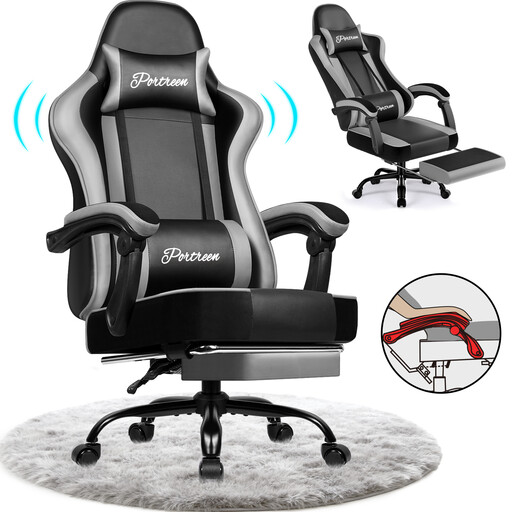
The Verdict: For those whose desk is a workstation, gaming arena, and relaxation spot all in one. Its deep recline and footrest transform your setup into a true cocoon for breaks or gaming sessions.
Instead of getting lost in a myriad of micro-adjustments, this chair focuses on life-changing features: a generous recline (up to 170°) and a telescopic footrest. These are tangible benefits that let you truly switch off.
The integrated footrest and near-flat recline offer comfort worthy of a living room armchair—an extremely rare feature on office chairs, even ergonomic ones.
We have curated a complete range of products that meet our strict specifications and current safety standards.
A good initial setup is key. Follow this guide:
It all depends on the quality of the materials and how it's used. An entry-level model will start to show wear after 2 or 3 years (compressed foam, creaking...). In contrast, a mid-range or high-end chair with a steel frame, high-density foam, and a quality mechanism can easily last you 7 to 10 years, or even longer with minimal maintenance.
Yes, but with a few caveats. Gaming chairs are designed for long sessions and often provide excellent support with their high backrests and cushions. The flip side? Their "bucket seat" look can clash with a minimalist decor, and their faux leather upholstery is often less breathable than the mesh on a classic office chair. It's a trade-off between enveloping support and ventilation.