
Livraison le jour même ou le lendemain

Qualité garantie

Débloquez vos offres de bienvenue: Livraison GRATUITE | Jusqu'à -80 % | 30 jours d'essai gratuits à JoyPlus
Téléchargez l'application
Spending long hours at your desk, whether working from home or in the office, can quickly lead to discomfort and pain. An ergonomic office chair isn't a luxury, but an essential investment in your well-being and productivity. Yet, faced with a jungle of offers and marketing promises, it's easy to make the wrong choice.
As a product expert at Joybuy, my role is to help you cut through the noise. Let's forget the jargon and focus on what truly matters. Here are the pitfalls to avoid and the essential criteria for selecting a chair that will support you for years to come.
The marketing is often more polished than the product itself. Beware of these three common mistakes that can turn a promising purchase into a costly regret.
To avoid making a mistake, focus on objective and verifiable features. Here are the three non-negotiable points to inspect before any purchase.
Lumbar support is the cornerstone of a good chair for remote work. Forget fixed supports. Look for a dynamic system or, at the very least, one that is adjustable in height and depth. An adaptive support that moves with you and adjusts its pressure based on your posture provides superior comfort and actively prevents pain. This is the difference between passive and active support.
A worthy adjustable office chair must go far beyond a simple height adjustment. The following elements are crucial for tailor-made comfort:
Don't just trust appearances. A certification like the BIFMA (Business and Institutional Furniture Manufacturer's Association) standard is a true guarantee of quality. It ensures the chair has undergone rigorous tests for strength, stability, and durability for professional use. It's the assurance of a long-lasting investment.
To put theory into practice, here are a few models that perfectly illustrate these criteria, adapted for different user profiles.
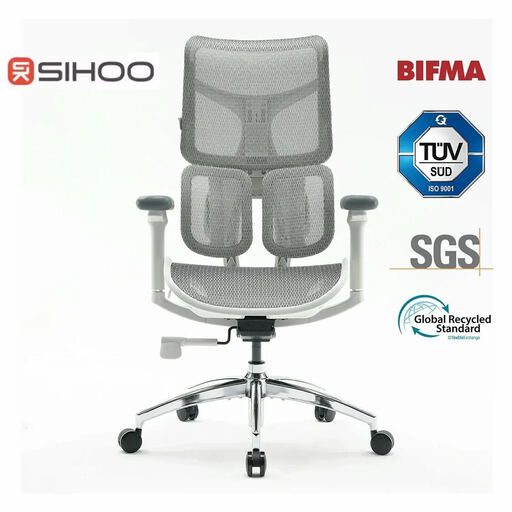
Why It Stands Out: Ideal for those who spend more than 8 hours a day at their desk and are looking for a complete solution to prevent back pain. Its sleek design makes it an excellent white office chair for modern interiors.
Its dual dynamic lumbar support is not a gimmick. It adapts in real-time to your movements, offering constant, personalized support where it's needed—a far cry from fixed, ineffective supports.
The coordinated 4D armrests and 5-level adjustable backrest offer deep customisation. The BIFMA and SGS certifications confirm its robustness.
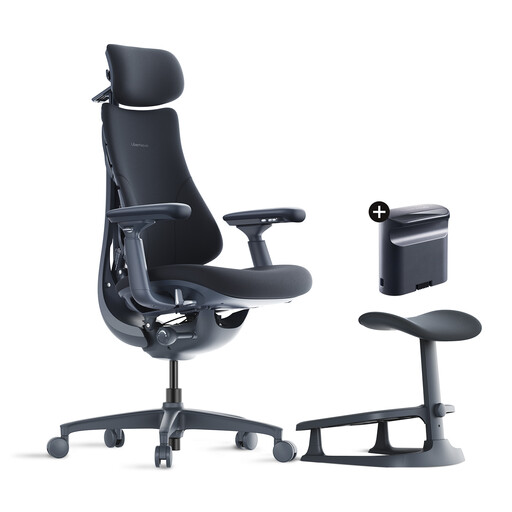
Why It Stands Out: Perfect for those who switch between intense work sessions, video meetings, and moments of relaxation. It's equally suited for remote work and casual gaming.
It goes beyond the simple "ergonomic" label by integrating advanced comfort features like a footrest and a wide recline, which are often absent from entry-level models.
The up to 160° recline combined with the integrated footrest transforms the chair into a true ergonomic office chair for breaks, while still providing adaptive lumbar support for work.
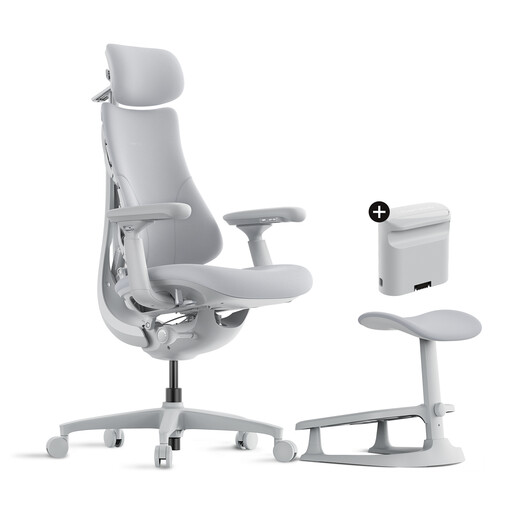
Why It Stands Out: For those who want a designer office chair that fits perfectly into a polished living room or home office, without compromising on essential comfort features.
This model proves that aesthetics don't have to exclude functionality. It avoids the trap of "designer" chairs that are beautiful but spartan by offering genuine adaptive lumbar support and a wide recline.
Its grey colour and modern lines offer an elegant alternative to traditional black, while the footrest and 160° recline ensure optimal comfort for both work and relaxation.
A suitable chair is the first step. To create a truly ergonomic workspace, the choice of desk is just as crucial.
Discover our selection of desks that pair perfectly with an ergonomic chair to create a healthy and productive workstation.
Start by adjusting the seat height so your feet are flat on the floor and your knees are at an approximately 90° angle. Next, adjust the seat depth to leave a space of 2 to 3 fingers between the edge of the chair and the back of your knees. Finally, position the lumbar support in the small of your back and adjust the armrests so your forearms can rest on them with your shoulders relaxed.
A quality, BIFMA-certified chair is designed to last between 7 and 10 years under normal use (about 8 hours a day). Durability will depend on the quality of the components: the mechanism, the gas lift, the mesh or fabric, and the overall frame. Regular maintenance can, of course, extend its lifespan.
Yes, provided the mesh is high-quality. Good quality mesh offers excellent breathability, a major asset during long workdays, especially in the summer. It also distributes pressure very well. Make sure it is sufficiently taut and resilient to avoid sagging over time.