
Livraison le jour même ou le lendemain

Qualité garantie

Débloquez vos offres de bienvenue: Livraison GRATUITE | Jusqu'à -80 % | 30 jours d'essai gratuits à JoyPlus
Téléchargez l'application
Spending hours glued to your desk, whether for remote work, studying, or gaming, can quickly become a nightmare for your back. An ergonomic office chair seems like the miracle solution, but the market is a jungle of marketing promises. How can you tell the difference between a genuinely beneficial model and one that will only make things worse? Before you pull out your credit card, here are the pitfalls to avoid.
heavy-duty office chair 150kg.To make a smart purchase, you need to look beyond aesthetics. Here are the three technical points you absolutely must check.
A good office chair for back pain must have adjustable lumbar support. The curve of the lower back varies enormously from person to person. Effective support must be height-adjustable to fit precisely into the small of your back. Some more advanced models even offer depth adjustment for more or less pronounced pressure. Without this customisation, the support is useless at best and counterproductive at worst.
Being able to move and change positions is essential. A quality reclining office chair offers a synchronous mechanism, where the seat and backrest tilt in a coordinated manner to promote good blood circulation. Make sure you can lock the tilt in multiple positions (and not just upright). Armrests are another detail that makes all the difference: adjustable armrests (in height, width, or even angle) help release tension in the shoulders and neck, a major asset for a work-from-home office chair.
A chair's durability depends on elements that are often invisible at first glance.
To guide you, here are a few models that check all the right boxes, each tailored to a specific user profile.
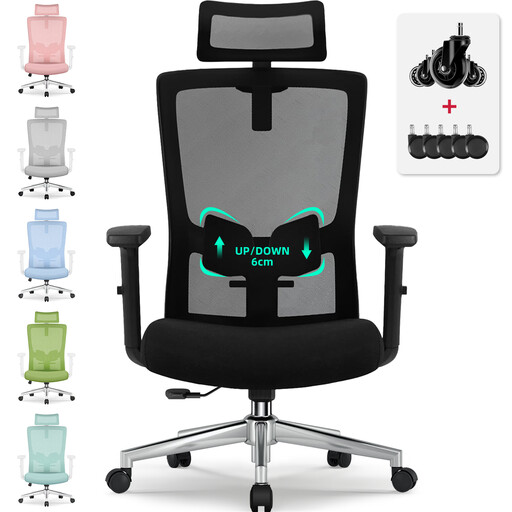
Why we recommend it: It checks the essential boxes (adjustable lumbar support and headrest, tilt function) at an affordable price point. Perfect for getting a serious remote work setup without breaking the bank.
Unlike fixed entry-level models, it features 6 cm of adjustable lumbar support and a lockable tilt, avoiding the "fake ergonomics" trap. Its base is BIFMA/SGS certified for a load of up to 150 kg.
Versatility and comprehensive adjustments (headrest, lumbar, tilt up to 135°) that are rare in this price segment.
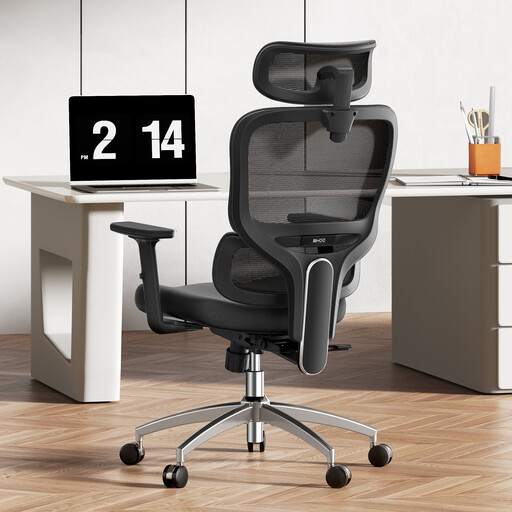
Why we recommend it: Designed for those who spend over 8 hours a day at their desk. Its dynamic lumbar support adjusts to your movements, providing constant, active support to prevent you from ending the day slouched and sore.
It goes beyond a simple adjustment by offering a "3D dynamic" lumbar support that prevents poor posture. The materials, like the high-elasticity mesh, are designed for heavy use without losing their shape.
Dynamic lumbar support and multiple adjustments (3D armrests, headrest) for customised, active comfort.
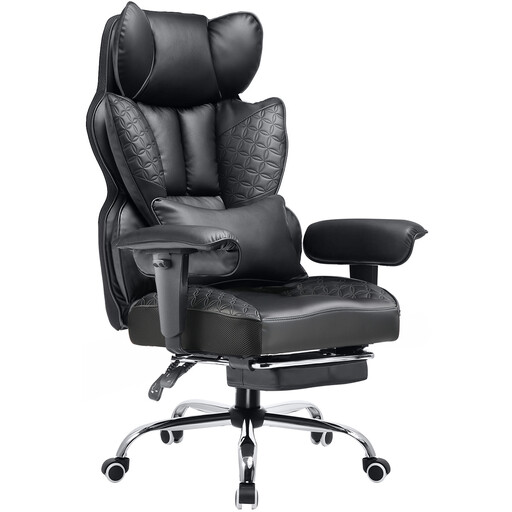
Why we recommend it: This `gaming chair` style model focuses on robustness and enveloping comfort. Its "Heavy Duty" frame and generously padded PU leather upholstery are suitable for heavier individuals or those seeking a cocoon-like feel, with the added bonus of a footrest for breaks.
It directly tackles the problem of undersized chairs. Its reinforced frame and robust gas lift are built to handle a significant load over the long term, preventing premature wear and tear of components.
Ultra-sturdy construction, high weight capacity, and an integrated footrest for maximum relaxation.
We've selected other models that meet our strict criteria for ergonomics, durability, and safety.
Its longevity, of course, depends on the quality of the materials and the intensity of your use. A model with a certified gas lift (Class 3 or 4), a metal base, and high-density foam can easily last between 7 and 10 years. Conversely, entry-level models often start showing signs of wear (sagging seat, suspicious creaks) after only 1 to 3 years. Regular maintenance, like tightening the screws once a year, can also extend its life.
A proper setup is key. Here is the checklist to follow:
This is primarily a matter of taste and use case.
designer office chair look. While easy to clean, it is less breathable and can get warm. It is often paired with thicker padding for a plusher feel.