
Livraison le jour même ou le lendemain

Qualité garantie

Débloquez vos offres de bienvenue: Livraison GRATUITE | Jusqu'à -80 % | 30 jours d'essai gratuits à JoyPlus
Téléchargez l'application
Remote work has become a staple of modern life, and with it, long hours spent in front of a screen. This welcome flexibility unfortunately comes with its own set of problems: neck tension, fatigue, and persistent back pain. The culprit? All too often, it's an unsuitable chair that puts a strain on our bodies.
Investing in an ergonomic office chair is therefore not a luxury, but a necessity for protecting your health and concentration. But with an overwhelming number of options on the market, it's hard to know where to start.
As product experts at Joybuy, our mission is to cut through the noise for you. This guide gives you the keys to making an informed decision and presents our selection of the best 2026 models, tailored to different needs and budgets.
Before you pull out your credit card, let's review the key features that define an excellent ergonomic chair. Here are three aspects to examine closely.
A good ergonomic chair should adapt to your body, not the other way around. A wide range of adjustments is therefore fundamental. Here are the essential adjustments to look for:
The upholstery of your office chair has a direct impact on your daily comfort.
The chair's base is the guarantor of your safety and mobility. A five-star base made of metal or reinforced nylon offers rock-solid stability. Also, remember to check that the maximum weight capacity is suitable for your body type.
Some chairs offer game-changing features, like a retractable footrest or a lumbar massage function. These options are particularly useful for those who like to switch between work and relaxation without leaving their seat.
To put theory into practice, here are three models that stand out for their unique features.

Why we love it: This model is a great all-rounder for anyone seeking a versatile and effective solution for remote work. Its breathable mesh back is a major asset for staying comfortable, even after hours of sitting. Its multiple adjustments, including the adjustable lumbar support and headrest, ensure a high degree of customisation.
Pros:
Who is it for? Ideal for remote workers and anyone who spends long days sitting and prioritises breathability and adaptable postural support.
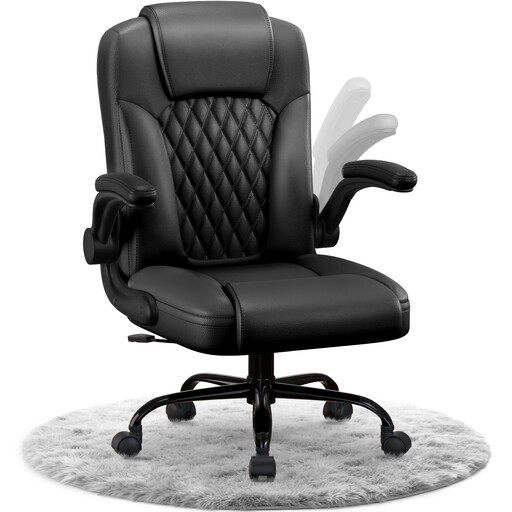
Why we love it: The GTIMEX chair combines a sleek aesthetic with clever features. Its quality faux leather upholstery gives it a professional look, while its 90° flip-up armrests are an ingenious solution for sliding the chair under the desk to save space.
Pros:
Who is it for? Perfect for those looking for a stylish and smart seat, especially for home offices where every inch counts.
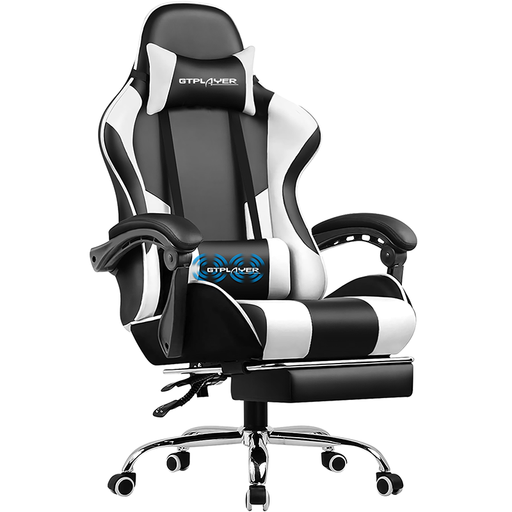
Why we love it: Though often pigeonholed into the gaming world, gaming chairs are excellent allies for work. The GTPLAYER model stands out with its retractable footrest and massaging lumbar cushion, turning every break into a true moment of recovery.
Pros:
Who is it for? For gamers and streamers, of course, but also for remote workers who want an "all-in-one" chair with advanced relaxation options to decompress between meetings.
This selection is just a glimpse of the solutions available to improve your comfort. Every body type and every office has specific needs.
If these models don't check all your boxes, or if you simply want to compare other products, a much wider range awaits you. To discover other styles, materials, and feature levels, feel free to explore our complete collection.
? Discover our selection of ergonomic contour chairs
A classic ergonomic office chair focuses on a minimalist design and precise adjustments to maintain a healthy work posture. A gaming chair, on the other hand, often adopts a bolder design and includes features designed for extreme long-term comfort, such as a deep recline, a footrest, and prominent head and lumbar cushions.
For an optimal setup:
Yes, and it's non-negotiable. Lumbar support is one of the cornerstones of a good ergonomic chair. It helps maintain the natural curve (lordosis) of the spine, which reduces pressure on the intervertebral discs and prevents lower back pain after long hours of sitting.