
Livraison le jour même ou le lendemain

Qualité garantie

Débloquez vos offres de bienvenue: Livraison GRATUITE | Jusqu'à -80 % | 30 jours d'essai gratuits à JoyPlus
Téléchargez l'application
Spending hours at your desk, whether working from home or in the office, should never lead to back pain or fatigue. An ergonomic office chair isn't a luxury; it's an essential investment in your well-being and focus. The problem? The market is flooded with models that often rely on hollow marketing promises. As our publication's product expert, my mission is to help you decipher the features that truly matter for a smart, long-lasting purchase.
Before you even start comparing models, let's learn how to sidestep the most common traps that lead to a poor investment.
To avoid these traps, focus on a few technical points that make all the difference.
A good office chair with lumbar support is non-negotiable. But be warned, not all support systems are created equal.
Properly adjusted lumbar support keeps your spine in a healthy posture and drastically reduces the muscle tension that builds up over hours.
The ability to move and change positions is vital for relieving pressure on your intervertebral discs.
Armrests aren't just for show: they relieve tension in your shoulders and neck. The right choice depends on your usage.
Rather than drowning you in spec sheets, we've matched models to specific needs to help you visualize their everyday utility.
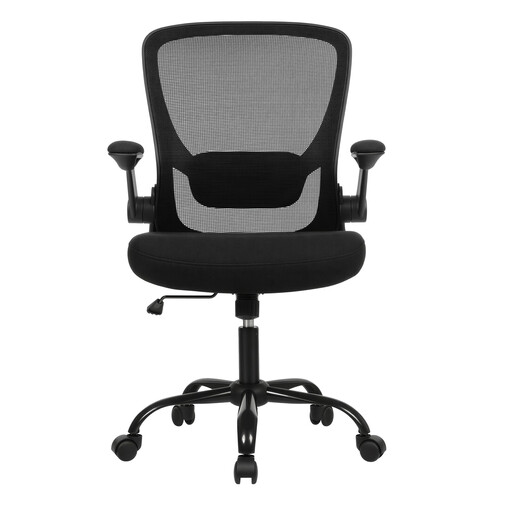
Why it's a match: Perfect for a home workspace where versatility is key. Its flip-up armrests allow it to be easily stored under a desk, a major advantage for optimising space in a living area.
This model does more than just carry an "ergonomic" label. It offers adjustable lumbar support and flip-up armrests—concrete features that set it apart from basic chairs.
The combination of lasting seat comfort, thanks to a thick cushion, and a smart, space-saving design.
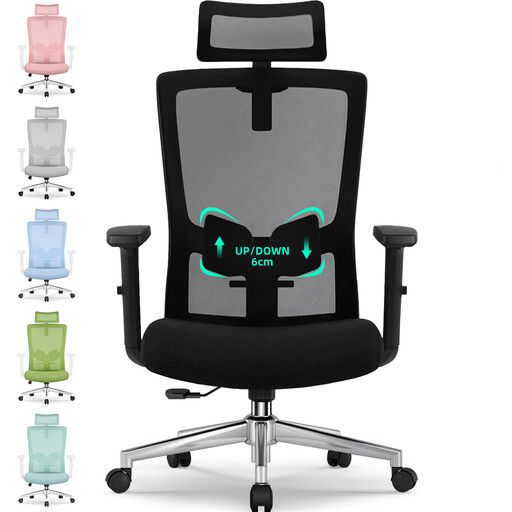
Why it's a match: The perfect companion for those who work 8+ hour days. Its multiple adjustment points (headrest, lumbar, recline up to 135°) allow for fine-tuned adjustments and flawless support.
It counters the "one-size-fits-all" trap by offering deep customisation. The 6 cm adjustable lumbar support and the adjustable headrest adapt to different body types, preventing the discomfort of a poorly sized chair.
Comprehensive adjustments for personalised, long-term support, with materials (gas lift, base) whose robustness has been verified by the manufacturer.
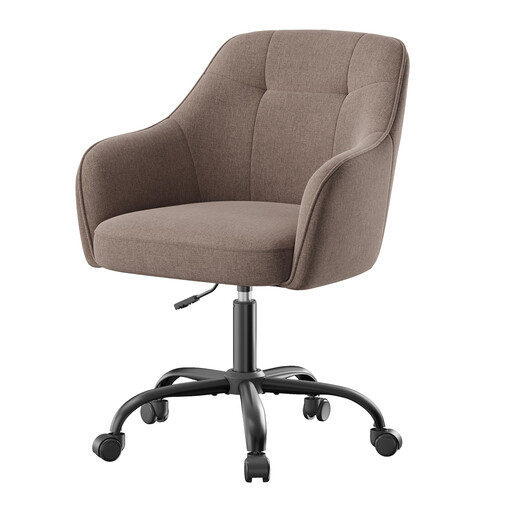
Why it's a match: Perfect for a student's desk or a remote work corner where style is as important as comfort. Its modern look and soft upholstery elegantly integrate into a curated interior.
This chair doesn't pretend to be an ultra-technical executive seat. It provides good basic comfort with a thick seat and a supportive backrest, without falling into the trap of cheap materials thanks to its sturdy steel base.
An excellent balance between a stylish design, a pleasant feel, and sufficient comfort for work or study sessions lasting several hours.
We've compiled a complete list of products that meet our strict selection criteria and safety standards.
A good adjustment only takes a few seconds. Follow these 4 steps:
The longevity of an office chair primarily depends on the quality of its components and the intensity of its use. A model with a steel base, high-density foam, and quality upholstery (mesh or fabric) can easily last between 7 and 10 years. Certifications like BIFMA or SGS, often highlighted by manufacturers, are a guarantee of durability and resistance, as they attest to rigorous testing.
For occasional use (less than an hour a day), a well-designed backrest may be sufficient. However, for anyone who spends several hours a day sitting, adjustable lumbar support becomes absolutely essential. It prevents the slouching that inevitably sets in with fatigue. By maintaining the natural curve of your spine, it significantly reduces the pressure on your lumbar discs.