
Livraison le jour même ou le lendemain

Qualité garantie

Débloquez vos offres de bienvenue: Livraison GRATUITE | Jusqu'à -80 % | 30 jours d'essai gratuits à JoyPlus
Téléchargez l'application
Spending hours at your desk, whether at home or in the office, should never be a painful experience. Yet, the wrong chair is all it takes to cause back, neck, and shoulder strain. Faced with the jungle of so-called "ergonomic" office chairs, how can you distinguish a genuinely beneficial model from one that is ergonomic in name only?
As the Head of Product Selection at Joybuy, my role is to help you find clarity. We've broken down the 3 most common pitfalls and the essential criteria to check to make an informed and confident choice.
Trusting the "ergonomic" label without checking the adjustments. Many entry-level chairs use this term as a mere marketing buzzword. A true ergonomic work-from-home chair must offer precise adjustments, especially for lumbar support, seat height, and armrests. A simple curved backrest is not enough.
Neglecting material quality. A breathable mesh office chair may seem appealing, but if the mesh is poor quality, it will sag within a few months, negating any benefits for your back. Likewise, a low-end gas lift can lose pressure and fail to hold its height, quickly rendering the chair unusable.
Believing in the "one-size-fits-all" myth. A chair that is perfectly suited for someone who is 1.80?m tall will likely be uncomfortable for someone who is 1.60?m. The lack of seat depth or armrest height adjustments can create new pressure points and lead to poor posture.
To avoid making a mistake, focus on a few key technical specifications. These objective benchmarks will allow you to assess the true quality of an ergonomic office chair.
A good office seat with lumbar support is the cornerstone of healthy posture. Don't settle for a fixed bulge in the lower backrest. Instead, choose a model where this support is adjustable in height, and ideally, in depth. This allows you to tailor it precisely to the natural curve of your spine. It's a non-negotiable feature if you're looking for a chair for office back pain.
The tilt mechanism determines how the chair moves with you. A simple tilt mechanism leans the seat and backrest back as a single unit. In contrast, a synchronous mechanism allows the backrest to recline more than the seat, promoting a more dynamic and less static posture.
Also, check for gas lift certifications like BIFMA or SGS. These standards guarantee that the component has been tested for durability and safety. This is your assurance that your adjustable office chair will reliably maintain its height over time.
Armrests play a crucial role in relieving tension in the shoulders and neck.
office chair with flip-up armrests is a clever solution for optimising your workspace.Forget endless lists. We've matched specific models to distinct user profiles, based on the objective criteria mentioned above.
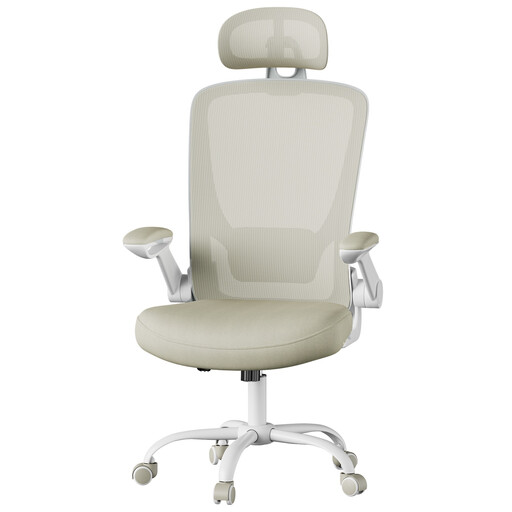
Why this model? Ideal for remote work in an apartment or bedroom, where every square inch matters. Its minimalist design and light colour integrate seamlessly into any decor.
Unlike basic chairs, this model includes genuine flip-up armrests—a practical feature, not a gimmick. It also offers adjustable lumbar support, going far beyond a simple "ergonomic" label.
The combination of full ergonomic support (head, lumbar) and flip-up armrests to maximise space under the desk.
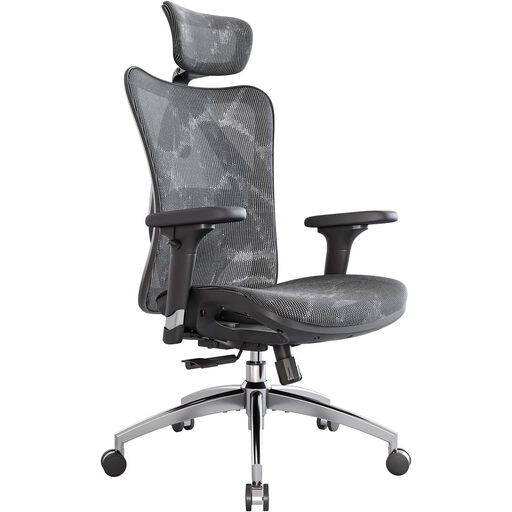
Why this model? Designed for those who spend over 6 hours a day at their desk. Its multiple adjustment points help you find and maintain an optimal posture throughout the day to reduce fatigue.
It shatters the "one-size-fits-all" myth with its 3D armrests and adjustable lumbar support. Its BIFMA and SGS-certified gas lift is a guarantee of durability that eliminates any doubts about material quality.
A high degree of customisation, with a high back, headrest, and 3D armrests for comprehensive body support.
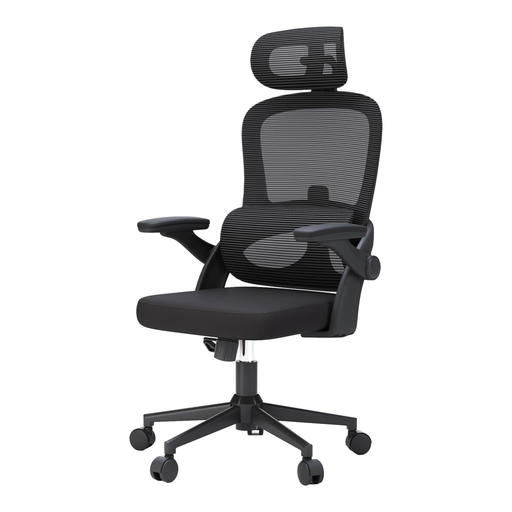
Why this model? Specially designed for larger body types who often feel cramped in standard chairs. Its robust frame and wide seat provide superior comfort and security.
It directly tackles the "one-size-fits-all" problem by offering a 136 kg (300 lbs) weight capacity and an oversized seat. Its separate, adjustable lumbar support is an advanced technical feature, light-years ahead of empty marketing claims.
Its ultra-sturdy design, featuring a wide, high-density foam seat and dedicated lumbar support, guarantees rock-solid comfort.
We have selected other models for you that meet our demanding specifications for quality and safety.
A chair's longevity primarily depends on the quality of its components. An entry-level model may show its first signs of wear (sagging foam, creaking) after 1 to 3 years. A quality chair, with a BIFMA-certified gas lift and a steel or aluminium frame, can easily last between 5 and 10 years with minimal maintenance.
For use exceeding two hours per day, adjustable lumbar support is highly recommended. It helps maintain the natural curve of the lower back (lumbar lordosis), which reduces pressure on the intervertebral discs and prevents pain. Without this support, the back tends to slump, and muscle tension soon follows.
Follow these simple steps to find your ideal posture: