
Livraison le jour même ou le lendemain

Qualité garantie

Débloquez vos offres de bienvenue: Livraison GRATUITE | Jusqu'à -80 % | 30 jours d'essai gratuits à JoyPlus
Téléchargez l'application
Whether you're working from home or in the office, long hours of sitting put a major strain on your body. Poor posture takes an immediate toll, causing tension in your back, neck, and shoulders. Far from being a luxury, investing in an ergonomic office chair has become essential for protecting your well-being and productivity.
But with an overwhelming number of options on the market, it's hard to know where to start. This guide is here to provide clear, objective selection criteria and help you find the comfortable office chair that's truly right for you, beyond the marketing jargon.
Before diving into our top picks, let's review the key points for making an informed choice. Always remember: a good chair should adapt to you, not the other way around.
The number one cause of back pain while sitting? Inadequate support for the natural curve of your lower back. An office chair with lumbar support is therefore paramount. There are two main types of mechanisms:
Poorly positioned armrests are a sneaky source of neck and shoulder tension. A chair with adjustable armrests is essential for aligning your forearms with the desk, allowing your elbows to form a 90° angle. The most advanced models offer 3D (height, depth, pivot) or even 4D (adding lateral adjustment) settings for tailored support.
Spending eight hours in a chair that traps heat is an ordeal. The mesh office chair is the gold standard here, highly valued for its breathability. This micro-perforated fabric ensures excellent air circulation, wicking away heat and moisture. It's the logical choice for intensive use, especially during the summer months.
After analysing technical specifications, modularity, and user reviews, we've selected several models that stand out from the crowd.
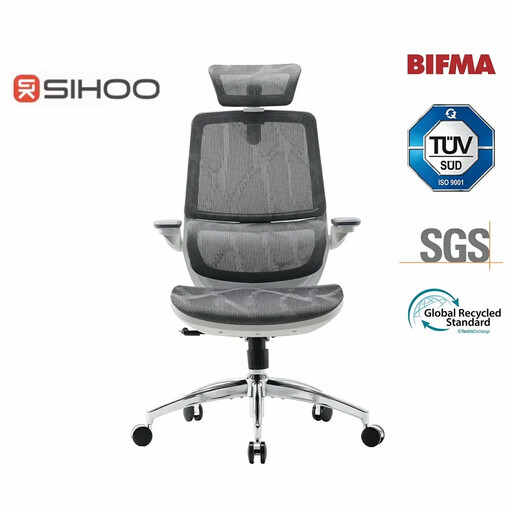
Why it stands out: The Sihoo M59AS distinguishes itself with its two-part backrest and dynamic lumbar support. The support adjusts to your movements in real time, offering constant backing without any manual adjustments. Its synchronised 3D armrests follow the backrest's recline, ensuring perfect forearm support.
Key features:
Who is it for? Ideal for people who move around a lot in their chair and for those looking for a clever solution for small spaces, thanks to its flip-up armrests. It's an excellent choice for versatile remote work.
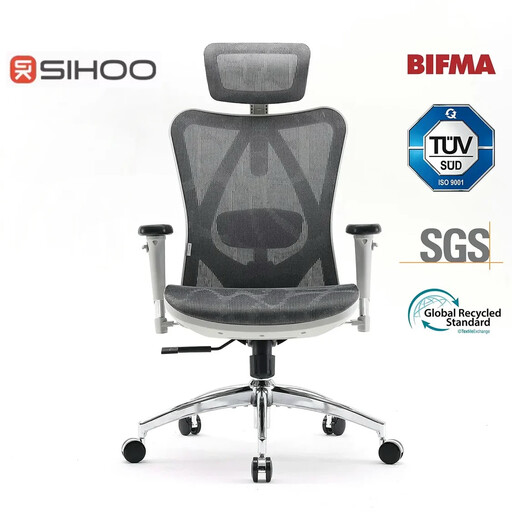
Why it stands out: The Sihoo M57S is designed to offer unwavering support and lasting comfort, especially for taller individuals. Its high, S-shaped backrest, combined with an adjustable headrest and lumbar support, allows for precise adjustments to fit any body type. Its wide seat and steel frame give it rock-solid durability.
Key features:
Who is it for? Recommended for those who spend long days sitting and are looking for a spacious, fully customisable chair. Its high back makes it the ideal choice for taller users who want total support, from the lumbar region to the neck.

Why it stands out: This Ochama model gets straight to the point, offering essential ergonomic features at a very accessible price. It's a pragmatic solution for improving your posture without getting lost in a sea of complex adjustments.
Key features:
Who is it for? Ideal for students or young professionals looking for their first ergonomic office chair. It provides the fundamental adjustments for good posture at an excellent value. An ideal entry point into the world of office ergonomics.
Our selection highlights models with distinct profiles, but the world of ergonomic seating is vast. If you haven't found the perfect one yet or want to explore other styles and features, feel free to browse our complete catalogue.
Discover our complete collection of office chairs and computer desks
A standard office chair often only offers height adjustment. In contrast, an ergonomic office chair is designed to conform to and support the body in a healthy posture through a multitude of adjustments: lumbar support, armrests, seat height and depth, backrest recline, headrest, and more. The goal is to reduce pressure on the spine and joints.
The longevity of an ergonomic chair depends on the quality of its materials, the intensity of its use, and its maintenance. A quality model, certified by BIFMA for example, is tested to stand the test of time and can easily last 5 to 10 years, or even longer. Regular maintenance (tightening screws, cleaning surfaces) is the secret to keeping it in perfect condition for as long as possible.
For an optimal setup, follow these steps: