Joybuy Insights

How to Choose the Right Ergonomic Office Chair and Avoid Pitfalls

Spending hours at a desk, whether for remote work, studying, or gaming, has become a part of our daily lives. This reality puts a significant strain on our bodies, especially when comfort is overlooked, leading to pain and fatigue. Investing in an ergonomic office chair is therefore no longer a luxury, but a necessity. The problem? The market is flooded with models featuring vague, or even misleading, marketing promises. This guide is here to cut through the noise, help you identify the criteria that truly matter, and avoid common mistakes to make an informed decision.

The 3 Pitfalls to Avoid When Buying an Office Chair

Before diving into technical specifications, let's start with the most common mistakes that turn a good investment into a regret.

  1. The "Ergonomic" Label Illusion: The term "ergonomic" is neither a certified label nor a protected designation. Many entry-level models proudly display it without offering any adjustments worthy of the name. Let's remember the basics: a true ergonomic chair adapts to your body, not the other way around.
  2. Prioritising Aesthetics Over Functionality: A sleek design is nice. But if it hides a rock-hard seat, a non-existent backrest, and poor-quality materials, the illusion won't last. Faux leather that cracks after a year or padding that sags are classic red flags to avoid.
  3. Underestimating Load Capacity and the Base: A flimsy plastic base or a low-grade gas lift can not only shorten your office chair's lifespan but also pose a real safety risk. Checking the maximum supported weight is a basic reflex, yet it's often overlooked.

The Essential Criteria for Custom-Fit Comfort

To make the right choice, focus on these concrete technical points that guarantee comfort and durability.

1. The Range of Adjustments: The Fundamentals of Comfort

An adjustable office chair is a non-negotiable prerequisite for good posture. Here are the essential adjustments:

  • Adjustable lumbar support: This is THE non-negotiable feature. A good chair with lumbar support must allow you to adjust the support in height and, ideally, in depth, to perfectly match the natural curve of your spine. Forget simple fixed bumps: they're a gimmick, not a support system.
  • Seat height and depth: For proper blood circulation, your feet should rest flat on the floor with your knees at a 90° angle. The trick: keep a space of two to three fingers between the edge of the seat and the back of your knees.
  • Adjustable armrests: Adjustable armrests (the so-called 3D or 4D, adjustable in height, width, depth, or angle) are essential for relieving tension in the shoulders and neck.
  • The tilt mechanism: A reclining office chair with a synchronous mechanism is a significant advantage. It coordinates the tilt of the backrest and seat to follow your movements, maintain a dynamic posture, and prevent you from sliding down.

2. Choosing Materials: Balancing Breathability and Durability

The upholstery and frame play a crucial role in your daily comfort and the chair's longevity.

  • Upholstery: Mesh is highly valued for its breathability, a clear advantage during long workdays, especially in the summer. Fabric offers a softer, warmer feel, while genuine leather, though durable and stylish, requires more maintenance and is less breathable.
  • Frame and base: A steel or aluminium base is a guarantee of stability and durability, light-years ahead of plastic bases that creak with every movement. The casters, meanwhile, should be suited to your flooring (hard for carpet, soft for hardwood) to roll smoothly and without scratching.
  • Certifications: Labels like BIFMA or SGS are a good indicator that the components (gas lift, base, casters) have passed rigorous strength and safety tests. A mention of a test exceeding 100,000 cycles for the gas lift, for example, is an excellent sign of reliability.

Recommended Office Chairs

Rather than an exhaustive list, here are a few models that target different needs and budgets, while respecting the criteria we've just discussed.
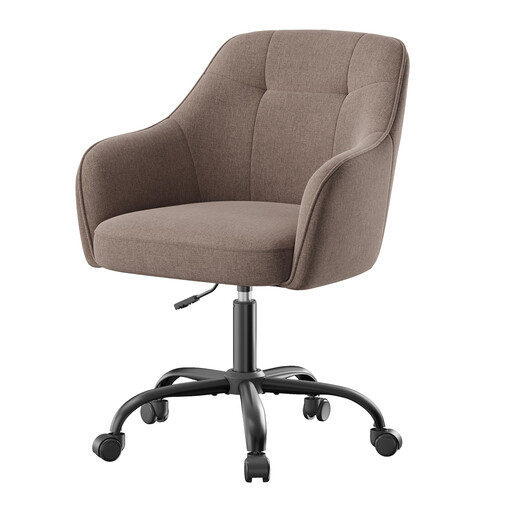
PROFILE: BUDGET-CONSCIOUS & COMPACT SPACES
Ochama Ergonomic Desk Chair, Adjustable Height

Ochama Ergonomic Desk Chair, Adjustable Height

Why it fits the bill: Ideal for students or as a first work-from-home chair in a limited space (bedroom, studio apartment...). Its minimalist design and small footprint allow it to blend into any decor.

How it avoids the pitfall

This model doesn't oversell its features. It focuses on the essentials: adjustable seat height and a supportive backrest, perfect for moderate use. It thus avoids the "pseudo-ergonomic" trap of unfulfilled promises.

Key advantage

Its quick assembly and breathable fabric make it an effective and comfortable "plug-and-play" solution for shorter work sessions.
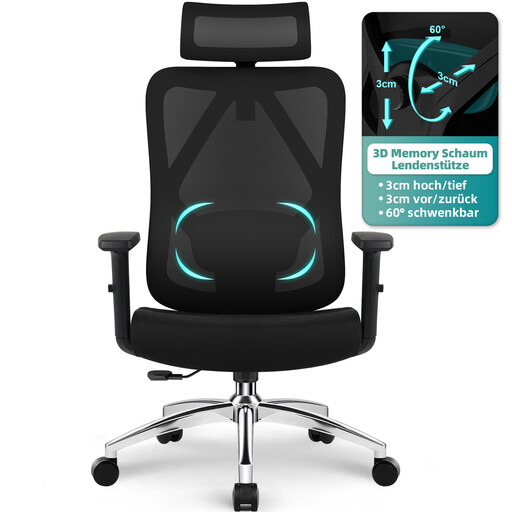
PROFILE: INTENSIVE REMOTE WORK
GTIMEX Ergonomic Office Chair with 3D Lumbar Support

GTIMEX Ergonomic Office Chair with 3D Lumbar Support

Why it fits the bill: Built for desk marathoners who put in 8+ hour days. Its full suite of adjustments provides a custom fit, which is essential for preventing musculoskeletal disorders (MSDs).

How it avoids the pitfall

Here, "ergonomic" isn't just a buzzword. The proof: 3D lumbar support (height and depth), a multi-adjustable headrest and armrests, all validated by BIFMA/SGS certifications. This is about tangible features, not marketing fluff.

Key advantage

Its memory foam lumbar support and robust build (max load of 200 kg) make it an investment that's built to last, taking care of your back year after year.
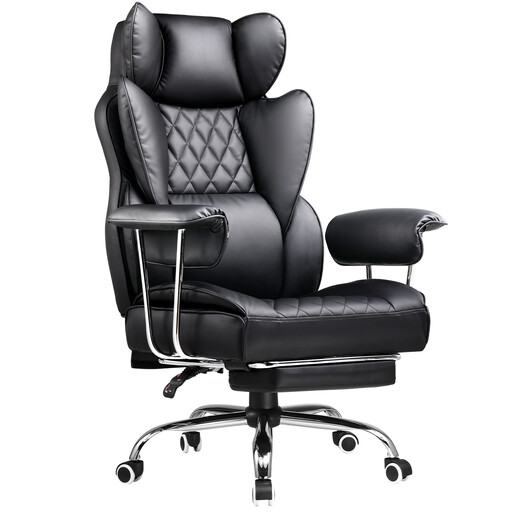
PROFILE: VERSATILE USE (WORK & LEISURE)
GTPLAYER Gaming and Office Chair with Footrest

GTPLAYER Gaming and Office Chair with Footrest

Why it fits the bill: The Swiss Army knife for those whose desk is used for work as much as for leisure (gaming, watching shows...). This type of hybrid executive chair combines postural support with relaxation features.

How it avoids the pitfall

More than just a "gaming" look, it offers real features: a high, deeply reclining backrest, a lumbar cushion, and a retractable footrest. Form doesn't sacrifice function; it enhances it.

Key advantage

Its generous recline, paired with the footrest, transforms this swivel chair into a true haven for unwinding between meetings or after a long gaming session.

Looking for more options?

We've curated a full range of products that meet our selection criteria and current safety standards.

Frequently Asked Questions

What is the average lifespan of an ergonomic office chair?

It all depends on the quality and usage. An entry-level model will barely last more than 2 or 3 years. Conversely, a good mid-range or high-end chair (metal base, certified gas lift, quality materials) can be a companion for 7 to 10 years, sometimes longer. Also, consider repairability: being able to replace the casters or the gas lift is a real advantage for longevity.

How do I properly adjust my office chair to prevent back pain?

For an optimal posture, follow these simple steps:

  • Seat Height: Feet flat on the floor, knees at a 90° angle.
  • Seat Depth: Leave a 2-3 finger gap between the edge of the seat and the back of your knees.
  • Lumbar Support: Position it snugly in the small of your back.
  • Armrests: Your forearms should rest on them naturally, with your shoulders relaxed.
  • Bonus: The Screen: The top of your monitor should be at eye level. This is the essential complement to good posture.

Is a mesh chair more comfortable than a fabric one?

Comfort is a matter of personal preference, but each material has its pros. Mesh is unbeatable for breathability: a real blessing in the summer or for those who tend to get warm. Fabric, on the other hand, offers a softer and warmer feel. Ultimately, what matters most is quality: a well-tensioned mesh and a dense fabric will stand the test of time much better than any low-grade material.