
Livraison le jour même ou le lendemain

Qualité garantie

Débloquez vos offres de bienvenue: Livraison GRATUITE | Jusqu'à -80 % | 30 jours d'essai gratuits à JoyPlus
Téléchargez l'application
Remote work is now a part of our daily lives, and with it come long hours spent at a home office desk. While a laptop and a good internet connection are theoretically enough, one element is too often overlooked until the first aches and pains appear: the chair. A bad chair can turn a productive day into a real ordeal for your back, neck, and shoulders.
However, the ergonomic office chair market is a jungle of marketing promises where it's easy to get lost. Before investing, it's crucial to know the pitfalls to avoid in order to find the model that is truly suited to your needs and body type.
The excitement for a new office chair can quickly fade if you fall into one of these classic traps.
To make the right choice, focus on the features that truly matter for your comfort and posture.
This is arguably the number one criterion. Good adjustable lumbar support should be adjustable in height and, ideally, in depth to perfectly match the natural curve of your lower back. Fixed or poorly positioned support can create more pressure than it relieves. It ensures your spine maintains a natural alignment, even after several hours of sitting.
The ability to adjust the seat height is fundamental. Your feet should rest flat on the floor, with your knees forming an angle of about 90?degrees. Another crucial point is the backrest tilt mechanism. A synchronous mechanism, where the seat and backrest tilt in a coordinated manner, is often recommended to support the body's natural movements and avoid excessive pressure on the thighs.
The choice of material is a matter of preference and use. A mesh office chair offers excellent breathability, a major advantage during the hot months. High-density foam or fabric seats provide a plusher, more cushioned feel. Also, consider the details that make life easier: flip-up armrests, for example, are an excellent solution for small spaces, as they allow the chair to be slid completely under the desk for optimal space-saving.
Rather than an endless list, here are a few models that meet the needs of specific user profiles, selected based on our essential criteria.

The profile: Perfect for remote work in a shared space or small office. This model combines essential ergonomic adjustments with a smart design to optimise space.
It focuses on the essentials with genuinely useful adjustments (height, tilt, lumbar support) and avoids gimmicks. Its flip-up armrests are a real bonus for sliding it under a desk.
Its breathable mesh back is a treat in warm weather, and its thick seat ensures comfort. It all rests on a sturdy metal base for rock-solid stability (supports up to 120 kg).
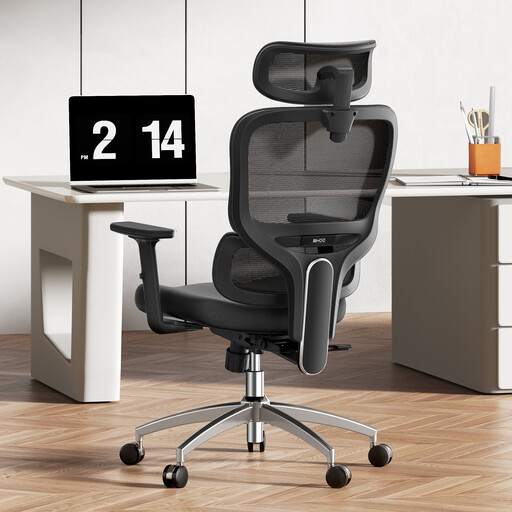
The profile: Designed for those who spend more than 8 hours a day at their desk. It takes customisation to the next level for tailor-made support, even over long periods.
Here, the multitude of adjustments isn't an empty marketing gimmick. The 3D dynamic lumbar support and fully adjustable headrest provide a real benefit in terms of comfort and prevention.
Its lumbar support dynamically adapts to your movements. The multi-adjustable armrests and headrest allow you to effectively release tension in your shoulders and neck.
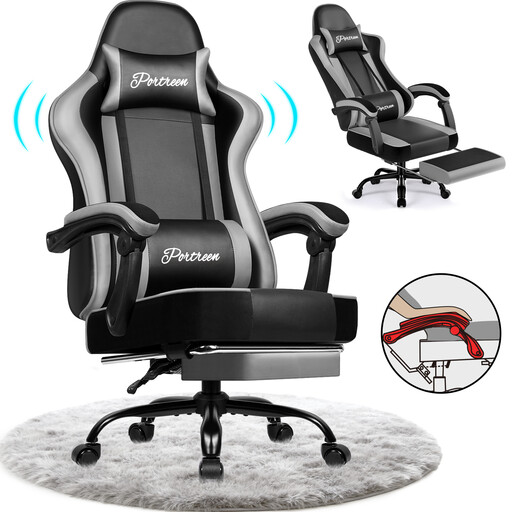
The profile: A hybrid model, equally at home during intense gaming sessions and work, with the added bonus of relaxation features like its integrated footrest.
Far from gaming chairs that only focus on looks, this model incorporates real ergonomic benefits: a backrest that reclines to 170°, lumbar and neck support cushions... This makes it perfectly suitable for office use.
Its retractable footrest and wide recline allow you to switch from a work posture to nap mode in the blink of an eye. Its PU leather upholstery is both durable and easy to maintain.
We have put together a complete selection of chairs that meet our quality criteria and European safety standards.
The lifespan of an ergonomic chair depends primarily on the quality of its materials and mechanism. An entry-level model will show signs of wear (sagging foam, play in the mechanism) after only 1 to 2 years. Conversely, a well-made chair (metal base, Class 3 or 4 gas lift, quality upholstery) can easily last you 5 to 10 years. Regular maintenance (tightening screws, cleaning the upholstery) can, of course, extend this lifespan even further.
A good adjustment can be done in a few simple steps:
It all depends on the model and the use case. A gaming chair can be an option if its ergonomic features (adjustable lumbar support, adjustable armrests, quality tilt mechanism) take precedence over its aesthetics. However, be wary of highly enveloping bucket seats: they can restrict movement and prove uncomfortable over the long term. For exclusively office use, a classic ergonomic chair often remains a more relevant and safer choice.